
GENERAL HT300S Wired Room Thermostat User Guide
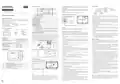


ScreenIndicators
MODE SETTING
Low Battery Warning: When the “
” icon appears on the screen, it means
ENGLISH
“low battery warning”. It is recommended to replace the batteries when this
warning appears.
MODES
7
1
2
8
9
Warning: When the product is not used for a long period (more than 15 days),
remove the batteries. Otherwise, malfunctions that may occur would be out of
warranty.
DIGITAL ROOM THERMOSTAT
WEEKLY
PROGRAM
MODE
PRESET MODES
MANUAL MODE
generallife.com.tr
Please throwyour dead batteries into thewaste bin forbatteries.
10
Economy
Mode
Comfort
Mode
11
12
3
4
5
6
ROOM THERMOSTAT WIRING DIAGRAM
HT300S USER MANUAL
Your Room Thermostat has 4 different modes. 3 of them (Comfort and
Economy Mode) are preset modes. Other modes are manual mode and
weeklyprogram mode.
HEATING/COOLING UNIT
1
2
3
4
5
6
7
8
Hour Indicator
GENERAL SPECIFICATIONS
HT300S is
Room Temperature
Economy Mode
Comfort Mode
In preset modes, temperature values are based on user's choices which
have been set in the beginning. Manual mode allows the Room Thermostat
to operate within the temperature which is required and set directly by user.
Weekly Program mode continues to work according to the weekly schedule
determined bytheuser.
a
wired room thermostat. The user can adjust the room
temperature with the required temperature and get more comfortable and
economic heating/cooling.
Holiday Mode
Weekly Program Mode
Day Indicator
Screen Lock
Battery Indicator
Set Temperature
Heating Indicator
Dailyand WeeklyProgramming
Different Mode Options (Comfort, Economy)
In order to change the temperaturevaluesof presetmodes:
Heating Calibration
ON/OFFControl
Wired Connection
NO COM
9
10
Press and hold the “Mode” button for
Thermostatis on.
3
seconds while your Room
Heating/Cooling Option
TPIAlgorithm
PreciseTemperatureMeasurement
Comfort Mode temperature value will appear. You may adjust the
temperature value of Comfort Mode by pressing the “Up” and “Down”
buttons.
Warning!
Operations within the heating / cooling unit or the electrical installation
must be carriedout byprofessionally qualified persons.
11
12
- If the Heating Indicator is blinking, the heating unit is working.
- If the Heating Indicator is steady, the heating unit is not working.
Cooling Indicator
- If the Cooling Indicator is blinking, the cooling unit is working.
- If the Cooling Indicator is steady, the cooling unit is not working.
HT300S AND EQUIPMENTS
HT300S
Room Thermostat
Alkaline Battery
Dowels and Screws
When setting is done, you may adjust the temperature value of Economy
Mode with the “Up” and “Down” buttons by pressing the “Mode” button
again.
ROOM THERMOSTATTEMPERATURE CALIBRATION
Temperature sensors which are used in Room Thermostats are highly
sensitive. You mayneed to calibrate yourRoom Thermostat if youwould like
to get the same temperature values with other thermometers in your living
space.
ROOM THERMOSTAT PLACEMENT
You mayexitthesetting screen bypressing the“Mode”button 3 seconds.
In order to change the manual mode temperature, press the “Up” or
“Down” button while in the main screen. The Room Thermostat will switch
to Manual Mode once pressedthe“Up” or “Down”button.
You maypressthe“Mode”button to switchto theother modes.
Room Thermostat needs to be placed in the room which is used most
frequently. For instance; living room or lounge. Placing the Room
Thermostat in a spot that have air circulation like entrance of a room or side
of window should be avoided. Also anywhere close to heating/cooling units
such as radiator, stove and spots which get direct sun lights would not be
suitable. Room Thermostat needs to be located above the floor 150 cm
height. Fewtrialsmaybe made to find themost convenientspot.
While your device is turned off, press and hold the “On/Off“ button for 3
seconds.
TECHNICAL DATA
Dimensions
Press the "On/Off" button until the “
” menu appears. In order to see
85mm / 125mm / 20mm
WEEKLY PROGRAM
the desired temperature, set the temperature difference by pressing the
“Temperature Adjustment Buttons”. This value can be arranged between
“-8° C" and “+8° C".
Operating Current
Relay NO Switching Current
3V DC (2 x AAA alkaline battery)
2A/30VDC (Resistive load)
0.5A/125VAC (Resistive load)
You may set the operating schedule of your Room Thermostat with weekly
program mode. 7 different temperature values can be set for each day in
weekly programming. These values can be set in temperature adjustment
screens '' P0-P6''.
min. 20 cm
Temperature Measurement Accuracy 0.1oC
In order to save the settings and exit, press the "On/Off" button until the
deviceturns off.
Operating Temperature Range
Battery Life
(5oC) – (30oC)
In order to set the weekly schedule, press and hold the “Weekly Program“
button for 3 seconds while your Room Thermostat is on. The “Hour,
Minute and Day” setting will appear. Press the “Heating & Cooling Option”
button untilthe“WeeklyProgram”menu (P0)appears.
1 Year (2 x AAA)
(-10oC) – (+50oC)
(-20oC) – (+60oC)
Note:Recommended temperaturecalibration is “0.0°C”.
Operating Temperature
Storage Temperature
FACTORY SETTINGS RESET
You can reset your Room Thermostat to its default factory settings. This
operation resets the mode temperature values, calibration setting and
heating/cooling modes to factory setting. In order to reset your Room
Thermostatto factory setting:
Days of the week will be blinking on the screen. You can initiate the weekly
program setting if you wish to set the same schedule for every day of the
week.
ROOM THERMOSTAT
Buttons Functions
1
2
Press the “Up“ button once if you wish to set the same schedule for the
weekdays. Firstfivedaysof weekwillbe blinking on thescreen.
Press the “Up“ button once more if you wish to set the same schedule only
for theweekend. Lasttwodaysof the weekwill be blinking on thescreen.
Press the “Up“ button one more time if you wish to set the same schedule
for every day of the week. 1st day of the week will be blinking on the
screen. You can switch between the days by pressing the “Up“ button.
Pressthe“Down“button in order to switchto the previousday.
Press the“WeeklyProgram“button once to setaschedule.
“P0” will be blinking on the screen. Set the temperature value of “P0” by
pressing the “Weekly Program“button once more. The hour setting of “P0”
cannot be changed since it's factory setting.
While your device is turned off, press and hold the “On/Off” button for 3
seconds.
Pressthe“On/Off” button untilthe“
While in the “ ” menu, select the “
“Down”buttons and pressthe“On/Off” button.
Your devicewill be turned off and resetto factory settings.
” menu appears.
3
4
5
6
” option by using the “Up” or
BATTERY PLACEMENT
Before starting, power off the device connected to the Room Thermostat
and make surethattheenergy is cut off.
KEY LOCK
In the Room Thermostat there is a key lock function to avoidany unintended
contact.
In order to unlock the Room Thermostat's key lock the “On/Off” button
should be pressed for 3 seconds. If buttons on Room Thermostat are not
touched for 10seconds, keylock will be reactivated.
1
2
3
4
5
6
Weekly Program Button
Temperature Adjustment Button (To Increase)
Heating & Cooling Option
Press the “Weekly Program” button again. Day indicator will be blinking. If
you will not change the day, press the “Weekly Program” button again and
switchto the“P1” setting bypressing the“Up” button.
DAY AND HOUR SETTINGS
Temperature Adjustment Button (To Decrease)
Mode Button
On/Off Button – Unlock Button
First, hour setting will appear on the screen. Once you complete the hour
setting, adjust the minute setting by pressing the “Weekly Program”
button. After the minute setting, press the “Weekly Program” button to set
thetemperaturevalue.
While your Room Thermostat is on, keep pressing the “Weekly Program”
button for 3 seconds.
At the first screen that appears, hour part will be blinking. You may set the
timewiththe“Up” and“Down” buttons.
Follow thesamesteps for other schedule settings.
After setting the time, the “Heating & Cooling Option” button needs to be
pressed once. For minute setting, minute part will be blinking. You mayset
the minute withthe“Up” and“Down” buttons.
Once all changes made, press and hold the “Weekly Program” button for 3
seconds to save.
After setting the minute, the “Heating & Cooling Option” button needs to
be pressed once to setthedayof theweek.
Note: In order to check the weekly schedule which has been set without
making any changes, press the “Weekly Program” button once while your
Room Thermostat is on. Press the “Up” and “Down” buttons to see the days,
press the“Mode”button to seethesettings between“P0-P6”.
As shown in the picture above, press the screwdriverforward from the space
shown, bend the tabs and separate the front cover. Insert 2 new AAA alkaline
batteries in the battery housing with the correct battery direction. Replace
both batteries at the same time. Then align the front part of your Room
Thermostatto thebackand squeezeittowards theback.
Mondayhas setasthefirstdayof theweekand indicated withnumber“1".
Numbers indicate the following days respectively 2-Tuesday,
3-Wednesday, 4-Thursday, 5-Friday, 6-Saturdayand 7-Sunday
When setting is done, you may exit by pressing the “Weekly Program”
button for 3 seconds.
1
2
3
4


| General | Details |
|---|---|
| Name | GENERAL HT300S Wired Room Thermostat User Guide |
| Make | GENERAL |
| Language | English |
| Filetype | PDF (Download) |
| File size | 2.06 MB |
 (1 votes, average: 5.00 out of 5)
 Loading...

GENERAL ARUNA 300S Smart Room Thermostat User Manual

GENERAL HT250S Digital Room Thermostat User Manual

GENERAL FH260S Underfloor Heating Thermostat User Manual

GENERAL HT100S Digital Room Thermostat User Manual

GENERAL SOLARA 330S SMART Smart Room Thermostat User Manual

GENERAL HT250 Digital Room Thermostat User Manual

GENERAL SENNA 300 Digital Room Thermostat User Manual

GENERAL ARUNA 300S RF Digital Room Thermostat User Manual

GENERAL SENNA 300 Smart Room Thermostat User Manual

GENERAL MITRA 250S Digital Room Thermostat User Manual

Other General Life HT300S manuals

heatit Z-TRM3 WiFi Thermostat Instruction Manual

PRO1 T731W Wireless PTAC Non-Programmable Thermostat Installation Guide

Honeywell TH1320U4002 Non Programmable Thermostat User Guide

NEOMITIS RTE0RFA Wireless Digital Room Thermostat and Receiver Instruction Manual

LUX CAG1500 SERIES Smart Temp Electronic Thermostat Instruction Manual

HVAC Electrical Heating Thermostat M5.XX Installation Guide

White-Rodgers 1F56N-444 Thermostat User Manual

Chytre Vypinace HC-T020-EWF Series Thermostat Owner’s Manual

heatmiser Slimline-RF V3 Programmable Wireless Thermostat Instructions

Hotwire HWGL2 Dual Programming Thermostat Instructions