
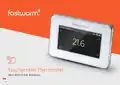
fastwarm 16AMP Touchscreen Thermostat Instruction Manual





4. EDIT SETTING
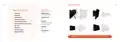
DEFAULT PARAMETERS
Edit setting can set and change the parameters. If you don’t choose Holiday Mode or
Hold Mode. The thermostat runs according to the parameters of Edit.
Press Edit Setting to enter days selection.
Day
Wake
Leave
Back
Sleep
Mon-Fri
Sat/Sun
07:00 22.0°C
08:00 22.0°C
08:30 19.0°C
08:30 22.0°C
17:00 22.0°C
17:00 22.0°C
22:00 19.0°C
22:00 19.0°C
Press the day you want to set.
Press ✓ to enter event selection.
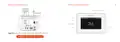
Press the event you want to set and enter the start time hour setting.
Press or to set start time hour.
Press ✓ to confirm and enter the start time minute setting.
Press or to set start time minute.
5. ADVANCED SETTING
The thermostat provides advanced settings to suit various special situations.
These are normally set by technicians during initial installation.
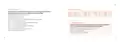
Press Advanced Setting to enter the page of warning.
Press ✓ to enter the page of advanced setting.
Press ✓ to confirm and enter temperature setting.
Press or to set temperature.
Press ✓ to confirm and back to event selection.
Press to back to the home screen.
Press or to switch page.
Press the item to set its parameters.
12
13

| General | Details |
|---|---|
| Name | fastwarm 16AMP Touchscreen Thermostat Instruction Manual |
| Make | fastwarm |
| Language | English |
| Filetype | PDF (Download) |
| File size | 0.14 MB |
 (1 votes, average: 5.00 out of 5)
 Loading...

fastwarm HM-01-16A Digital Programmable Thermostat Instruction Manual


Beok Controls TGR85 Thermostat User Guide

SALUS Wired Digital Thermostat – Non-programmable HTRS230 User Manual

GENERAL SENNA 300 Smart Room Thermostat User Manual

Milesight WT101 Smart Radiator Thermostat User Guide

ASA Electronics ACTH12 Digital LCD Thermostat Instruction Manual

micro-Air EasyTouch 352 Thermostat User Manual

GENERAL Life MITRA 250 Digital Room Thermostat User Manual

Robertshaw RS9423T Thermostat Installation Guide

EUROLAMP HY08BW Digital Heating Smart Thermostat User Manual

Danfoss RT 9E Automatic Thermostat Installation Guide