
Home > EXPERT4HOUSE > Expert4house BAC-1000ALNE Room Thermostat User Guide
Expert4house BAC-1000ALNE Room Thermostat User Guide
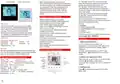


Model:BAC-1000ALNE
A1: Two pipe; Control Fan Coil Unit and Two
wired Motorized valve.(when room temperature
reaches the setpoint, both will turn off)
A2: Two pipe; Control Fan Coil Unit and Two
wired Motorized valve.(when room temperature
reaches the setpoint, valve will turn off but fan will
turn to low speed)
B: Two pipe; Control on/off Motorized Damper
C: Two Pipe; Control Fan Coil Unit and Three
wired Motorized valve
User Guide
BAC-1000 series Modern Touch Screen
Room Thermostats are designed to on/off control
the fans and valves in air conditioner applications
via comparison of the room temperature and
setting temperature as reaching the aim of
comfort and saving energy. BAC-1000 are
microprocessor based thermostat with LCD
display.
Features of your thermostat
M:Two pipe; Control 0-10V Motorized Valve
E: Four pipe; Control Fan Coil Unit and Two wired
Heat and Cool Motorized valve.
T: Clock
L: Backlight
P: Weekly Programmable
N: RS485/MODBUS RTU communication
K: Keycard
E: External sensor
Modern desgin similar as a cell phone.
Beautiful Frame CHROME creates elegant life.
Acrylic lenses to avoid the finger scrath.
Touch Button makes simple operation.
Large screen display with backlight is easy to
read—even in the dark.
Four periods program schedules maximize
comfort and economy.
One-touch temp control overrides program
schedule at any time.
Precise comfort control keeps temperature within
0.5°C of the level you set.
Internal and external sensor selectable is
suitable for any place.
Easy installation.
86mm hidden box and european 60mm round
box is available.
Welcome
Your new thermostat will provide year of reliable
service. Using this digital thermostat will provide
more uniform comfort in your home through the
seasons. Thank you for buying the product!
Please read this manual for complete instructions
on installing and operating your thermostat. If you
require further assistance, please feel free to
contact us.
P and N could not be compatible at the same time.
For example: BAC-1000A1LN
Operation
In the box you will find
Thermostat
User Guide
2pc
Screws
Wall plate
1pc
1pc
1. Setting the temperature
1pc
a. In the mode of programmable, set
temperature, time and timing on/off could not be
adjusted. If the user want to change, please
reprogram.
External Sensor 1pc
Service
Home screen quick reference
We offer the warranty of 18 months from the sales day.
If it is not the problem of quality or beyond the warranty
time, we will charge for the after-sale service.
b. In the mode of manual, press
to set
Set
Temp.
Fan
temperature.
screen.
will display in the left corner of
Room
Temp.
Valve
Speed
On/off
2. Setting Lock (optional function)
Technical Data of your thermostat
Energysaving
Network
Period
Press and hold
for 3 sec. to lock the screen.
Sensor:NTC
Temp. Range:5 -35℃ Power Consumption:<1.5W
Power Supply:110V~240V,50~60Hz
Accuracy:±0.5℃
The icon will display on the screen.
Manual
Auto Fan
Timing On/Off
Press and hold
screen.
again for 3 sec. to unlock the
Lock
Cooling
Timing error:<1%
Clock
Current Load:5A for fan and 3A for valve
Shell Material:PC (Fireproof)
Dimension:86x86x13.3mm
3. Setting the fan
Sleeping
Press
to select the fan speed AUTO, HIGH,
Installation box:86*86mm or European 60mm
Ambient Temp.:0 ~ 45℃,5 ~ 95%RH(Non condensing)
Fan
Down
Mode
Power
On/off
MED, LOW.
Up
Storage Temp:-5~ 55℃


| General | Details |
|---|---|
| Name | Expert4house BAC-1000ALNE Room Thermostat User Guide |
| Make | EXPERT4HOUSE |
| Language | English |
| Filetype | PDF (Download) |
| File size | 0.56 MB |
 (1 votes, average: 5.00 out of 5)
 Loading...

expert4house BHT-006 Series Thermostat Instruction Manual

expert4house BHT-003 Series Zigbee Thermostat User Guide

Expert4house BHT-9000 Smart Knob Thermostat User Guide

expert4house BHT-12 Smart Thermostat User Manual

expert4house BHT-2000 Series Zigbee Thermostat User Guide

expert4house BHT-18 AI Knob Thermostat User Guide

expert4house BHT-8000 Heating Thermostat User Guide

EXPERT4HOUSE BAC-9000 Smart Knob Thermostat User Guide

expert4house BAC-1000ALNE Manual: Questions and Answers
expert4house BAC-1000ALNE specifications
| Maximum load | 5A for fan and 3A for valve |
| Setpoint range | 5 -35℃ Power Consumption<1.5W |
| Accuracy | ±0.5℃ |
| Sensor | NTC |
| Operating temperature | 0 ~ 45℃ / 5 ~ 95RH |
| Storage temperature | -5~ 55℃ |
| Dimensions | 86x86x13.3mm |
What do the icons on the expert4house BAC-1000ALNE display mean?
| Icon | Meaning |
|---|---|
| Set | Temperature setpoint active |
| Room Temp. | Current room temperature |
| Valve On/off | Motorized valve status |
| Fan Speed | Fan operating speed |
| Lock | Screen is locked |
How do I set the temperature on the expert4house BAC-1000ALNE?
In manual mode, press the set button to adjust the setpoint temperature.
- Exit programmable mode if active
- Press the set button
- The setpoint will display in the left corner of the screen User Guide, p. 1
What do the mode and fan buttons control?
| Button | Function |
|---|---|
| M (Mode) | Change system mode between HEATING, COOLING and VENTILATION |
| Fan | Select fan speed: AUTO, HIGH, MED, LOW |
What happens if I set the expert4house BAC-1000ALNE to VENTILATION mode?
The motorized valve turns off but the fan continues to run. User Guide, p. 1
What is the difference between Fan Control options 00 and 01 on the expert4house BAC-1000ALNE?
Option 00 turns the fan off when room temperature reaches setpoint; option 01 reduces the fan to low speed at setpoint. User Guide, p. 2
expert4house BAC-1000ALNE compared with other expert4house thermostats
| Specification | expert4house BAC-1000ALNE | expert4house BHT-2000 | expert4house BHT-003 | expert4house BHT-006 |
|---|---|---|---|---|
| Maximum load | 5A for fan and 3A for valve | 3A | 3A | 5A (water heating, gas boiler), 16A (electric heating) |
| Accuracy | ±0.5℃ | ±0.5℃ or ±1℉ | ±0.5℃ | ±1°C |
| Sensor | NTC | NTC | NTC | NTC3950, 10K |
| Operating temperature | 0 ~ 45℃ / 5 ~ 95RH | 0 ~ 45 ℃ | 0 ~ 45 ℃ | 0~ 45°C |
More expert4house thermostat manuals

Beca BAC-9000 Smart Knob Thermostat User Guide

Carrier ecobee3 Lite Smart Thermostat User Manual

Vaillant VRT15 Room Thermostat User Guide

SALUS CONTROLS RT520 Thermostat User Manual

neptronic STS3 Series Wall Thermostat Instruction Manual

COMPUTHERM Q5RF Multi Zone Wireless Digital Room Thermostat Instruction Manual

DEVIreg 130 Electronic Thermostat Installation Guide

ENSTO ECO10BTW-J Heat Control Thermostat Instruction Manual

GENERAL LIFE 300S Smart Thermostat User Manual

FantiniCosmi C16 Room Thermostat Owner’s Manual