×
- 1. Room Thermostat (Installation And Operation Guide)
- 2. Installation Instructions (Factory Default Settings → Specifications → Lcd Display → Buttons → Wiring → Operating Instructions)
- 3. Adjust The Program Setting In 5/2 Day Mode (Temporary Override / Permanent Override → Boost Function → Menu Function → P0 1 Operating Mode → P0 2 Setting High & Low Limits → P0 4 Calibrate)
- 4. Mains Operated Programmable Room Thermostat (Installation Instructions)
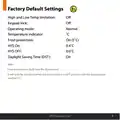
- 5. Factory Default Settings (High And Low Temp Limitation: → Keypad Lock: → Operating Mode: → Temperature Indicator: → Frost Protection: → Daylight Saving Time (dst):)
- 6. Specifications (Contacts → Power Supply / Input → Power Consumption → Temperature Range → Dimensions → Ip Rating)
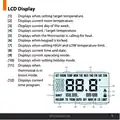
- 7. Lcd Display (Displays Current Room Temperature. → Displays Current Day Of The Week. → Displays Current / Target Temperature. → Displays When The Thermostat Is Calling For Heat. → Displays Current Time And Date. → Displays Current Operating Mode.)
- 8. Buttons (Reset Button → Menu Button → Ok Button → Time +1h → Down Button → Up Button)
- 9. Wiring (Terminal Connections → Neutral In → Live In → N/c Normally Closed Connection → Common Connection → N/o Normally Open Connection)
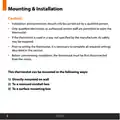
- 10. Mounting & Installation (Caution! → Installation And Connection → Qualified Person → Thermostat Usage → Required Settings)
- 11. Remove The Thermostat From Its Packaging (Choose A Mounting Location → Wire The Thermostat According To The Diagram → Screw The Backplate Onto A Back Box → Close The Front Housing And Tighten The Fastening Screw)
- 12.
- 13. Mains Operated Programmable Room Thermostat (Operating Instructions)
- 14. Adjusting The Target Temperature (Locking The Keypad)
- 15. Backlight (Auto → Off → On)
- 16. Auto (Mode Selection)
- 17. Setting The Date, Time & Programming Mode (Holiday Mode)
- 18. How Your Programmable Thermostat Works (Auto Mode Operation → Programming Options → Setting Temperatures → Turning The Thermostat Off)
- 19. Factory Program Setting (/2 Day → Day → Hour)
- 20. Programming Modes (/2 Day Mode → Day Mode → Hour Mode)
- 21. Adjust The Program Setting In 5/2 Day Mode (Programming For Monday To Friday → Programming For Saturday To Sunday → Adjust The P1 Time → Adjust The P1 Temperature → Return To Automatic Mode)
- 22. Temporary Override (Permanent Override)
- 23. Boost Function
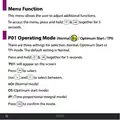
- 24. Menu Function (Operating Mode (normal / Optimum Start / Tpi))
- 25. Normal Mode (nor) (Graph (23.1): Normal Mode (on / Off Control))
- 26. P01 Operating Mode (Optimum Start Control (os) → Room Temperature (rt) → Setpoint Temperature (st) → Target Temperature Difference (ttd) → Optimum Start Time (ost))
- 27. Optimum Start Control Graph With Ti = 20 (Optimum Start Control Graph With Ti = 15 → Optimum Start Control Graph With Ti = 10 → Example When Ti = 20 → Example When Ti = 10 → Target Temperature Difference C → Ttd)
- 28. Operating Mode (Time Proportional Integral Mode (tpi) → Cyc Number Of Heating Cycles Per Hour)
- 29. Pb - Proportional Bandwidth (Tpi Control)
- 30. Operating Mode (Time Proportional Integral Mode (tpi) → Use)
- 31. Setting High & Low Limits (Hi 35c Lo 5c → Limit)
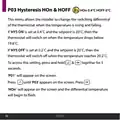
- 32. Hysteresis Hon & Hoff (This Menu Allows The Installer To Change The Switching Differential Of The Thermostat When The Temperature Is Rising And Falling.)
- 33. Use & To Select The Hon Temperature, Press To Confirm. Hoff Will Appear On The Screen And The Differential Temperature Will Begin To Flash.
- 34. P04 Calibrate
- 35. Resetting The Thermostat
- 36. Eph Controls Ie (Eph Controls Uk)
×
EPH CDTP2 Room Thermostat Installation Guide
P01 Operating Mode continued
Time Proportional Integral Mode (TPI) Continued
Once TPI mode is selected, ‘CYC’and ‘06’will appear on the screen.
Use
and
to select from 2, 3, 6 or 12.
Press
to conꢀrm.
‘P Band’and ‘2.0’will appear on the screen.
Use
and
to select from 1.5 to 3.0.
Press
Press
to conꢀrm.
to return to normal operation.
28
CDTP2
| General | Details |
|---|---|
| Name | EPH CDTP2 Room Thermostat Installation Guide |
| Make | EPH |
| Language | English |
| Filetype | PDF (Download) |
| File size | 0.58 MB |


Warmup 6iE mini WiFi Thermostat User Guide

TAELEK DIN-3-W Tsense Thermostat for DIN Rail Instruction Manual

GENERAL LIFE Solara 330S Wired Room Thermostat User Manual

ELKO ep TER-4 Double Thermostat Owner’s Manual

BlueLink 8205 Smart Wi-Fi Thermostat User Manual

COMPUTHERM E800RF Multizone Wi-Fi Thermostat Instruction Manual

vtech W960 E-Smart Thermostat Instruction Manual

SIEMENS M3182 Room Thermostat Instruction Manual

InfraComfort HY01WE Programmable Non Wi-Fi Thermostat User Manual

EPH CONTROLS RFC RF Cylinder Thermostat Instruction Manual
Table of Contents
- 1. Room Thermostat - Installation And Operation Guide →
- 2. Installation Instructions - Factory Default Settings →
- 3. Adjust The Program Setting In 5/2 Day Mode - Temporary Overr... →
- 4. Mains Operated Programmable Room Thermostat - Installation I... →
- 5. Factory Default Settings - High And Low Temp Limitation: →
- 6. Specifications - Contacts →
- 7. Lcd Display - Displays Current Room Temperature. →
- 8. Buttons - Reset Button →
- 9. Wiring - Terminal Connections →
- 10. Mounting & Installation - Caution! →
- 11. Remove The Thermostat From Its Packaging - Choose A Mounting... →
- 12. Page 12 →
- 13. Mains Operated Programmable Room Thermostat - Operating Inst... →
- 14. Adjusting The Target Temperature - Locking The Keypad →
- 15. Backlight - Auto →
- 16. Auto - Mode Selection →
- 17. Setting The Date, Time & Programming Mode - Holiday Mode →
- 18. How Your Programmable Thermostat Works - Auto Mode Operation →
- 19. Factory Program Setting - /2 Day →
- 20. Programming Modes - /2 Day Mode →
- 21. Adjust The Program Setting In 5/2 Day Mode - Programming For... →
- 22. Temporary Override - Permanent Override →
- 23. Boost Function →
- 24. Menu Function - Operating Mode (normal / Optimum Start / Tpi... →
- 25. Normal Mode (nor) - Graph (23.1): Normal Mode (on / Off Cont... →
- 26. P01 Operating Mode - Optimum Start Control (os) →
- 27. Optimum Start Control Graph With Ti = 20 - Optimum Start Con... →
- 28. Operating Mode - Time Proportional Integral Mode (tpi) →
- 29. Pb - Proportional Bandwidth - Tpi Control →
- 30. Operating Mode - Time Proportional Integral Mode (tpi) →
- 31. Setting High & Low Limits - Hi 35c Lo 5c →
- 32. Hysteresis Hon & Hoff - This Menu Allows The Installer To Ch... →
- 33. Use & To Select The Hon Temperature, Press To Confirm. Hoff ... →
- 34. P04 Calibrate →
- 35. Resetting The Thermostat →
- 36. Eph Controls Ie - Eph Controls Uk →