
Home > ENGO CONTROLS > ENGO CONTROLS EASYBATB Wired Thermostat User Guide
ENGO CONTROLS EASYBATB Wired Thermostat User Guide


WARNING!
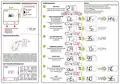
After entering the service menu, use
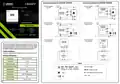
Description of the LCD display + description of the buttons
Installer parameters
-
or
+
buttons to choose parameter.
For the parameter selection to be confirmed, wait 3 seconds.
The screen will appear with the settings that you can change with
0
1
2
3
4
5
6
7
MAIN SCREEN
SWITCH (MODE SELECTION):
1
2
To enter the service menu, press and hold
„MINUS”and„PLUS”buttons for 5 seconds.
-
or
+
buttons.
HEATING
OFF
Wait 3 seconds for the selection to be confirmed.
The thermostat will go to the home screen.
-
+
5 SEC
5 SEC
COOLING
3
4
CHOOSE A CONTROL ALGORITHM
UFH - underfloor heating
RAD - radiator heating
WAIT
3 SEC
-
+
+
...
...
ELE - electric heating
H - hysteresis in the range from 0,4°C to 4,0°C
Example: H = 0,4°C = 0.2°C
-
-
-
-
-
-
+
+
+
+
+
+
1
2
MIN. TEMP SETPOINT LIMIT
Set the minimum temperature
setpoint limit.
WAIT
3 SEC
-
-
1. Current / set room temperature
2. Temperature unit
3. Heating mode icon
1. “MINUS” button
2. “PLUS” button
4. Cooling mode icon
Proper thermostat location
MAX. TEMP SETPOINT LIMIT
Set the maximum temperature
setpoint limit.
WAIT
3 SEC
+
TEMPERATURE CALIBRATION
Displayed (measured) temperature can be
calibrated in steps of 0.1°C
WAIT
3 SEC
-
+
(from -3.5°C to + 3.5°C).
For the thermostat to work properly, it must be installed in a suitable place.
Preferably approx. 150 cm above floor level, away from sources of heat or cold. In
addition, the thermostat should not be installed behind curtains or other obstacles
or in places with high humidity, as this will prevent an accurate measurement of
the temperature in the room. It is not recommended to install the thermostat on
an outside wall, in a draft or in a place where it will be exposed to direct sunlight.
BATTERY STATUS*
WAIT
3 SEC
Check the current battery status (%).
*only for battery version
Lock / Unlock the thermostat’s keys
To lock the keys on the thermostat,
press and hold simultaneously
OUTPUT CONTROL
Select whether the thermostat output has
to work as NO = Normally Open
or NC = Normally Closed.
WAIT
3 SEC
-
-
+
and
seconds. After the
buttons for 7
screen appears,
release the keys. Thermostat is locked.
-
+
To unlock the keys on the thermostat,
press and hold simultaneously
RESET
and
seconds. After the
buttons for 7
screen appears,
release the keys. Thermostat is unlocked.
-
+
WAIT
3 SEC
Reset thermostat settings
to default values.
+
7 SEC
7 SEC

| General | Details |
|---|---|
| Name | ENGO CONTROLS EASYBATB Wired Thermostat User Guide |
| Make | ENGO CONTROLS |
| Language | English |
| Filetype | PDF (Download) |
| File size | 0.19 MB |
 (1 votes, average: 5.00 out of 5)
 Loading...

ENGO Controls EONE230W Internet Controlled Thermostat User Guide

ENGO CONTROLS EFAN-230W Fan Coil Thermostat User Guide

ENGO CONTROLS FAN-24W 24V Fan Coil Thermostat User Guide

ENGO CONTROLS EASY230W Non-Programmable Wired Thermostat User Guide

ENGO CONTROLS EONE230 Internet Controlled Thermostat User Guide

ENGO CONTROLS EONEBATW, EONEBATB Internet Controlled Thermostat User Manual

ENGO Controls E901WIFI Internet Wireless Thermostat User Guide

ENGO CONTROLS EONE-BATW, EONE-BATB Internet Controlled Thermostat User Guide

ENGO CONTROLS EFAN-24W Fan Coil Thermostat User Guide

ENGO CONTROLS EFAN-230W WIFI 230V Fan Coil Thermostat User Guide


EUROLAMP 147-44030 Digital Heating Smart Thermostat User Manual

ADAX VG11 Digital Thermostat User Guide

EMOS P5611OT Wireless Thermostat Instruction Manual

TCL IPOWER Heat Mat Thermostat Instruction Manual

Day and Night TSTATIIEWF-01 Gray Smart Thermostat Owner’s Manual

White Rodgers 1F95-1277 Big Blue Universal Thermostat Instruction Manual

Braeburn 8205 Universal Smart Wi-Fi Thermostat User Guide

sauermann TST Electronic Thermostat User Guide

Honeywell THX321WFS2001W T10 or T10+ Pro Smart Thermostat User Guide

BAXI uSense 2 Wired Smart Thermostat Gateway Installation Guide