
BAXI uSense 2 Wired Smart Thermostat Installation Guide




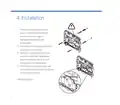



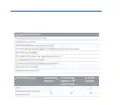



6. Slacken the screws at the sides of the
connectors and insert each wire into the
top at either side of the connector, then
re-tighten the screws
7. Make sure the wires are as flat as possible
against the back plate so that they do
not interfere with the controller when it is
mounted in position
8. Press the room unit onto the backplate until
it clicks into place
9. Connect the other end of the wires
to the R-BUS or OpenTherm terminals in
the boiler (or gateway if fitted). There is no
polarity - either wire can be connected to
either position
10.
The connections between the
room unit and boiler or gateway
are low voltage. 230 V will
damage the room unit and
gateway!
7

| General | Details |
|---|---|
| Name | BAXI uSense 2 Wired Smart Thermostat Installation Guide |
| Make | BAXI |
| Language | English |
| Filetype | PDF (Download) |
| File size | 0.34 MB |
 (1 votes, average: 5.00 out of 5)
 Loading...

BAXI uSense 2 Wired Smart Thermostat Gateway Installation Guide


PRO T751 Thermostat Installation Guide

EVOLVEO Thermal Smart Wireless Programmable Thermostat Owner’s Manual

MAGNUM FIRST M9-TS1 24 Volt Intelligent Thermostat Owner’s Manual

Honeywell Home PRO TH1000E1 Programmable Thermostat Installation Guide

miMonitor MI-TH02-HMO-V2 Wifi Smart Thermostat User Guide

Chytre Vypinace HC-T020-EWF Series Wireless Thermostat User Manual

BEOK TDR89 Wifi Heating Thermostat Instruction Manual

MClimate MC-LW-V02 Smart Radiator Thermostat User Manual

KETOTEK KTF0155 Smart Thermostat User Manual

nVent RAYCHEM Elexant 3500i Electronic Thermostat Installation Guide