
Home > asa ELECTRONICS > ASA Electronics ACTH12 Digital LCD Thermostat Instruction Manual
ASA Electronics ACTH12 Digital LCD Thermostat Instruction Manual




HEAT PUMP OPERATION
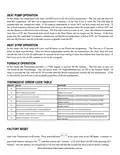
In this mode, the compressor will cycle On/Off based on the Room/Set temperature. The Fan will run first and
then the compressor will turn on in approximately 3 minutes. If the Fan is set to Auto, the Fan will stop 30
seconds after the compressor stops. If the outdoor temperature is below 38°F, the heat pump will not work. If
the system contains a furnace, the Thermostat will activate the furnace when the temperature is below 38°F and
use the furnace as the main source for heat. The Fan will continue to run as set. Once the outdoor temperature
rises above 45°F, the Thermostat will switch back to the Heat Pump, and no longer use the furnace. If the heat
pump runs for more than 20 minutes continuously and the Room temperature is below 64°F, the Thermostat will
activate the Furnace and run both heat sources to quickly heat the RV.
HEAT STRIP OPERATION
In this mode, the Heat Strip will cycle On/Off based on the Room/Set temperature. The Fan has a 20 second
delay to allow heat buildup. Once the Room temperature reaches the Set temperature, the Heat Strip will shut
off and the Fan will run for additional 30 seconds in the Auto setting to blow the residual heat from the ducts. If
the Fan is set to On, it will continue to run at the set speed.
FURNACE OPERATION
In this mode, the Thermostat provides a 12VDC trigger to activate the RV Furnace. The Fan may or may not
run based on the Fan settings. You can select Auto, On High/Medium/Low, or Off in the Furnace Mode. If
Auto is selected the Fan will run for 30 seconds after the Room temperature reaches the Set temperature. If On
is selected the Fan will run at the set speed regardless of Room temperature.
THERMOSTAT ERROR CODE TABLE
FACTORY RESET
Start with Thermostat in Off mode. Press and hold both
at the same time in the Off mode. Continue to
press both buttons and press the and then release all 3 buttons. LCD will flash On/Off while pressing all 3
buttons. One the buttons are released the LCD will turn off and the system has been reset to factory settings.

| General | Details |
|---|---|
| Name | ASA Electronics ACTH12 Digital LCD Thermostat Instruction Manual |
| Make | asa ELECTRONICS |
| Language | English |
| Filetype | PDF (Download) |
| File size | 0.17 MB |
 (1 votes, average: 5.00 out of 5)
 Loading...


Honeywell VisionPRO TH8000 Series Touch Screen Programmable Thermostat User Guide

GENERAL HT250S Digital Room Thermostat User Manual

sensi 1F87U-42WF Smart Thermostat Installation Guide

BEOK TGM50 Thermostat User Guide

BEOK CONTROLS BOT-R7X Wireless Gas Boiler Heating Thermostat Instructions

GENERAL LIFE MITRA 220 Smart Room Thermostat User Manual

SALUS RT520 Programmable Thermostat User Guide

WIFI Temp2 Battery Operated Thermostat Installation Guide

Danfoss M30 React Radiator Thermostat Installation Guide

GLOBAL HY06RF-BW/WW/WE Thermostat User Manual