
Home > asa ELECTRONICS > ASA Electronics ACTH12 Digital LCD Thermostat Instruction Manual
ASA Electronics ACTH12 Digital LCD Thermostat Instruction Manual




MAINTENANCE
.
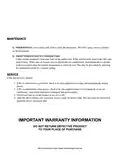
1) THERMOSTAT: Use a moist, soft cloth to clean the thermostat. DO NOT spray water or solvents
on the thermostat.
2) FROST FORMATION ON INDOOR COIL:
Under certain conditions, frost may form on the indoor coil. If this should occur, inspect the filter and
clean if dirty. Make sure air louvers are not obstructed. Air conditioners / heat pumps have a greater
tendency to frost when the outside temperature is relatively low. This may be prevented by adjusting
the thermostat control to a warmer setting.
SERVICE
If the unit does not operate:
1. If RV is connected to a generator, check to be sure generator is running and producing the proper
power.
2. If RV is connected to shore power, check to be sure supply breaker is sized properly to run air
conditioner / heat pump load and it is plugged into power supply.
3. Check your fuse or circuit breaker to see if it is off.
4. After the above checks, call your local service center for further help. This unit must be serviced by
qualified service personnel only.
IMPORTANT WARRANTY INFORMATION
DO NOT RETURN DEFECTIVE PRODUCT
TO YOUR PLACE OF PURCHASE

| General | Details |
|---|---|
| Name | ASA Electronics ACTH12 Digital LCD Thermostat Instruction Manual |
| Make | asa ELECTRONICS |
| Language | English |
| Filetype | PDF (Download) |
| File size | 0.17 MB |
 (1 votes, average: 5.00 out of 5)
 Loading...


ENSTO ECO16BT-J Floor Heating Thermostat User Guide

TELUS ASSORTED Smart Thermostat User Manual

sensi ST765470 Thermostat Installation Guide

VIVE COMFORT TP-S-755 Cool Programmable Thermostat Instruction Manual

GENERAL SOLARA 330S SMART Smart Room Thermostat User Manual

EPH CONTROLS CDT2 Room Thermostat Instruction Manual

GENERAL LIFE HT220 Wired Room Thermostat User Manual

SALUS RT310 Thermostat User Manual

Danfoss RT 107 Series Thermostat Installation Guide

DEVI 532 Electronic Thermostat Installation Guide