Home > Amana > Amana ATST-CWE-BL-A Smart Thermostat Owner’s Manual

Amana ATST-CWE-BL-A Smart Thermostat Owner’s Manual

Amana® Brand Smart Thermostat  
Homeowner Guide  
Amana is a registered trademark of Maytag Corporation or its related  
companies and is used under license. All rights reserved.  
GeneralDetails
NameAmana ATST-CWE-BL-A Smart Thermostat Owner’s Manual
MakeAmana
LanguageEnglish
FiletypePDF (Download)
File size0.5 MB
Download PDF
1 Star2 Stars3 Stars4 Stars5 Stars (1 votes, average: 5.00 out of 5)
Loading...
Amana MMW-2 Horizontal Digital Wireless non EMS Wall Thermostat Instruction Manual
Amana DS01 PTAC Wireless Thermostat User Manual
Amana DS01G Digi Smart Thermostat Instruction Manual

Amana ATST-CWE-BL-A Smart Thermostat Owner’s Manual
Get the free PDF manual for the Amana ATST-CWE-BL-A Smart Thermostat Owner’s Manual and access setup steps, usage instructions, and troubleshooting tips. 👉 View online or download now to keep your thermostat running smoothly!

Amana ATST-CWE-BL-A Smart Thermostat Owner’s Manual Overview

Summary of Contents

  • Page 1: Amana brand smart thermostat Homeowner guide Amana is a registered trademark of Maytag Corporation or its related companies and is used under license. All rights reserved.
  • Page 2: Stay connected with the Amana brand smart thermostat. The home screen displays the current temperature, mode, and a slider for adjusting the temperature. The schedule screen displays upcoming set point changes and scheduled times. The air quality screen displays outdoor air quality and weather when connected to the internet. The away screen displays energy-saving set points that can be invoked manually or automatically.
  • Page 3: To download the Amana Home mobile app, scan the QR code or visit the website. Amana brand smart thermostat homeowners guide.
  • Page 4: When WiFi is enabled on your Amana brand smart thermostat, the Amana home mobile app can help you manage and remotely control multiple Amana smart thermostats in your home. Enabling WiFi adds smart features to your thermostat, including automatic software updates, remote control with mobile app, and voice control capabilities when connected to Amazon Alexa and/or Google Assistant devices. You can connect the Amana brand smart thermostat to WiFi by following specific steps in the settings menu. To pair the thermostat to the app, navigate to the settings menu and use the displayed code in the app. Download the app and create an account to add your home location. The pair code will expire in 15 minutes, but you can always get a new code if needed.
  • Page 5: Connecting Amana brand smart thermostat to Amazon Alexa will enable voice command through Alexa. Complete setup on Amana brand smart thermostat and Amana brand home mobile app. Login to Alexa account from phone/tablet device. Select Skills & Games in the Alexa app. Type Amana Home in the search field and select. This will successfully link Amana brand smart thermostat to Amazon Alexa. Voice commands include setting the thermostat to a specific temperature or adjusting the temperature. Connecting Amana brand smart thermostat to Google Home will enable voice command through Google Assistant. Complete setup on Amana brand smart thermostat and Amana home mobile app. This will successfully link Amana brand smart thermostat to Google Home.
  • Page 6: For systems that have both heating and cooling, you have the ability to choose a mode: auto, cool, heat, or off. How to switch modes: From the Home Screen, simply tap the mode icons located on the left-hand side of the current temperature. Access settings from any primary screen by tapping the menu icon. Then select system mode.
  • Page 7: With the Amana brand smart thermostat, you can create a different schedule for each mode of the thermostat. Your thermostat will have the ability to create a schedule for Heat (only), Cool (only), and Auto mode. To create a schedule, tap on the schedule icon to bring up the schedule menu. Tap the menu icon located in the upper right-hand corner. Select the day you wish to edit by tapping the header in the upper left-hand corner. From the edit screen, tap the “add new event” or “edit event” option located at the bottom of the screen. Edit the name of the event in the event label section. Choose the action you want your system to perform in the event action section. Be sure to tap save after making your changes.
  • Page 8: Copy schedules To make things easy, we’ve added an option to copy a day’s schedule. Select which day you would like to copy. Select “copy day” on the bottom right footer. Choose which days to copy to. The day being copied will be greyed out, while the days that you are copying to will highlight white once selected.
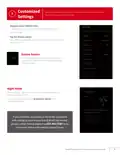
  • Page 9: With the Amana brand smart thermostat, customize settings to better suit your comfort needs. Navigate to the settings menu by tapping the menu icon in the top left of the home menu and selecting settings. Tap the display option to access the preference screen where updates can be made. Choose between a selection of screen savers to be displayed when the thermostat is not being interacted with. When enabled, night mode turns off the display during the selected schedule time. To access the night mode setting, tap the brightness option from the display menu. If you encounter any issues or need assistance with setting up your Amana brand smart thermostat, please contact Amana support. Amana brand smart thermostat homeowners guide.
  • Page 10: Important notes This device complies with Part 15 of the FCC Rules. Operation is subject to two conditions: it may not cause harmful interference and must accept any interference received. Changes or modifications not expressly approved by Daikin could void the user’s authority to operate the equipment. This equipment has been tested and found to comply with the limits for a Class B digital device, pursuant to part 15 of the FCC Rules. These limits are designed to provide reasonable protection against harmful interference in a residential installation. This equipment generates, uses, and can radiate radio frequency energy and may cause harmful interference if not installed and used according to the instructions. If this equipment does cause harmful interference to radio or television reception, the user is encouraged to try to correct the interference. This device contains license-exempt transmitter(s)/receiver(s) that comply with Innovation, Science and Economic Development Canada’s license-exempt RSS(s). Operation is subject to two conditions: it may not cause interference and must accept any interference, including interference that may cause undesired operation. L’émetteur/récepteur exempt de licence contenu dans le présent appareil est conforme aux CNR d’Innovation, Sciences et Développement économique Canada applicables aux appareils radio exempts de licence.
  • Page 11: Amana brand smart thermostat homeowners guide
  • Page 12: Amana brand products average 4.7 out of 5 stars in homeowner satisfaction with thousands of reviews captured on Amana brand heating and air conditioning products. If you encounter any issues or would like assistance with setting up your Amana brand smart thermostat, please contact Amana support to be connected with our thermostat support team. Before purchasing this appliance, read important information about its estimated annual energy consumption, yearly operating cost, or energy efficiency rating that is available from your retailer. Amana is a registered trademark of Maytag Corporation or its related companies and is used under license. All rights reserved.