
Vine TJ-610E Smart Thermostat User Manual





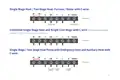

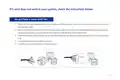














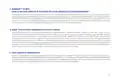
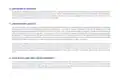




Conventional system without C wire ( also known as 4-wire system )
1 . 1. Remove the cover of the furnace or heating system, open the cover of the heating/cooling system to find the
control board where you should find the same terminal labels as of the thermostat, move the G-wire to the
C-wire, then connect G and Y terminals with the jumper wire (included in packing box).
2 . At the same thermostat, connect C-wire and G-wire.
3 . By this configuration, the thermostat will have NO fan control function.
NOTE : You may need to unscrew the cover, the control board may be either at the top or bottom.
G
Y
R
C
O/B
W/E
Furnace wiring
terminal
G
C
Move G wire to C terminal
R
W/E
Y
RC
RH
jumper
G
W/E
Y
C
O/B
Furnace
Thermostat
Move G wire to C terminal
13

| General | Details |
|---|---|
| Name | Vine TJ-610E Smart Thermostat User Manual |
| Make | Vine |
| Language | English |
| Filetype | PDF (Download) |
| File size | 0.45 MB |
 (1 votes, average: 5.00 out of 5)
 Loading...

Vine Smart Wi-Fi Thermostat with Nightlight TJ-225 User Guide

Vine TJ-560 Smart Thermostat User Manual


Honeywell Home T10 Programmable Smart Thermostat Installation Guide

Roth Minishunt Plus Wireless Room Thermostat Installation Guide

TECH EU-295 Underfloor Heating Room Thermostat User Manual

LAE AC1-2W Digital Thermostat Instruction Manual

WEINMANN C16 WiFi Digital Room Thermostat Instruction Manual

WHITE-RODGERS 1F86-444 Non Programmable Electronic Digital Thermostat Instruction Manual

Honeywell DT90A Digital Room Thermostat User Guide

Haswill Electronics STC-9200 Thermostat User Guide

BEOK CONTROLS BOT-323W Series Boiler Thermostat Instruction Manual
REHAU NEA SMART 2.0 Room Thermostat Installation Guide