
TRANE XR202 Programmable Thermostat User Guide



Trane XR202 Programmable Thermostat
6.1 User Menu
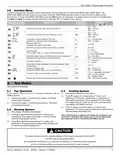
To customize thermostat settings, press the Menu button from the home screen. Use the or buttons to highlight Settings and press
Next. Use Next and Back to navigate through menu items. Press or to change the setting.
USER’S MENU #
(PRESS MENU BUTTON
AND RELEASE)
DEFAULT SETTING
(FLASHING ICONS)
SETTINGS
(PRESS OR
DESCRIPTION
)
7 – 7 Day
5 – 5-1-1 Day
0 – Non-programmable
Schedule Type (set as either 7-Day, 5-1-1
Day or Non Programmable)
5
01
Early Start (starts heating or cooling
early so your programmed temperature is OFF
reached by the programmed time)
On – start early
OFF – start at program
period time
02
03
04
E
°F – Fahrenheit
°C – Celsius
Fahrenheit or Celsius
°F
Temperature Display Adjustment (adjust
the Room Temperature)
0
-5 to +5
Continuous Display Light (keep the
backlight always on – “C” wire required)
On – always on
OFF – momentarily
OFF
05
06
dL
1 to 12 – reminder time
(months)
OFF – no filter reminder
Change Air Filter (set up a monthly
reminder)
OFF
6.2 Thermostat Operation
Set Current Time and Day
Note: Time icons will flash at initial power up or after a reset.
1.)
2.)
3.)
4.)
Press Set Time
Use or to adjust the hour
Press Next to advance to set the minutes and day of the week
Press Exit when finished.
The default program is 5-1-1 Day, but can be setup as a 7-Day or Non-Programmable thermostat (refer to the User Menu above)
• Hold Temperature (bypassing the schedule) – With the System switch set to Heat or Cool, momentarily press the Hold button.
Hold will be displayed. Use or to adjust the temperature. The thermostat will hold the room temperature at the selected
setting until you press Run to start program operation again.
• Program Override (Temporary Hold) – Press or until the desired temperature is displayed. The thermostat will override the
schedule until the next programmed time period with a minimum override of 2 hours. Then the thermostat will automatically revert
to the program.
• Keypad Lockout – To prevent unwanted changes, the buttons can be disabled. To turn this feature On, press and hold and
the Menu button until the icon appears. To turn Off, press and hold and the Menu button for 3 seconds. Scheduling
6.3 Energy Saving Factory Schedule
This thermostat is programmed with the energy saving settings shown in the table below for all days of the week.
P1/WAKE
P2/ LEAVE
8:00 AM - 62°F
8:00 AM - 85°F
P3/RETURN
5:00 PM - 70°F
5:00 PM - 78°F
P4/SLEEP
Heating Schedule
Cooling Schedule
6:00 AM - 70°F
6:00 AM - 78°F
10:00 PM - 62°F
10:00 PM - 82°F
Note: Thermostat can be programmed on or off the subbase
6.4 Modify the Heating Schedule
1.) Slide the system switch to Heat
2.) Press Menu
3.) Press Next to enter the schedule
4.) The time icons will flash – use or to set the time for the start of a period
5.) Press Next – the set point icons will flash – use or to set the temperature for the current period
6.) Continue to press Next to advance through all periods (P1/Wake, P2/Leave, P3/Return, P4/Sleep) for all days of the week.
Note:Press Back to return to the previous setting. Once all days of the week have been programmed the thermostat will display End.
Press Exit at any time to save changes and return to home screen.
Pub. No. 18HD51D1-1C-EN 09/2020 Part No. 37-7769005
11

| General | Details |
|---|---|
| Name | TRANE XR202 Programmable Thermostat User Guide |
| Make | Trane |
| Language | English |
| Filetype | PDF (Download) |
| File size | 0.33 MB |
 (1 votes, average: 5.00 out of 5)
 Loading...

TRANE BAYECON089A Programmable Touch Screen Thermostat Instruction Manual

TRANE XR103 Non-Programmable Heat Pump Thermostat User Guide

TRANE XR102 Non-Programmable Thermostat User Guide

TRANE SC360 Link System Controller and Smart Thermostat Instructions


PURGEAR STC-2304 Digital Thermostat User Guide

Honeywell TH1100DH Non Programmable Thermostat Instruction Manual

LEDLux LL0167 WiFi Fan Coil Unit Thermostat Instruction Manual

BAXI uSense 2 Wired Smart Thermostat Installation Guide

Roth Minishunt Plus Thermostat and Capillary Sensor Installation Guide

aube technologies TH104PLUS 5-2 Day Programmable Electric Thermostat Owner’s Manual

BEOK TGM50 Thermostat User Guide

VIVE COMFORT TP-N-721 Non Programmable Thermostat Instruction Manual

honeywell RLV3150 Electronic Thermostat User Manual

GENERAL MITRA 250S Digital Room Thermostat User Manual