
TechPunt E1 Smart WiFi Radiator Thermostat User Guide
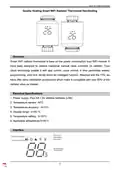


Smart WiFi Radiator Thermostat
Controller Installation
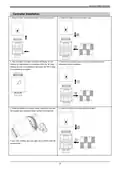
1. Press the button and pull the protective cover up to remove it.
2. Install 4*AA battery and the protection cover.
3. After the battery is installed, the screen will display “in” and
blinking, the internal push rod is retracting. When the “in” stops
blinking, the push rod is retracted to the bottom, the TRV is ready
to be installed on the radiator.
4. Remove the protective cover and remove the batteries to avoid
misoperation during installation.
5. Rotate and tighten the controller copper ring and the automatic
6. Install 4*AA battery and the protection cover again.
thermostatic valve installation thread interface of the heat sink.
If your valve interface does not match the controller install the
accessory first.
3

| General | Details |
|---|---|
| Name | TechPunt E1 Smart WiFi Radiator Thermostat User Guide |
| Make | TECHPUNT |
| Language | English |
| Filetype | PDF (Download) |
| File size | 0.2 MB |
 (1 votes, average: 5.00 out of 5)
 Loading...


OLIMPIA SPLENDID 9899 Thermostat User Manual

CORDIVARI Ardesia Electric Radiators with Digital Thermostat Instruction Manual

EPH CONTROLS eTRV-HW Smart Hot Water Thermostat Instruction Manual

AURATON Apus Set Wireless Thermostat with Electronic Radiator Head User Manual

ROMA HEATING RWI5 Wi5 Wi-Fi Digital Heating Thermostat User Manual

COPELAND 026-1739 Programmable Touchscreen Thermostat User Manual

GENERAL LIFE MITRA 260S Wired Room Thermostat User Manual

Eberle UTE 3500 Smart Home Capable Flush Mounted Thermostat Installation Guide

Owon Technology PCT 523-W-TY Tuya WiFi 24VAC Thermostat User Guide

Honeywell T5 7-Day Smart Wi-Fi Thermostat Instructions