
TechPunt E1 Smart WiFi Radiator Thermostat User Guide
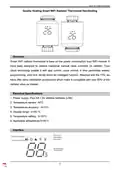


Smart WiFi Radiator Thermostat
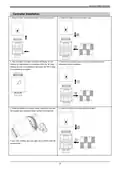
Fig 2-1
Fig 2-2
Fig 2-3
Step 3 Connect your Wi-Fi signal
On your thermostat
Turn the top knob of the TRV counterclockwise until the screen displays “--”, then press
and hold the knob until the wifi icon will flash.
Then, go back to the home page of your app
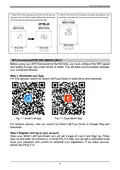
1. Turn on your phone's Bluetooth function.
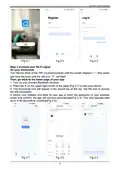
2. Press the + on the upper right corner of the page (Fig 3-1) to add your device.
3. The thermostat icon will appear in the search bar at the top. Tap the icon to access
the wifi connection.
4. Select your network and back to your app to enter the password of your wireless
router and confirm, the app will connect automatically(Fig 3-3). This may typically take
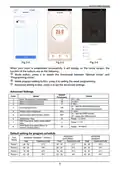
up to 5~90 seconds to complete(Fig 3-4).
Fig 3-1
Fig 3-2
Fig 3-3
5

| General | Details |
|---|---|
| Name | TechPunt E1 Smart WiFi Radiator Thermostat User Guide |
| Make | TECHPUNT |
| Language | English |
| Filetype | PDF (Download) |
| File size | 0.2 MB |
 (1 votes, average: 5.00 out of 5)
 Loading...


mars 7602-457 Communicating Programmable Thermostat Instruction Manual

STELPRO ASMC402 Maestro Zigbee Smart Programmable Thermostat User Guide

UNDERFLOOR HEATING WORLD UWi5 Wi-Fi Digital Heating Thermostat Instruction Manual

Homematic IP HmIP-WTH-B Wireless Wall Thermostat Instruction Manual

Eurotronic Technology sprit Z-Wave Smart Radiator Thermostat Installation Guide

Haswill Electronics STC-8080A+ Thermostat User Guide

TCL IPOWER Heat Mat Thermostat Instruction Manual

Honeywell N100 Series Non Programmable Thermostat Installation Guide

heatit Z-TRM3 WiFi Thermostat Instruction Manual

Danfoss ECtemp Next Plus Electronic Intelligent Timer Thermostat Installation Guide