
Rayotec PERGARP0DCN6YB3I Wi-Fi Thermostat Instruction Manual


3. Unable to separate the front from the backplate
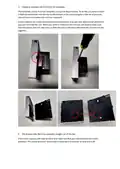
The backplate unclips from the faceplate so it can be disconnected. To do this you need to insert
a flathead screwdriver into the slot on the boꢁom of the unit and apply a liꢁle bit of pressure,
you will hear a click when the unit has separated.
Ensure that you are careful when puꢂng the screwdriver in as you only need a small amount of
pressure to unclip the unit. When you need to reconnect the unit you will need to make sure
that the secꢀon with the clips lines up with the port on the back otherwise the unit will not clip
together.
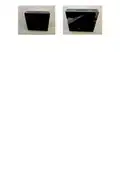
4. The display looks like it has scratches straight out of the box
If this if the case you will need to check and make sure that you have removed the screen
protector. The screen protector comes with a small tab in the corner to help pull it off.

| General | Details |
|---|---|
| Name | Rayotec PERGARP0DCN6YB3I Wi-Fi Thermostat Instruction Manual |
| Make | Rayotec |
| Language | English |
| Filetype | PDF (Download) |
| File size | 0.12 MB |
 (1 votes, average: 5.00 out of 5)
 Loading...

Rayotec Coloursense Wi-Fi Thermostat Instruction Manual

Rayotec Freedom Wi-Fi Thermostat Instructions


Honeywell TL116A Thermostat Installation Guide

LATICRETE Strata Heat WiFi Thermostat Instruction Manual

Honeywell Non-Programmable Digital Thermostat User Guide

White Rodgers 1E78 5 2 Day Programmable Thermostat Instruction Manual

Roth SL Car Air Conditioner Thermostat Instructions

EUROSTER 4040 Smart Programmable Thermostat User Manual

GENERALLIFE MITRA 260S RF Wireless Room Thermostat User Manual

EZAIoT 20230324 IPS Colorful LCD Screen Touch Smart Thermostat User Manual

ENGO CONTROLS EONE-BATW, EONE-BATB Internet Controlled Thermostat User Guide

Honeywell RTHL2510 Series Programmable Thermostat Owner’s Manual