
×
- 1. Pni Ct36 Pro
- 2. English
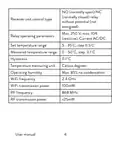
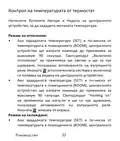
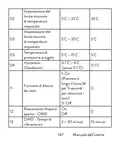
- 3. No (normally Open)/nc (normally Closed) Relay Without Potential (not Energized) (Receiver Unit Control Type → Relay Operating Parameters → Set Temperature Range → Measured Temperature Range → Temperature Measuring Unit → Operating Humidity)
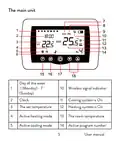
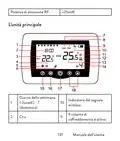
- 4. The Main Unit (Day Of The Week → Wireless Signal Indicator → Clock → Cooling System Is On → Heating System Is On → The Set Temperature)
- 5. Programmed Mode Selection (Eco Mode Active → Heating, Cooling Mode Selection → Manual Mode Active → Thermostat On/off → Battery Indicator)
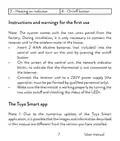
- 6. Heating On Indicator (On/off Button → Instructions And Warnings For The First Use → The Tuya Smart App)
- 7. Connect The Mobile Phone To A 2.4 Ghz Wireless Network (Download The Tuya Smart Application → Open The Tuya Smart Application → Select The 'small Home Appliances' - 'thermostat (wi-fi)' Option → Select The Wifi Network And Add The Network Password → Long Press The Pairing Button On The Receiver Unit)
- 8. In The Application, Press 'next' And Confirm That The Led Indicator On The Product Blinks Quickly.
- 9. Functions Available In The Application (Display The Set Temperature And The Measured Temperature → Heating/cooling Status → Operation Mode Selection)
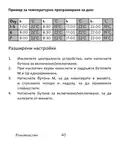
- 10. Advanced Settings (Daily Program Setting → Child Protection → Anti-freeze Protection → Open Window Protection → Temperature Calibration → Setting Dead Zone)
- 11. Temperature Control From The Thermostat (Heating Mode → Cooling Mode)
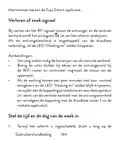
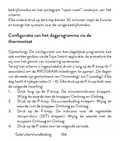
- 12. Temperature Control From The Tuya Smart Application
- 13. Pairing The Two Units
- 14. The Icon (Delete Pairing → Lost Or Weak Signal)
- 15. Recommendations (Set The Time And The Day Of The Week)
- 16. Menu Description (Options → Default → Internal Sensor Temperature Calibration → Setting The Maximum Set Temperature Limit → Setting The Minimum Set Temperature Limit → Frost Protection Temperature)
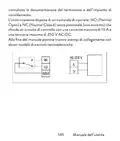
- 17. Open Window Detection - Owd (Owd - Detection Time → Owd - Temperature Drop (during Detection) → Owd - Time Delay (return To Previous Setting/program) → Return To Factory Settings → Software Version → Receiver Unit Connection Diagram)
- 18. And To A Heating Plant Is Performed Only By Qualified Personnel
- 19. Специални Предупреждения (Технически Спецификации)
- 20. Захранване На Приемника (Тип Управление На Приемника → Параметри На Работа На Релето → Задайте Температурен Диапазон → Измерен Температурен Диапазон → Устройство За Измерване На Температура → Работна Влажност)
- 21. Rf Свързаност Между Двете Устройства (Основната Единица → Ден От Седмицата → Индикатор За Безжичен Сигнал → Ръководство)
- 22. Охладителната Система Е Включена (Часовник → Зададената Температура → Отоплителната Система Е Включена → Активен Режим На Отопление → Активен Режим На Охлаждане → Програмиран Избор На Режим)
- 23. Приемното Устройство (Инструкции Употреба И Предупреждения За Първа)
- 24. Свържете Приемника Към 230v Захранване (Уверете Се, Че Термостатът Работи Правилно → Приложението Tuya Smart → Забележка 1 → Забележка 2 → Предупреждение)
- 25. Приложението (Светодиодът На Приемника → Ръководство)
- 26. Функции, Налични В Приложението (Показване На Зададената Температура И Измерената → Състояние На Отопление/охлаждане)
- 27. Избор На Режим На Работа: Ръчен, Еко И Програмиран (Разширени Настройки: → За Двата Режима На Работа, Heat И Cold, Са Налични)
- 28. Контрол На Температурата От Термостат (Режим На Отопление → Режим На Охлаждане)
- 29. Контрол На Температурата От Приложението Tuya Smart
- 30. Температура (Сдвояване На Двете Единици → Предупреждение)
- 31. Сдвояване На Приемника (Тест На Функционалността)
- 32. Изтриване На Сдвояването (Загубен Или Слаб Сигнал)
- 33. Препоръки (Задайте Часа И Деня От Седмицата → Ръководство)
- 34. Меню Описание (Стойности → Default → Вътрешно → Калибриране На → Температура На Защита От Замръзване → Хистерезис (мъртва Зона))
- 35. Откриване На Отворен Прозорец - Owd (Owd - Време За Откриване → Owd - Температурен Спад (по Време На Откриване) → Owd - Забавяне Във Времето → Ръководство)
- 36. Върнете Се Към Фабричните Настройки (Софтуерна Версия → Схема На Свързване На Приемника → Предупреждение: Свързването На Приемника Към Електрическа Мрежа 230 V И Към Отоплителна Централа Се Извършва Само От Квалифициран Персонал И Само След)
- 37. Справка С Документацията На Термостата И Отоплителната Централа (Приемникът Има Команда От Релеен Тип → Примери За Свързване С Определени Модели Топлоелектрически Централи)
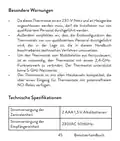
- 38. Besonderewarnungen (Technische Spezifikationen → Stromversorgung Der Zentraleinheit → Stromversorgung Der Empfängereinheit)
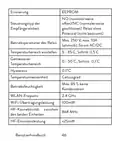
- 39. Erinnerung (Betriebsparameter Des Relais → Temperaturbereich Einstellen → Gemessener Temperaturbereich → Hysteresis → Temperaturmesseinheit → Betriebsfeuchtigkeit)
- 40. Die Haupteinheit (Drahtlose Signalanzeige → Das Kühlsystem Ist Eingeschaltet → Die Eingestellte Temperatur → Das Heizsystem Ist Eingeschaltet → Aktiver Heizmodus → Aktiver Kühlmodus)
- 41. Auswahl Des Eco- Oder Manuellen Modus (Eco-modus Aktiv → Auswahl Des Heiz- Und Kühlmodus → Manueller Modus Aktiv → Programmierter Thermostat Modus Aktiv → Batterieanzeige Von Temperatur Und Parametern)
- 42. Kopplungstaste (Anzeige Heating Ausgeschaltet' → Betriebsanzeige → Ein-/aus-taste → Hinweise Und Warnhinweise Für Den Ersten Gebrauch)
- 43. Die Tuya Smart-app (Hinweis 1: Aufgrund Der Zahlreichen Updates Der Tuya Smart-anwendung Ist Es Möglich, Dass Die In Diesem Handbuch Beschriebenen Bilder Und Informationen Von Der Von Ihnen Installierten Version Abweichen. → Warnung: Stellen Sie Sicher, Dass Sie Das Telefon Über Die 2,4-ghz-frequenz Mit Dem Drahtlosen Netzwerk Verbunden Haben. → Laden Sie Die Tuya Smart-anwendung Aus Dem App Store Oder Google Play Herunter Oder Scannen Sie Den Untenstehenden Qr-code:)
- 44. Benutzerhandbuch
- 45. In Der Anwendung Verfügbare Funktionen (Die Folgenden Funktionen Stehen In Der Tuya Smart-anwendung Zur Verfügung:)
- 46. Auswahl Des Betriebsmodus: Manuell, Eco Und Programmiert (Erweiterte Einstellungen → Für Die Beiden Betriebsarten Wärme Und Kälte → Tagesprogrammeinstellung → Einstellungen)
- 47. Kühlmodus
- 48. Temperaturregelung Über Die Tuya Smart-anwendung
- 49. Hinweis: Wenn Die Temperatur Auf Dem Bildschirm Der Zentraleinheit Nicht Innerhalb Von Maximal 2 Minuten Aktualisiert Wird, Überprüfen Sie I… (Koppeln Der Beiden Einheiten)
- 50. Kopplung Löschen (Testen Sie Die Funktionalität → Verbindung Mit Der Empfängereinheit Herstellen)
- 51. Achtung: Koppeln Sie Zuerst Die Beiden Einheiten Und Fügen Sie Dann Den Thermostat Zur Tuya Smart-anwendung Hinzu. Signal Verloren Oder Schw…
- 52. Stellen Sie Die Uhrzeit Und Den Wochentag Ein (Erkennung Geöffneter Fenster)
- 53. Menu Beschreibung (Einstellen Der Maximal Eingestellten Temperaturgrenze → Einstellen Der Minimal Eingestellten Temperaturgrenze → Frostschutztemperatur → Hysteresis)
- 54. Erkennung Geöffneter Fenster - Owd (Owd - Erkennungszeit → Owd - Temperaturabfall (während Der Erkennung) → Owd - Zeitverzögerung (zurück Zur Vorherigen Einstellung/programm) → Halten Sie Die Ein-/aus-taste 5 Sekunden Lang Gedrückt, Bis Der Thermostat Neu Startet. → Zurück Zu Den Werkseinstellungen)
- 55. Softwareversion (Anschlussplan Der Empfängereinheit → Achtung → Benutzerhandbuch)
- 56. Advertencias Especiales (Especificaciones Técnicas → Alimentación De La Unidad Central → Manual De Usuario)
- 57. Fuente De Alimentación De La Unidad Receptora (Tipo De Control De La Unidad Receptora → Parámetros De Funcionamiento Del Relé → Establecer Rango De Temperatura → Rango De Temperatura Medido → Unidad De Medida De Temperatura → Humedad De Funcionamiento)
- 58. Conectividad Rf Entre Las Dos Unidades. (Potencia De Emisión De Rf → La Unidad Principal → Día De La Semana → Wireless Signal Indicator → Cooling System Is On)
- 59. La Temperatura Establecida (Modo De Calefacción Activo → Modo De Enfriamiento Activo → Selección De Modo Eco, Manual, Programado → Modo Ecológico Activo → Modo Manual Activo → Modo Programado Activo)
- 60. La Unidad Receptora (Instrucciones Y Advertencias Para El Primer Uso. → Botón De Emparejamiento → Indicador De Encendido → Indicador De Calentamiento → Botón De Encendido/apagado)
- 61. Conecte La Unidad Receptora A Una Fuente De Alimentación (Asegúrese De Que El Termostato Esté Funcionando Correctamente → La Aplicación Tuya Smart → Conecta El Teléfono Móvil A Una Red Inalámbrica De 2,4 Ghz → Advertencia: Asegúrese De Haber Conectado El Teléfono A La Red Inalámbrica En La Frecuencia De 2,4 Ghz → Descargue La Aplicación Tuya Smart Desde App Store)
- 62.
- 63. Funciones Disponibles En La Aplicación (Smart → Estado De Calefacción/refrigeración → Selección Del Modo De Funcionamiento)
- 64. Ajustes Avanzados (Modos De Funcionamiento → Configuración Del Programa Diario → Protección Infantil → Protección Anticongelante → Protección De Ventana Abierta → Calibración De Temperatura)
- 65. Control De Temperatura Desde El Termostato (Modo Calefacción → Modo De Enfriamiento)
- 66. Control De Temperatura Desde La Aplicación Tuya Smart
- 67. Emparejamiento De Las Dos Unidades
- 68. Eliminar Emparejamiento (Advertencia: Primero Empareje Las Dos Unidades Y Luego Agregue El Termostato A La Aplicación Tuya Smart.)
- 69. Señal Perdida O Débil (Recomendaciones: → Establecer La Hora Y El Día De La Semana)
- 70. Detección De Ventana Abierta
- 71. Configuración Del Límite Mínimo De Temperatura Establecido (Temperatura De Protección Contra Heladas → Deadzone → Función De Bloqueo De Teclas → Detección De Ventana Abierta - Owd)
- 72. Owd - Retardo De Tiempo (Versión Del Software → Diagrama De Conexión De La Unidad Receptora → Advertencia → Manual De Usuario)
- 73. La Unidad Receptora Cuenta Con Un Comando Tipo Relé, No (normal Abierto) Y Nc (normal Cerrado) Sin Potencial (no Energizado) Que Cierra Un C…
- 74. Avertissements Spéciaux (Spécifications Techniques → Alimentation De L'unité Centrale → Alimentation Du Récepteur → Manuel Utilisateur)
- 75. Mémoire (Eeprom → Type De Commande Du Récepteur → Paramètres De Fonctionnement Du Relais → Plage De Température Mesurée → Unité De Mesure De La Température → Humidité D'exploitation)
- 76. Puissance D'émission Rf (Lunité Principale → Indicateur De Signal → Le Système De Refroidissement Est Activé → Le Système De Chauffage Est Allumé → Manuel Utilisateur)
- 77. Mode Chauffage Actif (Mode Refroidissement Actif → Sélection Du Mode Eco → Mode Éco Actif → Mode Manuel Actif → Marche/arrêt Du Thermostat → Mode Programmé Actif)
- 78. Lunité De Réception (Instructions Et Avertissements Pour La Première Utilisation → Bouton D'appairage → Indicateur Heating On → Indicateur D'alimentation → Bouton Marche/arrêt)
- 79. Connectez Le Récepteur (Lapplication Tuya Smart → Remarque 1 → Remarque 2 → Attention)
- 80. Manuel Utilisateur
- 81. Fonctions Disponibles Dans Lapplication (Smart → Etat Chauffage/refroidissement)
- 82. Sélection Du Mode De Fonctionnement (Réglages Avancés → Protection Enfants → Protection Antigel → Protection Fenêtre Ouverte → Calibrage De La Température → Réglage De La Zone Morte)
- 83. Contrôle De La Température Depuis Le Thermostat (Mode Chauffage: → Mode Refroidissement:)
- 84. Contrôle De La Température Depuis Lapplication Tuya Smart
- 85. Remarque: Si La Température Sur Lécran De Lunité Centrale Ne Se Met Pas À Jour Dans Un Délai Maximum De 2 Minutes, Vérifiez À Nouveau Dans L… (Appairage Des Deux Unités → Attention: Les Deux Unités Sont Couplées En Usine.)
- 86. Appairage Avec Le Récepteur (Supprimer Le Jumelage → Attention : Associez Dabord Les Deux Unités Puis Ajoutez Le Thermostat À Lapplication Tuya Smart)
- 87. Signal Perdu Ou Faible (Recommandations → Régler Lheure Et Le Jour De La Semaine)
- 88. Détection De Fenêtre Ouverte
- 89. Réglage De La Limite Maximale De Température Réglée (Réglage De La Limite Minimale De Température De Consigne → Température De Protection Contre Le Gel → Hysteresis (deadzone) → Fonction De Verrouillage Des Touches → Détection De Fenêtre Ouverte - Owd)
- 90. Owd - Temps De Détection (Owd - Chute De Température → Owd - Temporisation)
- 91. Schéma De Connexion Du Récepteur (Attention: Le Raccordement Du Boîtier Récepteur → Unité De Réception → Exemples De Raccordement)
- 92. Különleges Figyelmeztetések (Műszaki Adatok → Használati Utasítás)
- 93. Vevőegység Vezérlési Típusa (Relé Működési Paraméterei → Hőmérséklet Mérő Egység → Működési Páratartalom → Wifi Frekvencia → Rf Kapcsolat)
- 94. A Fő Egység (A Hét Napja → Vezeték Nélküli Jel Jelző → A Hűtőrendszer Be Van Kapcsolva → A Beállított Hőmérséklet → A Fűtési Rendszer Be Van Kapcsolva → Aktív Fűtési Mód)
- 95. Aktív Hűtési Mód (Eco Mód Aktív → Programozott Mód Kiválasztása → Fűtés, Hűtés Üzemmód Kiválasztása → Manuális Mód Aktív → Termosztát Be/ki → Akkumulátor Jelző)
- 96. Párosítás Gomb (Heating On Jelző → Tápellátás Visszajelző → Be/ki Gomb → Utasítások És Figyelmeztetések Az Első Használathoz → A Tuya Smart Alkalmazás)
- 97. Csatlakoztassa A Mobiltelefont Egy 2,4 Ghz-es Vezeték Nélküli Hálózathoz, És Aktiválja A Gps-helymeghatározást A Telefonon.
- 98. Használati Utasítás
- 99. Az Alkalmazásban Elérhető Funkciók (Használati Utasítás)
- 100. Üzemmód Kiválasztása: Kézi, Eco És Programozott (További Beállítások → Napi Programbeállítás → Gyermekvédelem → Fagyvédelem → Nyitott Ablakvédelem → Hőmérséklet Kalibrálása)
- 101. Hőmérséklet Szabályozás A Termosztátról (Fűtési Mód → Hűtési Mód)
- 102. Hőmérséklet Szabályozás A Tuya Smart Alkalmazásból
- 103. Megjegyzés (A Két Egység Párosítása → Ha A Termosztát Offline Állapotban Jelenik Meg Az Alkalmazásban)
- 104. Párosítás Törlése (Elveszett Vagy Gyenge Jel)
- 105. Ajánlások (Állítsa Be Az Időt És A Hét Napját → Használati Utasítás)
- 106. Villogni (Nyitott Ablak Észlelése → Napi Program Konfigurálása A Termosztáton Keresztül)
- 107. Kapcsolja Ki A Központi Egységet A Be-/kikapcsoló Gomb Megnyomásával. (Menu Leírás → Belső Érzékelő → Lehetőségek → Használati Utasítás)
- 108. Hysteresis (Billentyűzár Funkció → Nyitott Ablak Észlelése - Owd → Owd Észlelési Idő → Owd - Hőmérséklet Csökkenés → Owd - Időkésleltetés → Használati Utasítás)
- 109. Visszatérés A Gyári Beállításokhoz (Szoftver Verzió → A Vevőegység Bekötési Rajza → Használati Utasítás)
- 110. Használati Utasítás
- 111. Avvertenze Speciali (Specifiche Tecniche → Alimentazione Dell'unità Centrale → Alimentazione Dell'unità Ricevente → Eeprom)
- 112. Relè No (normalmenteaperto)/nc (normalmentechiuso) Senza Potenziale (noneccitato) (Tipo Di Controllo Dell'unitàricevente → Parametri Di Funzionamentodel Relè → Impostare L'intervallo Ditemperatura → Intervallo Di Temperaturamisurata → Umidità Operativa → Potenza Di Trasmissione Wifi)
- 113. Potenza Di Emissione Rf (Lunità Principale → Giorno Della Settimana → Indicatore Del Segnale Wireless → Il Sistema Di Raffreddamento È Attivo → Manuale Dellutente)
- 114. La Temperatura Impostata (Modalità Di Riscaldamento Attiva → Modalità Di Raffreddamento Attivo → Modalità Ecologica Attiva → Selezione Modalità Eco, Manuale, Programmata → Modalità Manuale Attiva → Modalità Programmata Attiva)
- 115. Lunità Ricevente (Pulsante Di Abbinamento → Indicatore Di Heating On → Indicatore Di Alimentazione → Tasto Di Accensione/spegnimento → Istruzioni E Avvertenze Per Il Primo Utilizzo)
- 116. Collegare Lunità Ricevente Ad Una Alimentazione A 230v (Assicurati Che Il Termostato Funzioni Correttamente → Lapp Tuya Smart → Nota 1 → Nota 2 → Collega Il Telefono Cellulare A Una Rete Wireless A 2,4 Ghz → Attenzione)
- 117. Manuale Dellutente
- 118. Funzioni Disponibili Nellapplicazione (Visualizza La Temperatura Impostata → Stato Riscaldamento/raffrescamento)
- 119. Selezione Modalità Di Funzionamento: Manuale, Eco (Impostazioni Avanzate → Modalità Di Funzionamento: Caldo E Freddo → Impostazione Programma Giornaliero → Protezione Bambini → Protezione Antigelo → Calibrazione Temperatura)
- 120. Controllo Della Temperatura Dal Termostato (Modalità Riscaldamento → Modalità Di Raffreddamento)
- 121. Controllo Della Temperatura Dallapplicazione Tuya Smart
- 122. Nota: Se La Temperatura Sullo Schermo Dellunità Centrale Non Si Aggiorna Entro Un Massimo Di 2 Minuti, Verificare Nuovamente Nellapplicazion… (Associazione Delle Due Unità)
- 123. Premere (Elimina Labbianamento → Attenzione: Associare Prima Le Due Unità E Poi Aggiungere Il Termostato Allapplicazione Tuya Smart.)
- 124. Segnale Perso O Debole (Raccomandazioni: → Imposta Lora E Il Giorno Della Settimana)
- 125. Rilevamento Finestra Aperta
- 126. Impostazione Del Limite Massimo Di Temperatura Impostato (Impostazione Del Limite Minimo Di Temperatura Impostato → Temperatura Di Protezione Antigelo → Hysteresis (deadzone) → Funzione Di Blocco Dei Tasti → Rilevamento Finestra Aperta - Owd)
- 127. Owd - Calo Di Temperatura (Owd - Ritardo → Versione Software → Schema Di Collegamento Dellunità Ricevente → Attenzione: Il Collegamento Dellunità Ricevente Ad Una Alimentazione Di 230 V E Ad Un Impianto Di Riscaldamento Deve Essere Effettuato Solo Da Personale Qualificato E Solo Dopo Aver)
- 128. Consultato La Documentazione Del Termostato E Dellimpianto Di Riscaldamento. Lunità Ricevente Dispone Di Un Comando Di Tipo Relè, No (normal…
- 129. Speciale Waarschuwingen (Technische Specificaties → Gebruikershandleiding)
- 130. Voeding Ontvangereenheid (Geheugen → Besturingstype → Bedrijfsparameters Van Het Relais → Temperatuurbereik Instellen → Hysteresis → Temperatuur Meeteenheid)
- 131. De Hoofdeenheid (Draadloze Signaalindicator → Koelsysteem Is Ingeschakeld → Verwarmingssysteem Is Ingeschakeld → Gebruikershandleiding)
- 132. Actieve Verwarmingsmodus (Actieve Koelmodus → Geprogrammeerde Modusselectie → Eco-modus Actief → Handmatige Modus Actief → Thermostaat Aan/uit → Batterij Indicator)
- 133. De Ontvangsteenheid (Instructies En Waarschuwingen Voor Het Eerste Gebruik → Gebruikershandleiding)
- 134. De Tuya Smart-app (Verbinding Maken Met Een 2,4 Ghz Draadloos Netwerk → Zorg Ervoor Dat De Thermostaat Goed Werkt)
- 135. Gebruikershandleiding
- 136. Functies Beschikbaar In De Applicatie (Weergave Van De Ingestelde Temperatuur En De Gemeten Temperatuur → Verwarmings-/koelingsstatus)
- 137. Keuze Van De Bedrijfsmodi: Handmatig, Eco En Geprogrammeerd (Geavanceerde Instellingen → Voor De Twee Bedrijfsmodi, Verwarmen En Koud)
- 138. Temperatuurregeling Vanaf De Thermostaat (Verwarmingsmodus → Koelmodus)
- 139. Temperatuurregeling Vanuit De Tuya Smart-applicatie
- 140. Het Koppelen Van De Twee Eenheden (Als De Thermostaat Offline Verschijnt In De Applicatie → Controleer De Status Van De Thermostaat → Instructies Voor Het Koppelen)
- 141. Koppeling Verwijderen (Test De Functionaliteit Door De Ingestelde Temperatuur (set) Te Wijzigen En Kijk Hoe Het Relais In De Ontvanger Wordt Geactiveerd.)
- 142. Verloren Of Zwak Signaal (Aanbevelingen: → Stel De Tijd En De Dag Van De Week In)
- 143. Detectie Van Open Raam
- 144. Menu Beschrijving (Opties → Kalibratie Van De Interne Sensortemperatuur → Instellen Van De Maximaal Ingestelde Temperatuurlimiet → Instellen Van De Minimaal Ingestelde Temperatuur → Vorstbeschermings Temperatuur → Hysteresis)
- 145. Detectie Open Raam (Owd - Detectietijd → Owd - Temperatuurdaling → Owd - Tijdvertraging → Software Versie)
- 146. Aansluitschema Ontvangereenheid (Gebruikershandleiding)
- 147. Specjalne Ostrzeżenia (Termostat → Specyfikacja Techniczna → Instrukcja Obsługi)
- 148. Przekaźnik No (normalnie Otwarty)/nc (normalnie Zamknięty) Bez Potencjału (niezasilany) (Typ Sterowania Jednostką Odbiorczą → Parametry Pracy Przekaźnika → Ustawić Zakres Temperatur → Wilgotność Pracy → Częstotliwość Wi-fi → Moc Transmisji Wifi)
- 149. Jednostka Główna (Dzień Tygodnia → Wskaźnik Sygnału Bezprzewodowego → Układ Chłodzenia Jest Włączony → Zegar → Ustawiona Temperatura → System Ogrzewania Jest Włączony)
- 150. Aktywny Tryb Ogrzewania (Aktywny Tryb Chłodzenia → Wybór Trybu Eco → Tryb Ręczny Aktywny → Tryb Zaprogramowany Aktywny → Włączenie/wyłączenie Termostatu → Wskaźnik Baterii)
- 151. Jednostka Odbiorcza (Przycisk Parowania → Wskaźnik Zasilania → Wskaźnik Włączenia → Przycisk Włączania/wyłączania → Instrukcje I Ostrzeżenia Dotyczące Pierwszego Użycia)
- 152. Podłącz Odbiornik Do Źródła Zasilania 230v (operacja Może Być Wykonana Wyłącznie Przez Wykwalifikowany Personel). Upewnij Się, Że Termostat …
- 153. Instrukcja Obsługi
- 154. Funkcje Dostępne W Aplikacji (Wyświetla Ustawioną I Zmierzoną Temperaturę → Stan Ogrzewania/chłodzenia → Wybór Trybu Pracy)
- 155. Zaawansowane Ustawienia (Dla Dwóch Trybów Pracy, Ogrzewania I Chłodzenia → Ustawienie Programu Dziennego → Zabezpieczenie Przed Dziećmi → Zabezpieczenie Przed Zamarzaniem → Zabezpieczenie Otwartego Okna → Kalibracja Temperatury)
- 156. Regulacja Temperatury Z Termostatu (Tryb Ogrzewania: → Tryb Chłodzenia:)
- 157. Sterowanie Temperaturą Z Aplikacji Tuya Smart
- 158. Parowanie Dwóch Jednostek (Uwaga → Ostrzeżenie)
- 159. Usuń Parowanie (Przetestuj Funkcjonalność → Uwaga: Najpierw Sparuj Obydwa Urządzenia, A Następnie Dodaj Termostat Do Aplikacji Tuya Smart. → Instrukcja Obsługi)
- 160. Utracony Lub Słaby Sygnał (Zalecenia: → Ustaw Godzinę I Dzień Tygodnia)
- 161. Wskaźnik (Wykrywanie Otwartego Okna → Instrukcja Obsługi)
- 162. Ustawianie Maksymalnego Ustawionego Limitu Temperatury (Ustawianie Minimalnego Ustawionego Limitu Temperatury → Temperatura Ochrony Przed Zamarzaniem → Hysteresis (deadzone) → Funkcja Blokady Klawiszy → Wykrywanie Otwartego Okna - Owd)
- 163. Owd Czas Detekcji (Owd Spadek Temperatury (podczas Detekcji) → Owd Opóźnienie Czasowe (powrót Do Poprzedniego Ustawienia/programu) → Wróć Do Ustawień Fabrycznych → Wersja Oprogramowania)
- 164. Schemat Podłączenia Odbiornika (Uwaga → Odbiornik Posiada Polecenie Typu Przekaźnikowego → Przykłady Połączeń Z Określonymi Modelami Elektrowni Cieplnych → Instrukcja Obsługi)
- 165. Atentionari Speciale (Specificatii Tehnice → Manual De Utilizare)
- 166. Releu No (normal Deschis) (Tip Comanda Unitate Receptor → Parametri De Functionare → Interval Temperatura Setata → Interval Temperatura Masurata → Hysteresis → Unitate De Masura Temperatura)
- 167. Prezentare Unitate Centrala (Ziua Saptamanii → Indicator Semnal Wireless → Ora Curenta → Indicator Racire Pornita → Indicator Incalzire Pornita → Temperatura Setata)
- 168. Selectare Mod Eco (Selectare Mod Incalzire → Mod Eco Activ → Mod Manual Activ → Mod Programat Activ → Pornire/oprire Termostat → Indicator Baterie)
- 169. Instructiuni Si Atentionari La Prima Utilizare (Control Din Aplicatia Tuya Smart)
- 170. Manual De Utilizare
- 171. Functii Disponibile In Aplicatie (Afisare Temperatura Setata Si Temperatura Masurata → Afisare Stare Incalzire/racire → Selectare Mod De Lucru)
- 172. Setari Avansate (Moduri De Lucru → Setare Program Zilnic → Protectie Copii → Protectie Anti-inghet → Calibrare Temperatura → Setare Dead Zone)
- 173. Controlul Temperaturii Din Termostat (Mod Incalzire: → Mod Racire:)
- 174. Controlul Temperaturii Din Aplicatia Tuya Smart
- 175. Nota: Daca Temperatura Pe Ecranul Unitatii Centrale Nu Se Actualizeaza Intr-un Interval De Maxim 2 Minute, Verificati Din Nou In Aplicatie S…
- 176. Led-ul (Pictograma → Stergere Imperechere Unitati → Atentionare: Imperecheati Mai Intai Cele Doua Unitati Si Mai Apoi Adaugati Termostatul In Aplicatia Tuya Smart. → Semnal Slab Sau Pierdut → Manual De Utilizare)
- 177. Recomandari (Setare Ora Si Ziua Saptamanii)
- 178. Indicatorul Corespunzator Zilei Saptamanii (Ecranul Revine La Modul Normal De Afisare → Functia Detectie Geam Deschis → Configurare Program Zilnic Prin Termostat)
- 179. Cu Ecranul Stins, Apasati Lung Si Simultan Butoanele M Si Sus.
- 180. Functie Detectie (Geam Deschis - Owd → Owd - Timp → On: Pornit → Owd - Scadere → Temperatura → Revenire La Setarile Din Fabrica)
- 181. Diagrama Conexiuni Unitate Receptor (Atentionare: Conectarea Unitatii Receptor La O Sursa De Alimentare → Manual De Utilizare)
- 182. Exemple De Conectare (Pro La Diferite Modele De Centrale Termice → Atentionare: Conectarea Unitatii Receptor La O Sursa De Alimentare)
- 183. Ferroli Divacondens 24/28 (Vaillant Ecotec Pure)
- 184. Motan Max Optimus
×
PNi CT36PRO Smart Thermostat Instruction Manual











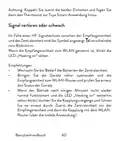


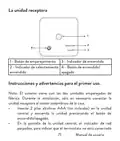
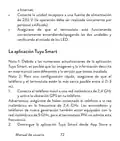


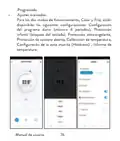


















L’unità ricevente
1
2
3
4
1 - Pulsante di abbinamento
2 - Indicatore di Heating on
3 - Indicatore di alimentazione
4 - Tasto di accensione/
spegnimento
Istruzioni e avvertenze per il primo utilizzo
Nota: il sistema viene fornito con le due unità accoppiate in
fabbrica. Durante l’installazione è solo necessario collegare l’unità
ricevente al router wireless della casa.
•
Inserire 2 batterie alcaline AAA (non incluse) nell’unità
centrale accendere l’unità premendo il pulsante di
e
accensione/spegnimento.
•
Sullo schermo dell’unità centrale, l’indicatore di rete
lampeggia, per indicare che il termostato non è connesso a
133
Manuale dell’utente

| General | Details |
|---|---|
| Name | PNi CT36PRO Smart Thermostat Instruction Manual |
| Make | PNI |
| Language | English |
| Filetype | PDF (Download) |
| File size | 1.12 MB |
 (1 votes, average: 5.00 out of 5)
 Loading...

PNI-CT40 Smart Wireless Thermostat User Manual

PNI CT25PW WIFI Smart Thermostat User Manual

PNi ACRF8508 Wireless Programmable Room Thermostat Instruction Manual


hansgrohe 15763003 Shower Select Thermostat Instruction Manual

SASWELL SAS908XWHB-7 Thermostat User Manual
STELPRO UT202NP Series Non-Programmable Electric Thermostat Owner’s Manual
PNi ACRF8508 Wireless Programmable Room Thermostat Instruction Manual

STELPRO ST402PFF Programmable Electronic Thermostat Owner’s Manual

BEOK BOT306RF-WIFI Thermostat Owner’s Manual

ICM CONTROLS SC2010 N-L Non Programmable Electronic Thermostat Instruction Manual

network thermostat X X7-WIFI Smart Touchscreen Thermostat Instructions

aube TH146-P-2H1C Programmable Thermostat Installation Guide

COMPUTHERM E800RF Multizone Wi-Fi Thermostat Instruction Manual
Table of Contents
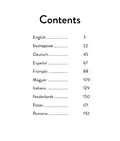
- 1. Pni Ct36 Pro →
- 2. English →
- 3. No (normally Open)/nc (normally Closed) Relay Without Potent... →
- 4. The Main Unit - Day Of The Week →
- 5. Programmed Mode Selection - Eco Mode Active →
- 6. Heating On Indicator - On/off Button →
- 7. Connect The Mobile Phone To A 2.4 Ghz Wireless Network - Dow... →
- 8. In The Application, Press 'next' And Confirm That The Led In... →
- 9. Functions Available In The Application - Display The Set Tem... →
- 10. Advanced Settings - Daily Program Setting →
- 11. Temperature Control From The Thermostat - Heating Mode →
- 12. Temperature Control From The Tuya Smart Application →
- 13. Pairing The Two Units →
- 14. The Icon - Delete Pairing →
- 15. Recommendations - Set The Time And The Day Of The Week →
- 16. Menu Description - Options →
- 17. Open Window Detection - Owd - Owd - Detection Time →
- 18. And To A Heating Plant Is Performed Only By Qualified Person... →
- 19. Специални Предупреждения - Технически Спецификации →
- 20. Захранване На Приемника - Тип Управление На Приемника →
- 21. Rf Свързаност Между Двете Устройства - Основната Единица →
- 22. Охладителната Система Е Включена - Часовник →
- 23. Приемното Устройство - Инструкции Употреба И Предупреждения ... →
- 24. Свържете Приемника Към 230v Захранване - Уверете Се, Че Терм... →
- 25. Приложението - Светодиодът На Приемника →
- 26. Функции, Налични В Приложението - Показване На Зададената Те... →
- 27. Избор На Режим На Работа: Ръчен, Еко И Програмиран - Разшире... →
- 28. Контрол На Температурата От Термостат - Режим На Отопление →
- 29. Контрол На Температурата От Приложението Tuya Smart →
- 30. Температура - Сдвояване На Двете Единици →
- 31. Сдвояване На Приемника - Тест На Функционалността →
- 32. Изтриване На Сдвояването - Загубен Или Слаб Сигнал →
- 33. Препоръки - Задайте Часа И Деня От Седмицата →
- 34. Меню Описание - Стойности →
- 35. Откриване На Отворен Прозорец - Owd - Owd - Време За Открива... →
- 36. Върнете Се Към Фабричните Настройки - Софтуерна Версия →
- 37. Справка С Документацията На Термостата И Отоплителната Центр... →
- 38. Besonderewarnungen - Technische Spezifikationen →
- 39. Erinnerung - Betriebsparameter Des Relais →
- 40. Die Haupteinheit - Drahtlose Signalanzeige →
- 41. Auswahl Des Eco- Oder Manuellen Modus - Eco-modus Aktiv →
- 42. Kopplungstaste - Anzeige Heating Ausgeschaltet' →
- 43. Die Tuya Smart-app - Hinweis 1: Aufgrund Der Zahlreichen Upd... →
- 44. Benutzerhandbuch →
- 45. In Der Anwendung Verfügbare Funktionen - Die Folgenden Funkt... →
- 46. Auswahl Des Betriebsmodus: Manuell, Eco Und Programmiert - E... →
- 47. Kühlmodus →
- 48. Temperaturregelung Über Die Tuya Smart-anwendung →
- 49. Hinweis: Wenn Die Temperatur Auf Dem Bildschirm Der Zentrale... →
- 50. Kopplung Löschen - Testen Sie Die Funktionalität →
- 51. Achtung: Koppeln Sie Zuerst Die Beiden Einheiten Und Fügen S... →
- 52. Stellen Sie Die Uhrzeit Und Den Wochentag Ein - Erkennung Ge... →
- 53. Menu Beschreibung - Einstellen Der Maximal Eingestellten Tem... →
- 54. Erkennung Geöffneter Fenster - Owd - Owd - Erkennungszeit →
- 55. Softwareversion - Anschlussplan Der Empfängereinheit →
- 56. Advertencias Especiales - Especificaciones Técnicas →
- 57. Fuente De Alimentación De La Unidad Receptora - Tipo De Cont... →
- 58. Conectividad Rf Entre Las Dos Unidades. - Potencia De Emisió... →
- 59. La Temperatura Establecida - Modo De Calefacción Activo →
- 60. La Unidad Receptora - Instrucciones Y Advertencias Para El P... →
- 61. Conecte La Unidad Receptora A Una Fuente De Alimentación - A... →
- 62. Page 62 →
- 63. Funciones Disponibles En La Aplicación - Smart →
- 64. Ajustes Avanzados - Modos De Funcionamiento →
- 65. Control De Temperatura Desde El Termostato - Modo Calefacció... →
- 66. Control De Temperatura Desde La Aplicación Tuya Smart →
- 67. Emparejamiento De Las Dos Unidades →
- 68. Eliminar Emparejamiento - Advertencia: Primero Empareje Las ... →
- 69. Señal Perdida O Débil - Recomendaciones: →
- 70. Detección De Ventana Abierta →
- 71. Configuración Del Límite Mínimo De Temperatura Establecido - ... →
- 72. Owd - Retardo De Tiempo - Versión Del Software →
- 73. La Unidad Receptora Cuenta Con Un Comando Tipo Relé, No (nor... →
- 74. Avertissements Spéciaux - Spécifications Techniques →
- 75. Mémoire - Eeprom →
- 76. Puissance D'émission Rf - Lunité Principale →
- 77. Mode Chauffage Actif - Mode Refroidissement Actif →
- 78. Lunité De Réception - Instructions Et Avertissements Pour La... →
- 79. Connectez Le Récepteur - Lapplication Tuya Smart →
- 80. Manuel Utilisateur →
- 81. Fonctions Disponibles Dans Lapplication - Smart →
- 82. Sélection Du Mode De Fonctionnement - Réglages Avancés →
- 83. Contrôle De La Température Depuis Le Thermostat - Mode Chauf... →
- 84. Contrôle De La Température Depuis Lapplication Tuya Smart →
- 85. Remarque: Si La Température Sur Lécran De Lunité Centrale Ne... →
- 86. Appairage Avec Le Récepteur - Supprimer Le Jumelage →
- 87. Signal Perdu Ou Faible - Recommandations →
- 88. Détection De Fenêtre Ouverte →
- 89. Réglage De La Limite Maximale De Température Réglée - Réglag... →
- 90. Owd - Temps De Détection - Owd - Chute De Température →
- 91. Schéma De Connexion Du Récepteur - Attention: Le Raccordemen... →
- 92. Különleges Figyelmeztetések - Műszaki Adatok →
- 93. Vevőegység Vezérlési Típusa - Relé Működési Paraméterei →
- 94. A Fő Egység - A Hét Napja →
- 95. Aktív Hűtési Mód - Eco Mód Aktív →
- 96. Párosítás Gomb - Heating On Jelző →
- 97. Csatlakoztassa A Mobiltelefont Egy 2,4 Ghz-es Vezeték Nélkül... →
- 98. Használati Utasítás →
- 99. Az Alkalmazásban Elérhető Funkciók - Használati Utasítás →
- 100. Üzemmód Kiválasztása: Kézi, Eco És Programozott - További Be... →
- 101. Hőmérséklet Szabályozás A Termosztátról - Fűtési Mód →
- 102. Hőmérséklet Szabályozás A Tuya Smart Alkalmazásból →
- 103. Megjegyzés - A Két Egység Párosítása →
- 104. Párosítás Törlése - Elveszett Vagy Gyenge Jel →
- 105. Ajánlások - Állítsa Be Az Időt És A Hét Napját →
- 106. Villogni - Nyitott Ablak Észlelése →
- 107. Kapcsolja Ki A Központi Egységet A Be-/kikapcsoló Gomb Megny... →
- 108. Hysteresis - Billentyűzár Funkció →
- 109. Visszatérés A Gyári Beállításokhoz - Szoftver Verzió →
- 110. Használati Utasítás →
- 111. Avvertenze Speciali - Specifiche Tecniche →
- 112. Relè No (normalmenteaperto)/nc (normalmentechiuso) Senza Pot... →
- 113. Potenza Di Emissione Rf - Lunità Principale →
- 114. La Temperatura Impostata - Modalità Di Riscaldamento Attiva →
- 115. Lunità Ricevente - Pulsante Di Abbinamento →
- 116. Collegare Lunità Ricevente Ad Una Alimentazione A 230v - Ass... →
- 117. Manuale Dellutente →
- 118. Funzioni Disponibili Nellapplicazione - Visualizza La Temper... →
- 119. Selezione Modalità Di Funzionamento: Manuale, Eco - Impostaz... →
- 120. Controllo Della Temperatura Dal Termostato - Modalità Riscal... →
- 121. Controllo Della Temperatura Dallapplicazione Tuya Smart →
- 122. Nota: Se La Temperatura Sullo Schermo Dellunità Centrale Non... →
- 123. Premere - Elimina Labbianamento →
- 124. Segnale Perso O Debole - Raccomandazioni: →
- 125. Rilevamento Finestra Aperta →
- 126. Impostazione Del Limite Massimo Di Temperatura Impostato - I... →
- 127. Owd - Calo Di Temperatura - Owd - Ritardo →
- 128. Consultato La Documentazione Del Termostato E Dellimpianto D... →
- 129. Speciale Waarschuwingen - Technische Specificaties →
- 130. Voeding Ontvangereenheid - Geheugen →
- 131. De Hoofdeenheid - Draadloze Signaalindicator →
- 132. Actieve Verwarmingsmodus - Actieve Koelmodus →
- 133. De Ontvangsteenheid - Instructies En Waarschuwingen Voor Het... →
- 134. De Tuya Smart-app - Verbinding Maken Met Een 2,4 Ghz Draadlo... →
- 135. Gebruikershandleidin... →
- 136. Functies Beschikbaar In De Applicatie - Weergave Van De Inge... →
- 137. Keuze Van De Bedrijfsmodi: Handmatig, Eco En Geprogrammeerd ... →
- 138. Temperatuurregeling Vanaf De Thermostaat - Verwarmingsmodus →
- 139. Temperatuurregeling Vanuit De Tuya Smart-applicatie →
- 140. Het Koppelen Van De Twee Eenheden - Als De Thermostaat Offline... →
- 141. Koppeling Verwijderen - Test De Functionaliteit Door De Inge... →
- 142. Verloren Of Zwak Signaal - Aanbevelingen: →
- 143. Detectie Van Open Raam →
- 144. Menu Beschrijving - Opties →
- 145. Detectie Open Raam - Owd - Detectietijd →
- 146. Aansluitschema Ontvangereenheid - Gebruikershandleidin... →
- 147. Specjalne Ostrzeżenia - Termostat →
- 148. Przekaźnik No (normalnie Otwarty)/nc (normalnie Zamknięty) B... →
- 149. Jednostka Główna - Dzień Tygodnia →
- 150. Aktywny Tryb Ogrzewania - Aktywny Tryb Chłodzenia →
- 151. Jednostka Odbiorcza - Przycisk Parowania →
- 152. Podłącz Odbiornik Do Źródła Zasilania 230v (operacja Może By... →
- 153. Instrukcja Obsługi →
- 154. Funkcje Dostępne W Aplikacji - Wyświetla Ustawioną I Zmierzo... →
- 155. Zaawansowane Ustawienia - Dla Dwóch Trybów Pracy, Ogrzewania... →
- 156. Regulacja Temperatury Z Termostatu - Tryb Ogrzewania: →
- 157. Sterowanie Temperaturą Z Aplikacji Tuya Smart →
- 158. Parowanie Dwóch Jednostek - Uwaga →
- 159. Usuń Parowanie - Przetestuj Funkcjonalność →
- 160. Utracony Lub Słaby Sygnał - Zalecenia: →
- 161. Wskaźnik - Wykrywanie Otwartego Okna →
- 162. Ustawianie Maksymalnego Ustawionego Limitu Temperatury - Ust... →
- 163. Owd Czas Detekcji - Owd Spadek Temperatury (podczas Detekcji... →
- 164. Schemat Podłączenia Odbiornika - Uwaga →
- 165. Atentionari Speciale - Specificatii Tehnice →
- 166. Releu No (normal Deschis) - Tip Comanda Unitate Receptor →
- 167. Prezentare Unitate Centrala - Ziua Saptamanii →
- 168. Selectare Mod Eco - Selectare Mod Incalzire →
- 169. Instructiuni Si Atentionari La Prima Utilizare - Control Din... →
- 170. Manual De Utilizare →
- 171. Functii Disponibile In Aplicatie - Afisare Temperatura Setata... →
- 172. Setari Avansate - Moduri De Lucru →
- 173. Controlul Temperaturii Din Termostat - Mod Incalzire: →
- 174. Controlul Temperaturii Din Aplicatia Tuya Smart →
- 175. Nota: Daca Temperatura Pe Ecranul Unitatii Centrale Nu Se Ac... →
- 176. Led-ul - Pictograma →
- 177. Recomandari - Setare Ora Si Ziua Saptamanii →
- 178. Indicatorul Corespunzator Zilei Saptamanii - Ecranul Revine ... →
- 179. Cu Ecranul Stins, Apasati Lung Si Simultan Butoanele M Si Su... →
- 180. Functie Detectie - Geam Deschis - Owd →
- 181. Diagrama Conexiuni Unitate Receptor - Atentionare: Conectare... →
- 182. Exemple De Conectare - Pro La Diferite Modele De Centrale Te... →
- 183. Ferroli Divacondens 24/28 - Vaillant Ecotec Pure →
- 184. Motan Max Optimus →