
Home > InverterCool > InverterCool CPT100 2C Wi-Fi Thermostat Instruction Manual
InverterCool CPT100 2C Wi-Fi Thermostat Instruction Manual


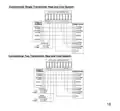


Attach Wiring: To insert a wire into a terminal, flip up the locking tab and
slide the wire into the socket directly above the corresponding label.
Insert each wire as required for the desired appliance. Once each wire is
inserted, flip the tab down to lock it in position. Pull gently on each wire
after locking the tab is closed to be sure the wire is secure.
A factory supplied jumper is supplied between RC and
RH. This should be removed in two transformer systems
(see Appendix A, page 18).
7

| General | Details |
|---|---|
| Name | InverterCool CPT100 2C Wi-Fi Thermostat Instruction Manual |
| Make | InverterCool |
| Language | English |
| Filetype | PDF (Download) |
| File size | 0.3 MB |
 (1 votes, average: 5.00 out of 5)
 Loading...


Gelia ip24 1.5m Cable With Stepless Thermostat Instruction Manual

Honeywell Communicating Fan Coil Thermostat Instruction Manual

Honeywell RTH6300B Programmable Thermostat Installation Guide
tuya TRV603 Smart WiFi Radiator Thermostat Instruction Manual

DAIKIN DKN509 Wireless Communicating Thermostat Instruction Manual

SIEMENS RDF660MB Flush Mount Room Thermostat Instruction Manual

ESi ESRTP6C, ESRTP6CW Centro Prog Room Thermostat User Guide

Danfoss RT 8L Thermostat Installation Guide

GENERAL LIFE Therma 300S Wired Room Thermostat User Manual

EBECO EB-25 Regulator Thermostat Instruction Manual