
Home > InverterCool > InverterCool CPT100 2C Wi-Fi Thermostat Instruction Manual
InverterCool CPT100 2C Wi-Fi Thermostat Instruction Manual




Installing the Thermostat
Tools
You may need the following tools to
install the CPT100 Thermostat:
There are five steps to installing
the thermostat:
• #1 Phillips or flathead screwdriver
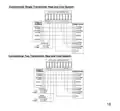
1. Determine Wiring Configuration
Power drill with 3/16”bit (if new
mounting holes are required)
•
2. Remove Old Thermostat
3. Determine if Wall Plate is required
to cover opening, damage, or
discoloration of wall surface.
• Smartphone/camera to photograph
wiring for reference (optional)
Screwdriver to disconnect wires
existing thermostat
4. Install CPT100 Base
5. Connect Wires
•
• Pencil
6. Attach Display
Turn Off Power to HVAC System
Locate the HVAC panel breaker and turn
OFF the system. Before removing the
old thermostat, change the temperature
setting to cause a heating or cooling
call. When the thermost indicates there
is a call, make sure the HVAC System is
not operating.
2

| General | Details |
|---|---|
| Name | InverterCool CPT100 2C Wi-Fi Thermostat Instruction Manual |
| Make | InverterCool |
| Language | English |
| Filetype | PDF (Download) |
| File size | 0.3 MB |
 (1 votes, average: 5.00 out of 5)
 Loading...


Braeburn 8205 Universal Smart Wi-Fi Thermostat User Guide

NT NetX X5 IP Ethernet Thermostat Instruction Manual

SEALEY FH2010.V2 2000W Fan Heater with Thermostat User Manual

MI-HEAT MTS200 WiFi Thermostat Instruction Manual

NEOMITIS RTE0RFA Wireless Digital Room Thermostat and Receiver Instruction Manual

THE HEATING COMPANY Slim and Compact WiFi Thermostat User Manual

ENGO CONTROLS E901WIFI Wireless Internet Thermostat User Guide

SALUS SQ610RF Smart Thermostat Instruction Manual

VIESSMANN ViCare ZK05991 Wireless Thermostat Instruction Manual

Honeywell Home PRO TH1000E1 Programmable Thermostat Installation Guide