
HYSEN HY510 WiFi Heating Thermostat Instruction Manual
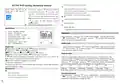


Advance option
Heating/Cooling
mode
0: heating
1: cooling
0
L
Turn off thermostat,long press“ ”to enter advance option. Short press“ ” to choose
item, rotate the knob to change the value.After setting, the parameters will be
automatically saved and exited after holding the interface for 10 seconds.
Return difference : limit valve of external sensor is 45℃ for factory default (6),value of
external sensor control return difference (3) is 2. when temperature rise to 45℃,then relay stop working
and will remind high temperature protection alarm. If temperature decline to 43℃relay continue to
work and alarm will be relieved. (it can be operated ,only when indoor temperature is lower than setting
temperature )
No.
Items
Measure Temperature
Calibration
Parameter
Default
-9-+9℃
-1
1
Temperature return
difference
0.5-2.5℃
1℃
2
2
3
Sensor fault display:please choose correct working way of built-in and external sensor, if
choose wrongly or sensor fault (breakdown), “E1” or “E2” will be displayed on the screen. Thermostat
will stop heating until the fault is eliminated
External sensor control 1~9 ℃
return difference
N1
:inner
protection closed)
sensor(high
temperature N1
installation instructions
N2: external sensor(high temperature
protection closed)
4
Choose sensor
N3: inner sensor for temperature controlling,
external sensor for high temperature
protection
5
6
Child lock
0:half lock;
1:full lock
0
1:20℃-70℃
2:less than 20℃,display【--】,mean closed
this function
45
High temperature
protection
1:1℃-10℃
2:more than10℃,display【--】,mean closed
this function
1-10
5
Low temperature
protection
7
The lowest setting
temperature
5
8
9
The highest setting
temperature
20-70
35
0
Descaling function
0:closed
1:open
A
Wiring Diagram
Power with memory
function
0:Power with memory function
1:Off state after connecting with power
2:On state after connecting with power
0
B
C
D
E
F
Programmable
Standby display
0:5+2 ;
1: 6+1 ;
2: 7
0
2
0: display nothing
1:Standby brightness is weak-bright
2: Standby brightness is semi-bright
Long press“ ” until whole display
10-20°C,setting temperature is 10°C,
Reset
Window function
triggers temperature decrease it,will display【--】,then canceled
--
WE
WW
LD
WE: electrical heating
WW: water heating
this function
Window function
running time
LD: boiler heating and water heating
H
10-20min
10

| General | Details |
|---|---|
| Name | HYSEN HY510 WiFi Heating Thermostat Instruction Manual |
| Make | HYSEN |
| Language | English |
| Filetype | PDF (Download) |
| File size | 0.13 MB |
 (1 votes, average: 5.00 out of 5)
 Loading...

HYSEN HY518WE WIFI Digital Heating Thermostat User Manual

HYSEN HY312 Wi-Fi Digital Heating Thermostat Instruction Manual

HYSEN HY511 WiFi Heating Thermostat Owner’s Manual

HYSEN HY608 Wi-Fi Digital Heating Thermostat User Manual

HYSEN HY02B05RF Wireless Heating Thermostat User Manual

HYSEN HY09RF WI-FI Wireless Thermostat User Manual

HYSEN HY02DB-WIFI Wifi Plug In Thermostat User Manual


QC Manufacturing Inc IT-30003 Attic Fan Adjustable Thermostat User Manual

GE APPLIANCES RAK190V 2 Way Energy Management Thermostat Instruction Manual

VIMAR 02952 Well-Contact Plus Electronic Touchscreen Thermostat Instruction Manual

VIMAR 02971 Smart Automation Rotary Dial Thermostat Instruction Manual

EPH Controls CDT2-24 24V Room Thermostat Installation Guide

GENERAL LIFE ARUNA 301S Digital Room Thermostat User Manual

Honeywell D1-528 Inncom Direct Thermostat User Guide

ideal HEATING HALO LITE Room Thermostat User Guide

BEOK BOT-T9N-WIFI Desktop Type RF Smart Thermostat for Wall-Hung Boiler User Manual

WHITE-RODGERS 1F51N-619 Low Voltage Evaporative Cooler Thermostat Instruction Manual