
Hunter 44110 Set And Save Programmable Thermostat Owner’s Manual



®
4
■ Auto Recovery selector (DISABLE/ENABLE)
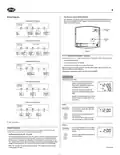
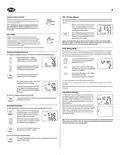
Wiring Diagrams
Your thermostat is set from the factory with the Auto Recovery Feature enabled, which com-
plies with the EPA ENERGY STAR® Program. If you prefer to use normal recovery, slide the
switch to the DISABLE position.
4-wire Heat/Cool System
Wallplate
Terminals
Jumper
Rh
G
Rc
Y
W
Auto Recovery
(SW4)
X
DISABLE ENABLE
Heat/Cool
24V Supply
Heat Relay
or Valve
Cool
Contactor
Fan
Relay
Fan Option
(SW6)
5-wire Heat/Cool System
Wallplate
Terminals
No Jumper
W
G
Rc
Rh
Y
Figure 7
Heat Relay
or Valve
Cool 24V
Supply
Heat 24V
Supply
Cool
Contactor
Fan
Relay
F˚ / C˚ Selection (Fahrenheit / Celcius)
Your thermostat is set for F˚ mode from the factory. To change to C˚ mode, follow these steps:
■ Press and hold the Up key.
2-wire Heat Only System
■ Use a paper clip to press the reset key.
Wallplate
Terminals
Jumper
■ Once all the LCD segments turn on, release the Up key.
NOTE: To return to F˚ mode, press the reset key with a paper clip. Do not press any
other keys during the reset process.
Rh
G
Rc
Y
W
X
X
X
All programs and settings will be lost when pressing RESET.
Heat 24V or
Millivolt Supply
Heat Relay
or Valve
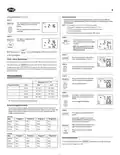
OPERATION
Setting Day and Time
3-wire Heat Only System
■ The LCD will show this information when
batteries are first installed, or after the
M
AM
Wallplate
Terminals
Jumper
Reset button is pressed. The temperature
will update after a few seconds.
4
G
Rc
Rh
Y
W
■ During time and day setting mode, the
temperature and program displays will go
TEMP
X
X
Heat 24V
Supply
blank.
Heat Relay
or Valve
Fan
Relay
■ Example: Set the Thermostat to the current
time of 2:16 pm on Saturday. Refer to the
Steps below.
3-wire Cool Only System
STEP 1:
Wallplate
Terminals
Jumper
■ Press to enter time and day setting mode.
The current hour and the AM / PM indica-
tor will be flashing.
M
day/time
W
G
Rc
Rh
Y
AM
X
X
Fan
Relay
Cool 24V
Supply
Cool
Contactor
■ Press to change the Hour up or down to
the current hour.
Note the AM / PM indicator, as the dis-
play will change at 12 AM and 12 PM.
X - No Connection
STEP 2:
■ Press again to change from hour setting to
minute setting. The current minute will be
flashing.
Selector Switches
M
day/time
In order for this thermostat to control your system, the system type must be specified by the
selector switches on the printed circuit board inside the thermostat.
PM
■ Heating System Selector (HG - HE switch)
■ Press to change the Minute up or down to
the current minute.
The factory position for this switch is in the “HG” position. Leave it in this position if you have
a gas furnace or an oil burner. If you have an electric furnace, test to see whether the Heat
and Fan come on as expected after installation. If the Fan operation is normal, leave it in the
“HG” position. If the Fan does not come on within a minute of the thermostat calling for heat,
change the switch position to “HE”. The system selector has no effect in the cooling mode.
NOTE: “HG” position is for gas and most other systems. “HE” position is for certain electric
systems having a fan relay.
(Continued)

| General | Details |
|---|---|
| Name | Hunter 44110 Set And Save Programmable Thermostat Owner’s Manual |
| Make | Hunter |
| Language | English |
| Filetype | PDF (Download) |
| File size | 0.34 MB |
 (1 votes, average: 5.00 out of 5)
 Loading...


SIEMENS RS485 Flush Mounted Room Thermostat User Manual

DEVIreg 330 Electronic Thermostat Installation Guide

SALUS CONTROLS IT700 Smart Thermostat Instruction Manual

Honeywell TH8321WF1001 Programmable Thermostat User Guide

WHITE-RODGERS 1F90-71 5-Day 2-Day Electronic Digital Thermostat Instruction Manual

Wengart TP808-3 Heat Pump Thermostat User Guide

resideo TH2110WF4008 Smart Thermostat User Guide

EAE TECHNOLOGY KNX ORIA Thermostat Installation Guide

ENSTO ECO10BTW-J Floor Heating Thermostat Instruction Manual

Stelpro Uniwatt UTE202NP NON PROGRAMMABLE ELECTRONIC THERMOSTAT