Home > Honeywell > Honeywell T8131A Programmable Thermostat Owner’s Manual

Honeywell T8131A Programmable Thermostat Owner’s Manual

Welcome to the world of comfort and energy  
savings with your new Honeywell program-  
mable thermostat.  
By following the programing instructions in this  
manual, your new thermostat will automatically  
control the temperature in your home, keeping  
you comfortable while saving energy.  
2
69-1636-1  
Table of Contents  
Page  
Program the Thermostat .................................................................................................................  
4
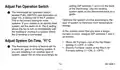
Adjust Fan Operation Switch........................................................................................................... 13  
Adjust System On-Time, °F/°C........................................................................................................ 13  
Set Fan and System Switches ........................................................................................................ 18  
Install Batteries................................................................................................................................ 19  
Troubleshooting Guide .................................................................................................................... 21  
Limited One-Year Warranty ............................................................................................................. 22  
Customer Assistance ...................................................................................................................... 24  
3
69-1636-1  
time periods are available. These periods can  
be seen individually on the display as you  
press the Set Schedule key.  
Program the Thermostat  
When batteries are installed, your thermostat  
can be programmed in your hand, before it is  
mounted on the wall.  
WAKE is the time period you want the house at  
a comfortable temperature when you get up  
and while you get ready for work or school.  
When deciding what time to set for your WAKE  
period, include extra lead time, depending on  
the outside temperature and your furnace  
response time, to give the furnace a head start  
to heat the house before you get up. (This will  
be a higher temperature during heating  
season, or a lower temperature during cooling  
season.)  
If you would prefer to program the thermostat  
after it is mounted on the wall, (see Mount  
Thermostat section), and return later to this  
programming section.  
Refer to the personal Program Schedule  
section to program your time and temperature  
settings for various times of the day.  
Four time periods are available during week-  
days—WAKE, LEAVE, RETURN, and SLEEP.  
During weekends, only the WAKE and SLEEP  
LEAVE is the time period you can set for an  
energy-saving temperature while you are away  
4
69-1636-1  
at work or school. (This will be a lower tem-  
perature during heating season, or a higher  
temperature during cooling season.)  
sleeping. (Again, lower for heating or higher for  
cooling. For more comfortable sleeping, some  
homeowners choose not to raise the cool  
temperature during the night.)  
RETURN is the time period you want the  
house at a comfortable temperature for  
activities before bedtime. When deciding what  
time to set for your RETURN period, include  
extra lead time, depending on the outside  
temperature and your furnace response time,  
to give the furnace a head start to heat the  
house before you arrive home. (Again, higher  
for heating or lower for cooling.)  
You will set one schedule for weekdays and  
another for weekends, because your require-  
ments are probably different for each.  
Fill in the times and temperatures you desire  
for weekdays and weekends. If you decide not  
to program the thermostat, it automatically  
controls heating at 68°F (20°C), and cooling at  
78°F (26°C), 24 hours a day. Also, you do not  
need to enter a time and temperature program  
for all periods if your schedule does not require  
SLEEP is the time period you can set for an  
energy-saving temperature while you are  
5
69-1636-1  
NOTE: Using sharp fingernails or pencil  
points can damage the keypad.  
it. For example, a house that is occupied during  
weekdays would only require programs for  
WAKE and SLEEP.  
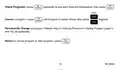
If you make an error at any time during  
programming, press the Run Program key and  
continue again at the last step.  
Before programming, remove the clear plastic  
overlay covering the display.  
When pressing the keys, use the ball of your  
finger or a soft pencil eraser.  
6
69-1636-1  
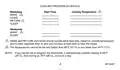
Program Schedule  
Weekdays  
HEATING PROGRAM SCHEDULE  
Start Time Heating Temperature  
2
1
WAKE  
LEAVE  
1
RETURN  
SLEEP  
Weekends  
1
WAKE  
SLEEP  
1
WAKE and RETURN start times should include extra lead time, based on outside temperature  
and furnace response time, to give your furnace a head start to heat the house.  
2
The temperatures cannot be set any higher than 88°F (31°C) or any lower than 45°F (7°C).  
7
69-1636-1  
GeneralDetails
NameHoneywell T8131A Programmable Thermostat Owner’s Manual
MakeHoneywell
LanguageEnglish
FiletypePDF (Download)
File size0.15 MB
Download PDF
1 Star2 Stars3 Stars4 Stars5 Stars (1 votes, average: 5.00 out of 5)
Loading...
Honeywell T6 Pro Programmable Thermostat User Manual
Honeywell D1-528 Direct Thermostat Installation Guide
Honeywell FocusPRO P200 Programmable Thermostat User Guide
Honeywell RCHT8610WF Series Smart Thermostat Installation Guide
Honeywell T9 Smart Thermostat Installation Guide
Honeywell TH2320WF4011 FocusPRO Smart S200 Series Thermostat User Guide
Honeywell TL116A Thermostat Installation Guide
T10 Pro Smart Thermostat with Redlink Room Sensor
Honeywell TH6320WF2003 Lyric T6 Pro Wi-Fi Programmable Thermostat User Guide
Honeywell RTH9580 Wi-Fi Color Touchscreen Programmable Thermostat User Guide

Honeywell T8131A Programmable Thermostat Owner’s Manual