Home > Honeywell > Honeywell T8131A Programmable Thermostat Owner’s Manual

Honeywell T8131A Programmable Thermostat Owner’s Manual

Troubleshooting Guide  
IF…  
Display will not come on.  
THEN…  
Check that the green light emitting diode (LED)  
located to the left of the LCD is lit, indicating the  
thermostat is powered properly.  
Temperature display will not go lower  
than 45°F (7°C) or higher than 88°F  
(31°C) during programming.  
You have reached the temperature setting limit.  
The setting range is 45°F to 88°F (7°C to 31°C).  
Temperature change occurs at the  
wrong times.  
Check the program times for the period in  
question. Be sure that AM and PM indications are  
correct. Make sure the current day and time are  
correct. Reprogram if necessary.  
Heating will not come on.  
Check that the green LED is lit.  
Check that the switch on the thermostat is set to  
HEAT.  
18  
69-1636-1  
Heating will not come on (Cont).  
Check the system fuse or circuit breaker and  
replace or reset, if necessary.  
Check for correct wiring and good connections.  
If temperature setting is higher than current  
temperature and displays HEAT, contact Honeywell  
Customer Relations at 1-800-468-1502.  
Cooling will not come on.  
Check that the green LED is lit.  
Check that the switch on the thermostat is set to  
COOL.  
Check the system fuse or circuit breaker and  
replace or reset, if necessary.  
Check for correct wiring and good connections.  
The thermostat has a built-in time delay on cooling.  
Allow five to ten minutes after changing the setting  
before the air conditioner starts.  
19  
69-1636-1  
Cooling will not come on (Cont).  
If temperature setting is lower than current  
temperature, and displays COOL, move system  
switch from COOL to OFF for ten minutes. After  
ten minutes, return switch to COOL position. If the  
air conditioner comes on, compressor could have  
reached its high limit temperature protection and  
shut down. If the air conditioner does not come on  
after ten minutes and displays COOL, contact  
Honeywell Customer Relations at 1-800-468-1502.  
The house is too warm or too cool.  
Press Present Setting key to check the current  
temperature setting.  
If desired, change the temperature setting. See  
page 11.  
SYSTEM ON indicator is lit, but no  
heat is coming from the registers.  
Allow time for the furnace to heat up and the fan to  
come on before checking for heat at the register.  
(Check to make sure system on-time is set  
correctly according to pages 13 and 14.)  
20  
69-1636-1  
The furnace or air conditioner  
on-time is too short or too long.  
Contact your heating or air conditioner contractor.  
If further assistance is needed, call Honeywell  
Customer Relations at 1-800-468-1502.  
The thermostat’s current setting  
does not match the display  
temperature.  
Check that the wiring hole in the wall behind the  
wallplate was plugged with insulation to prevent  
drafts that could adversely affect thermostat  
operation.  
Be aware that it is normal for the current setting  
and display temperature to differ occasionally.  
bAt Lo remains on display after  
fresh batteries are installed.  
Remove batteries. Wait one hour. Install fresh  
alkaline batteries.  
21  
69-1636-1  
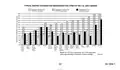
TYPICAL ENERGY SAVINGS FOR REPRESENTATIVE CITIES IN THE U.S. AND CANADA  
Savings for Once-A-Day  
10°F (5°C) decrease  
Savings for Twice-A-Day  
10°F (5°C) decrease*  
Savings for 5°F (3°)  
summer increase  
30%  
28%  
26%  
24%  
22%  
20%  
18%  
16%  
14%  
12%  
10%  
8%  
6%  
4%  
2%  
Calgary  
Halifax  
Vancouver  
Buffalo  
Denver  
Des Moines Chicago  
Boston  
New York  
Louisville  
Portland  
San  
Francisco Atlanta  
Dallas  
Los Angeles San Diego  
Minneapolis Edmonton  
Cincinnati  
St. Paul  
Montreal  
Ottawa  
Regina  
Moncton  
North Bay  
Quebec  
Cleveland  
Milwaukee  
Kansas City Philadelphia  
Wash., D C  
Omaha  
Salt Lake  
City  
Detroit  
St. Louis  
Columbus  
Seattle  
Winnipeg  
Pittsburgh  
Indianapolis  
Toronto  
St. John's  
*Based on 10°F (5°C) decrease—(5°F (3°C) decrease  
gives approximately 55 percent of these savings).  
M2416A  
22  
69-1636-1  
GeneralDetails
NameHoneywell T8131A Programmable Thermostat Owner’s Manual
MakeHoneywell
LanguageEnglish
FiletypePDF (Download)
File size0.15 MB
Download PDF
1 Star2 Stars3 Stars4 Stars5 Stars (1 votes, average: 5.00 out of 5)
Loading...
Honeywell T6 Pro Programmable Thermostat User Manual
Honeywell D1-528 Direct Thermostat Installation Guide
Honeywell FocusPRO P200 Programmable Thermostat User Guide
Honeywell RCHT8610WF Series Smart Thermostat Installation Guide
Honeywell T9 Smart Thermostat Installation Guide
Honeywell TH2320WF4011 FocusPRO Smart S200 Series Thermostat User Guide
Honeywell TL116A Thermostat Installation Guide
T10 Pro Smart Thermostat with Redlink Room Sensor
Honeywell TH6320WF2003 Lyric T6 Pro Wi-Fi Programmable Thermostat User Guide
Honeywell RTH9580 Wi-Fi Color Touchscreen Programmable Thermostat User Guide

Honeywell T8131A Programmable Thermostat Owner’s Manual