Home > Honeywell Home > Honeywell Home M38794 T10 and T10 plus Pro Smart Thermostat with RedLINK Installation Guide
×
- 1. T10 And T10+ Pro (Smart Thermostat → Specifications → Programmable Thermostat → Package Includes → Compatibility → Customer Assistance)
- 2. Uwp Mounting System Installation (Optional Cover Plate Installation)
- 3. Wiring Uwp (Terminal Designations → Conventional Systems → Heat Pump Systems)
- 4. Setting Slider Tabs (Set R Slider Tab → Set U Slider Tab)
- 5. Whole House Humidifier, Dehumidifier, Or Ventilator (Using U Slider Tab → Wired To Humidifier → Wired To Fresh Air Damper → Dehumidifier Or Ventilator → Humidifier, Dehumidifier, Or Ventilator → Damper)
- 6. Wiring (Conventional Systems → Heat-only System With Fan → Cool-only System With Fan → H/2c System (1 Transformer) → Hot Water Relay Panel)
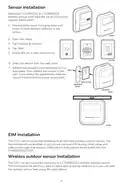
- 7. Sensor Installation (Eim Installation → Wireless Outdoor Sensor Installation)
- 8. Apple Homekit Setup (How To Use Your Thermostat → Adjust Temperature)
- 9. How To Use Priority (Selected Rooms → Unselected Room → Active Rooms → Room Without Activity → Room With Activity)
- 10. How To Find More Options (Installer Options → Installer Setup → Installer Test → Devices & Sensors → Thermostat Information → Dealer Information)
- 11. Alerts And Notifications (Notifications → Set The Date And Time)
- 12. Troubleshooting (Screen Is Blank → Screen Is Difficult To Read → Heating Or Cooling System Does Not Respond → Temperature Settings Do Not Change → 'cool On' Or 'heat On' Is Flashing → Sensor Will Not Connect)
- 13. Caution: Electrical Hazard (Caution: Equipment Damage Hazard → Caution: Mercury Notice → Caution: Electronic Waste Notice → Year Limited Warranty → Regulatory Information → Fcc Regulations)
- 14. Thermostat Intelligent (Guide Dinstallation Professionnelle → Compatibilité → Assistance Clientèle)
- 15. Installation Du Système De Montage Uwp (Installation Du Couvercle En Option)
- 16. Câblage De Luwp (Identification Des Bornes → Systèmes Classiques → Thermopompes → Raccordement Au Moniteur Du Compresseur → Robinet De Jumelage Pour Thermopompes → Chauffage Dappoint)
- 17. Réglage Des Languettes À Glissière (Réglez La Languette À Glissière R → Réglez La Languette À Glissière U)
- 18. Humidificateur, Déshumidificateur Ou Ventilateur Pour Toute La Maison (Avec La Languette À Glissière U → Câblé À Un Humidificateur, Un Déshumidificateur Ou Un Ventilateur → Câblé À Un Registre Dair Frais → Câblé À Un Humidificateur, Un Ventilateur Ou Un Registre Alimenté → Câblé À La Borne De Ventilateur Basse Vitesse Du Système De Cvc → Déshumidificateur*)
- 19. Câblage (Systèmes Classiques → Système De Chauffage Avec Ventilateur → Système De Climatisation Avec Ventilateur → Système 2h/2c (un Transformateur) → Tableau De Relais Deau Chaude)
- 20. Installation Dun Détecteur (Installation Du Module Dinterface Déquipement → Installation Du Détecteur Extérieur Sans Fil)
- 21. Configuration Dapple Homekit (Utilisation De Votre Thermostat → Régler La Température)
- 22. Utilisation De La Fonction Priorité (Pièces Choisies → Pièce Non Sélectionnée → Pièce Sélectionnée → Pièces Actives → Pièce Sans Activité → Pièce Avec Activité)
- 23. Comment Trouver Dautres Options (Installer Options → Configuration De Linstallateur → Test De Linstallateur → Appareils Et Détecteurs → Information Sur Le Thermostat → Informations Sur Le Détaillant)
- 24. Alertes Et Notifications (Notifications → Set The Date And Time)
- 25. Dépannage (Lécran Est Vide → Lécran Est Difficilement Lisible → Le Système De Chauffage Ou De Climatisation Ne Répond Pas → Impossible De Modifier Les Réglages De La Température → Climatisation Active Ou Chauffage Actif Clignote → Le Détecteur Ne Se Connecte Pas)
- 26. Attention: Risque Électrique (Attention: Risque Dendommagement De Léquipement → Attention: Avis Relatif Au Mercure → Mise En Garde: Avis De Déchets Électroniques → Garantie Limitée De 5 Ans → Informations Réglementaires → Normes Fcc)
- 27. Termostato Inteligente (Guía De Instalación Profesional → Compatibilidad → Material De Lectura Sobre El Termostato → Servicio De Atención Al Cliente)
- 28. Instalación Del Sistema De Montaje Uwp (Instalación De Placa De Cubierta Opcional)
- 29. Cableado Uwp (Designaciones De Las Terminales → Sistemas Convencionales → Sistemas De Bomba De Calor)
- 30. Configuración De Las Lengüetas Deslizantes (Configure La Lengüeta Deslizante R → Configure La Lengüeta Deslizante U)
- 31. Humidificador, Deshumidificador O Ventilador Para Toda La Casa (Uso De La Lengüeta Deslizante U → Cableado A Un Humidificador, Deshumidificador O Ventilador Con Transformador Incorporado. → Cableado A Un Regulador De Aire Fresco Alimentado Por Un Transformador De Caldera. → Cableado A Un Humidificador, Ventilador O Regulador Alimentado Por Un Transformador Externo. → Cableado Al Terminal De Un Ventilador De Baja Velocidad En Un Sistema De Hvac Para Deshumidificación.)
- 32. Cableado (Sistemas Convencionales → Sistema De Calefacción Únicamente Con Ventilador → Sistema De 1 Nivel De Calefacción Y 1 De Enfriamiento (1 Transformador) → Sistema De 1 Nivel De Calefacción Y 1 De Enfriamiento (2 Transformadores) → Sistema De Refrigeración Únicamente Con Ventilador → Sistema De 2 Niveles De Calefacción Y 2 De Enfriamiento (1 Transformador))
- 33. Instalación Del Sensor (Instalación Del Eim → Instalación Del Sensor Inalámbrico Para Exteriores)
- 34. Configuración De Apple Homekit (Cómo Usar El Termostato → Ajustar La Temperatura)
- 35. Cómo Usar La Prioridad (Habitaciones Seleccionadas → Habitación No Seleccionada → Habitaciones Activas → Habitación Sin Actividad → Habitación Con Actividad)
- 36. Cómo Obtener Más Opciones (Installer Options → Configuración Del Instalador → Prueba Del Instalador → Dispositivos Y Sensores → Información Del Termostato → Información Del Distribuidor)
- 37. Alertas Y Notificaciones (Notificaciones → Set The Date And Time)
- 38. Solución De Problemas (La Pantalla Está En Blanco → Tiene Dificultades Para Leer La Pantalla → El Sistema De Calefacción Y Refrigeración No Responde → Las Configuraciones De Temperatura No Cambian → La Calefacción Auxiliar Se Ejecuta En La Refrigeración → La Refrigeración Se Ejecuta Con La Activación De La Calefacción → El Sensor No Se Conecta)
- 39. Precaución: Peligro Eléctrico (Precaución: Peligro De Daños Al Equipo → Precaución: Aviso Sobre El Mercurio → Precaución: Aviso De Desperdicio Electrónico → Garantía Limitada De 5 Años → Información Regulatoria → Normas De La Fcc)
×
Honeywell Home M38794 T10 and T10 plus Pro Smart Thermostat with RedLINK Installation Guide
| General | Details |
|---|---|
| Name | Honeywell Home M38794 T10 and T10 plus Pro Smart Thermostat with RedLINK Installation Guide |
| Make | Honeywell Home |
| Language | English |
| Filetype | PDF (Download) |
| File size | 1.5 MB |

Honeywell Home TH8320R1003-Uv VisionPRO 8000 with RedLINK Multistage Thermostat Installation Guide

Honeywell Home TH2110DH 1 Cool Programmable Digital Thermostat Installation Guide

Honeywell Home DT4R Wireless Room Thermostat User Guide

Honeywell Home N100 Series Non Programmable Thermostat User Guide

Honeywell Home X1N Non Programmable Thermostat Installation Guide

Honeywell Home DT4M Wired Room Thermostat User Manual

Honeywell Home T834 Series Thermostat Owner’s Manual

Honeywell Home DT4 Channel Wired Room Thermostat Instruction Manual

Honeywell Home T10 Smart Home Thermostat Instructions

Honeywell Home FocusPRO Smart S200 Series Smart Thermostat User Guide


DAIKIN DTST-ONE-ADA-A One Touch Smart Thermostat Installation Guide

HIVE 81351 Thermostat Mini for Heating Installation Guide

ARUNA 302S RF Digital Room Thermostat User Manual

BEOK TDS23 Wifi Thermostat Owner’s Manual

namron 4512737 Touch Zigbee 16A Thermostat Instruction Manual
CORDIVARI Stand Alone Control Thermostat for VENTANA Fan Coils User Manual

WARMZONE UWG5 Wi-Fi LED Touch Thermostat User Guide

Wyze Thermostat User Guide
UNIWATT UT202NP Series Non Programmable Electronic Thermostat Owner’s Manual

network thermostat NetX X-Series Ethernet Thermostat Owner’s Manual
Table of Contents
- 1. T10 And T10+ Pro - Smart Thermostat →
- 2. Uwp Mounting System Installation - Optional Cover Plate Inst... →
- 3. Wiring Uwp - Terminal Designations →
- 4. Setting Slider Tabs - Set R Slider Tab →
- 5. Whole House Humidifier, Dehumidifier, Or Ventilator - Using ... →
- 6. Wiring - Conventional Systems →
- 7. Sensor Installation - Eim Installation →
- 8. Apple Homekit Setup - How To Use Your Thermostat →
- 9. How To Use Priority - Selected Rooms →
- 10. How To Find More Options - Installer Options →
- 11. Alerts And Notifications - Notifications →
- 12. Troubleshooting - Screen Is Blank →
- 13. Caution: Electrical Hazard - Caution: Equipment Damage Hazar... →
- 14. Thermostat Intelligent - Guide Dinstallation Professionnelle →
- 15. Installation Du Système De Montage Uwp - Installation Du Cou... →
- 16. Câblage De Luwp - Identification Des Bornes →
- 17. Réglage Des Languettes À Glissière - Réglez La Languette À G... →
- 18. Humidificateur, Déshumidificateur Ou Ventilateur Pour Toute ... →
- 19. Câblage - Systèmes Classiques →
- 20. Installation Dun Détecteur - Installation Du Module Dinterfa... →
- 21. Configuration Dapple Homekit - Utilisation De Votre Thermosta... →
- 22. Utilisation De La Fonction Priorité - Pièces Choisies →
- 23. Comment Trouver Dautres Options - Installer Options →
- 24. Alertes Et Notifications - Notifications →
- 25. Dépannage - Lécran Est Vide →
- 26. Attention: Risque Électrique - Attention: Risque Dendommagem... →
- 27. Termostato Inteligente - Guía De Instalación Profesional →
- 28. Instalación Del Sistema De Montaje Uwp - Instalación De Plac... →
- 29. Cableado Uwp - Designaciones De Las Terminales →
- 30. Configuración De Las Lengüetas Deslizantes - Configure La Le... →
- 31. Humidificador, Deshumidificador O Ventilador Para Toda La Ca... →
- 32. Cableado - Sistemas Convencionales →
- 33. Instalación Del Sensor - Instalación Del Eim →
- 34. Configuración De Apple Homekit - Cómo Usar El Termostato →
- 35. Cómo Usar La Prioridad - Habitaciones Seleccionadas →
- 36. Cómo Obtener Más Opciones - Installer Options →
- 37. Alertas Y Notificaciones - Notificaciones →
- 38. Solución De Problemas - La Pantalla Está En Blanco →
- 39. Precaución: Peligro Eléctrico - Precaución: Peligro De Daños... →