×
- 1. Model: Slimline-b V3
- 2. Model: Slimline-b V3 (Battery Series)
- 3. Holiday Programming (Frost Protection → What Is A Programmable Room Thermostat? → Power On / Off → Optional Features → Re-calibrating The Thermostat → Factory Reset)
- 4. What Is A Programmable Room Thermostat? (Setting A Room Thermostat To A Higher Temperature Will Not Make The Room Heat Up Any Faster. → Battery Series)
- 5. The Best Way To Do This Is To Set The Room Thermostat To A Low Temperature.
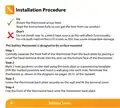
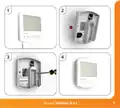
- 6. Installation Procedure (Do → Dont → Step 1 → Step 2 → Step 3 → Step 4)
- 7. Model: Slimline-b V3
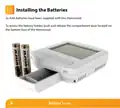
- 8. Installing The Batteries (Battery Series)
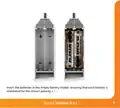
- 9. Insert The Batteries In The Empty Battery Holder, Ensuring That Each Battery Is Orientated For The Correct Polarity + / - .
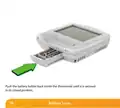
- 10. Push The Battery Holder Back Inside The Thermostat Until It Is Secured In Its Closed Position.
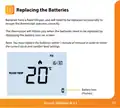
- 11. Replacing The Batteries (Battery Icon)
- 12. Battery Series
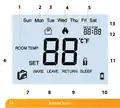
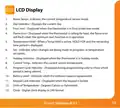
- 13. Lcd Display (Room Temp → Day Indicator → Frost Icon → Flame Icon → Temperature Hold → Holiday Indicator)
- 14. Setting The Clock (Battery)
- 15. Temperature Display (Room Temperature → Set Temperature)
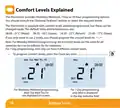
- 16. Comfort Levels Explained (Optional Features → Default Times And Temperatures → Weekday/weekend Programming → Day Programming → Programming Comfort Levels → Battery Series)
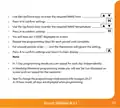
- 17. Use The Up/down Keys To Enter The Required Wake Time (Press H To Confirm Settings → Use The Up/down Keys To Enter The Required Wake Temperature → Repeat The Programming Steps For Each Period Until Complete → For Unused Periods Enter --.-- And The Thermostat Will Ignore The Setting → In 7 Day Programming Mode You Can Repeat For Each Day Independently → In Weekday/weekend Programming Mode You Will See Sat Sun Displayed On Screen And Can Repeat For The Weekend)
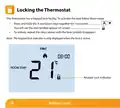
- 18. Locking The Thermostat (Keypad Lock Indicator → Battery)
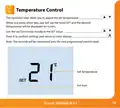
- 19. Temperature Control (Set Temperature)
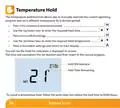
- 20. Temperature Hold (Hold On Indicator → Hold Time Remaining → Battery)
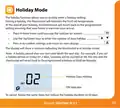
- 21. Holiday Mode (Holiday Days → Holiday On Indicator)
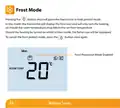
- 22. Frost Mode (Frost Protection Mode Enabled → Battery)
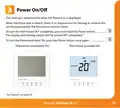
- 23. Power On/off (Thermostat Completely Off → Thermostat Powered On)
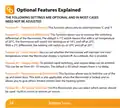
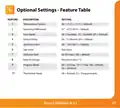
- 24. Optional Features Explained (Feature 01 - Temperature Format → Feature 02 Switching Differential → Feature 03 Frost Protect → Feature 04 Output Delay → Feature 05 Temperature Up/down Limit → Feature 06 Air Sensor Selection)
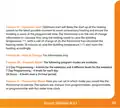
- 25. Feature 07 Optimum Start (Feature 09 Program Mode → Feature 10 Thermostat Mode)
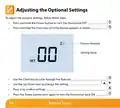
- 26. Adjusting The Optional Settings (Battery Series)
- 27. Optional Settings - Feature Table (Temperature Format → Switching Differential → Frost Mode → Output Delay → Up/down Limit → Optimum Start → Program Mode)
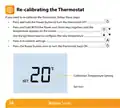
- 28. Re-calibrating The Thermostat (Calibration Temperature Setting → Battery)
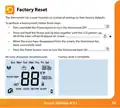
- 29. Factory Reset
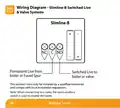
- 30. Wiring Diagram (Slimline-b Switched Live & Valve Systems → Slimline-b → Battery Series)
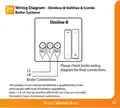
- 31. Wiring Diagram (Boiler Systems → Slimline-b → Boiler Connections)
- 32. Want More Information? (Faq)
×
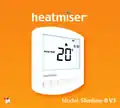
heatmiser Slimline-B V3 Programmable Room Thermostat Owner’s Manual
| General | Details |
|---|---|
| Name | heatmiser Slimline-B V3 Programmable Room Thermostat Owner’s Manual |
| Make | heatmiser |
| Language | English |
| Filetype | PDF (Download) |
| File size | 0.42 MB |

heatmiser neoStat Touch-e Touchscreen Electric Floor Heating Thermostat Owner’s Manual
heatmiser Slimline-RF V3 Programmable Wireless Thermostat Instructions

heatmiser DS1-V2 Thermostat Owner’s Manual
heatmiser neoStat-e Electric Floor Heating Thermostat Instructions

heatmiser neoStat-Pro Smart Thermostat Instruction Manual


EPH CONTROLS PR092K7 RF Cylinder Thermostat Instruction Manual

DEVI 330 Electronic Thermostat Installation Guide

GENERAL LIFE FH10 Underfloor Heating Thermostat User Manual
LUX PSP511Ca Programmable Thermostat Instruction Manual

vtech T961NN50 Wired Thermostat User Guide

tado 104388 Smart Thermostat Installation Guide

GENERAL LIFE ARUNA 302S RF Digital Room Thermostat User Manual

ST76 Sensi Touch 2 Smart Thermostat Instruction Manual

EPH CONTROLS eTRV-HW Smart Hot Water Thermostat Instruction Manual

Honeywell Home T3 Pro Non-Programmable Thermostat User Manual
Table of Contents
- 1. Model: Slimline-b V3 →
- 2. Model: Slimline-b V3 - Battery Series →
- 3. Holiday Programming - Frost Protection →
- 4. What Is A Programmable Room Thermostat? - Setting A Room The... →
- 5. The Best Way To Do This Is To Set The Room Thermostat To A L... →
- 6. Installation Procedure - Do →
- 7. Model: Slimline-b V3 →
- 8. Installing The Batteries - Battery Series →
- 9. Insert The Batteries In The Empty Battery Holder, Ensuring T... →
- 10. Push The Battery Holder Back Inside The Thermostat Until It ... →
- 11. Replacing The Batteries - Battery Icon →
- 12. Battery Series →
- 13. Lcd Display - Room Temp →
- 14. Setting The Clock - Battery →
- 15. Temperature Display - Room Temperature →
- 16. Comfort Levels Explained - Optional Features →
- 17. Use The Up/down Keys To Enter The Required Wake Time - Press... →
- 18. Locking The Thermostat - Keypad Lock Indicator →
- 19. Temperature Control - Set Temperature →
- 20. Temperature Hold - Hold On Indicator →
- 21. Holiday Mode - Holiday Days →
- 22. Frost Mode - Frost Protection Mode Enabled →
- 23. Power On/off - Thermostat Completely Off →
- 24. Optional Features Explained - Feature 01 - Temperature Forma... →
- 25. Feature 07 Optimum Start - Feature 09 Program Mode →
- 26. Adjusting The Optional Settings - Battery Series →
- 27. Optional Settings - Feature Table - Temperature Format →
- 28. Re-calibrating The Thermostat - Calibration Temperature Sett... →
- 29. Factory Reset →
- 30. Wiring Diagram - Slimline-b Switched Live & Valve Systems →
- 31. Wiring Diagram - Boiler Systems →
- 32. Want More Information? - Faq →