
Home > EPH CONTROLS > EPH CONTROLS CDC2 Cylinder Room Thermostat User Guide
EPH CONTROLS CDC2 Cylinder Room Thermostat User Guide










CDC2
Cylinder / Room Thermostat
Installation and Operation Guide


| General | Details |
|---|---|
| Name | EPH CONTROLS CDC2 Cylinder Room Thermostat User Guide |
| Make | EPH CONTROLS |
| Language | English |
| Filetype | PDF (Download) |
| File size | 0.66 MB |
 (1 votes, average: 5.00 out of 5)
 Loading...

EPH CONTROLS eTRV-HW Smart Cylinder Thermostat User Guide

EPH CONTROLS eTRV-HW Smart Hot Water Thermostat Instruction Manual

EPH CONTROLS eTRV Smart Radiator Thermostat Instruction Manual

EPH CONTROLS 20221026 RFRA – RF Room Thermostat Instruction Manual

EPH CONTROLS CDTP2 Hardwired Room Thermostat Instruction Manual

EPH Controls CDT2-24 24V Room Thermostat Installation Guide

EPH CONTROLS PR092K7 RF Cylinder Thermostat Instruction Manual

EPH CONTROLS COMBIPACK2 Smart Thermostat with Automation and Optimum Start Instructions

EPH CONTROLS RFCA RF Cylinder Thermostat Instruction Manual

EPH CONTROLS CRT2 Room Thermostat Instruction Manual

EPH CONTROLS CDC2 Cylinder Room Thermostat User Guide Overview
Summary of Contents
- Page 1: Cylinder / Room Thermostat Installation and operation guide
- Page 2: Table of contents Installation instructions Factory default settings Specifications LCD display Buttons Wiring Mounting & installation Operating instructions Quick introduction to your CDC2 thermostat On / off function & adjusting the target temperature
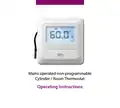
- Page 3: Mains operated non-programmable cylinder/room thermostat installation instructions.
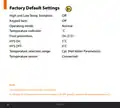
- Page 4: Factory default settings High and low temperature limitation Keypad lock Operating mode Temperature indicator Frost protection Temperature selection range Temperature sensor Frost protection is built into this thermostat. It will only be activated when the thermostat is in OFF position and the temperature reaches 5˚C.
- Page 5: Specifications Volt free 230VAC Power supply/input Ambient temperature: 0 … 45˚C Ambient admissible humidity: 5-95%RH Contact rating: 10(3)A 230VAC Dimensions: 91 x 91 x 26mm External temperature sensor: NTC 10K Backlight: White IP rating: IP20
- Page 6: LCD display shows various statuses and settings. It displays when setting target temperature. It indicates when heating mode is active. It shows when cylinder mode is active. It displays current and target temperature. It indicates when changing mode settings. It shows when the thermostat is calling for heat. It indicates when the keypad is locked. It displays when the thermostat is in the OFF mode. It shows when setting high and low temperature limits.
- Page 7: Reset button. OK button. Standby button. Down button. Up button. EPH Controls Ltd.
- Page 8: Wiring Terminal connections Neutral Live Normally closed connection Common connection Normally open connection
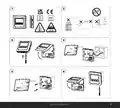
- Page 9: Mounting & installation Installation and connection should only be carried out by a qualified person. Only qualified electricians or authorized service staff are permitted to open the thermostat. If the thermostat is used in a way not specified by the manufacturer, its safety may be impaired. Prior to setting the thermostat, it is necessary to complete all required settings described in this section. Before commencing installation, the thermostat must be first disconnected from the mains. This thermostat can be mounted in the following ways: directly mounted on wall, to a recessed conduit box, or to a surface mounting box.
- Page 10: Mounting & installation instructions include several key steps. Remove the thermostat from its packaging. Choose a mounting location for accurate temperature measurement. Mount the thermostat 1.5 metres above the floor level. Prevent direct exposure to sunlight or other heating/cooling sources. Use a Philips screwdriver to loosen the screw on the bottom of the thermostat to open the front housing. Wire the thermostat according to the wiring diagram. Screw the backplate onto a back box or directly to the surface. Ensure the temperature sensor is free from obstruction. Close the front housing and tighten the screw on the bottom of the thermostat. For side entry of the temperature sensor, use the breakout provided.
- Page 11: Page 11
- Page 12: Mounting of temperature sensor The temperature sensor should be fitted on the bottom 1/3 of the cylinder. Remove a section of insulation on the cylinder to reveal the copper surface. Attach the temperature sensor to the surface of the cylinder using the foil tape provided. Insert the temperature sensor into the appropriate pocket on the cylinder. Secure the temperature sensor to the pocket using the foil tape provided. Remove any insulation on the pipework to reveal the pipe. Attach the temperature sensor to the surface of the pipe using the foil tape provided.
- Page 13: Adjacent room Mount the NTC sensor housing 1.5 meters above floor level. Ensure the temperature sensor is secured tightly in the NTC sensor housing. NTC sensor housing can be purchased as an accessory from EPH Controls.
- Page 14: Mains operated non-programmable cylinder/room thermostat operating instructions.
- Page 15: Quick introduction to your CDC2 thermostat: The CDC2 thermostat is a mains operated, non-programmable thermostat which can control either hot water or heating applications. The easily accessible menu will allow you to change from hot water to heating temperature ranges at the push of a button. The external temperature sensor gives the installer the option to read the temperature of a hot water cylinder or of an adjacent room. The temperature sensor comes connected with hot water temperature ranges set as default.
- Page 16: On/Off function allows you to turn the thermostat on or off. In ON mode, the thermostat displays the current temperature. In OFF mode, the thermostat displays the current temperature and the word 'OFF'. Adjusting the target temperature can be done by pressing the appropriate buttons. Press to increase the target temperature. Press to decrease the target temperature. Waiting 5 seconds saves the target temperature. The target temperature is now saved after adjustment.
- Page 17: Locking the keypad To lock the thermostat, press and hold specific buttons for 10 seconds. The lock icon will appear on the screen. To unlock the thermostat, press and hold the same buttons for 10 seconds. The lock icon will disappear from the screen. Backlight There are three settings for selection: ‘AUt’ - The backlight is on for 5 seconds when any button is pressed. ‘OFF’ - The backlight is permanently off. ‘ON’ - The backlight is permanently on. To adjust the backlight setting, press and hold specific buttons for 10 seconds. Use specific buttons to change the mode between AUTO, ON, and OFF. Press a specific button to confirm selection and return to normal operation.
- Page 18: Menu function allows the user to adjust additional functions. To access the menu, press and hold specific buttons together for 5 seconds. When CyL mode is active, PO1 menu is not accessible. PO1 operating mode includes Normal, Delay Start, or TPI settings. The default setting is Normal. Press and hold specific buttons together for 5 seconds to access PO1. Use the buttons to select between Normal mode, Delay Start mode, or Time Proportional Integral mode. Press to confirm the selected mode.
- Page 19: Operating mode options include normal, delay start, and TPI. In normal mode, when the temperature falls below the target temperature, the thermostat activates the demand for heat. When the temperature rises above the target temperature, the thermostat cancels the demand for heat. A graph illustrates the on/off control with target and actual temperatures over time. The target temperature is set at 21˚C. The graph shows temperature readings ranging from 17˚C to 22˚C. Time is measured in minutes, ranging from 0 to 100. The document includes a reference to EPH Controls Ltd.
- Page 20: Operating mode options include normal, delay start, and TPI. Delay start control can be activated, indicated by 'dS' on the screen. The thermostat's activation is delayed based on current and target temperatures. The display will flash until the thermostat activates. If the temperature is significantly below the target, the thermostat will call for heat immediately. A smaller temperature difference may result in a delay before the thermostat calls for heat. The delay time varies depending on the temperature difference. Graph (18.1) illustrates the delay start control. The thermostat's response is influenced by the fall in temperature after activation. The system is designed to optimize heating based on temperature readings.
- Page 21: When activated, the thermostat will allow the heating system time to reach the target. Delay start can be reactivated by adjusting the target temperature. The heating will be delayed as per the graph on page 18. If the difference between the actual temperature and the target is 1°C, the thermostat will delay starting for circa 40 minutes. If the difference is 3°C, the delay will be circa 24 minutes. If the difference is 6°C or more, the thermostat will be switched on immediately. The time delay will change if the temperature drops from the original calculation.
- Page 22: Operating mode options include normal, delay start, and TPI. In TPI mode, the thermostat adjusts operation based on temperature changes within the proportional bandwidth. The thermostat turns on and off to avoid overshooting or undershooting the target temperature. Two settings affect the thermostat's operation: the number of heating cycles per hour and the proportional bandwidth. The number of heating cycles per hour can be set to 2, 3, 6, or 12. The proportional bandwidth is set to 2°C.
- Page 23: This value refers to the temperature below the target at which the thermostat will start to operate in TPI control. You can set this temperature from 1.5°C to 3.0°C in 0.1°C increments.
- Page 24: Setting high and low limits allows the installer to change the minimum and maximum temperatures for the thermostat. To access this setting, press and hold specific buttons together for 5 seconds. ‘P01’ will appear on the screen. Press until ‘P02 & LIMIT’ appears on the screen. ‘HI LIMIT’ will appear on the screen, and the temperature will begin to flash. Use the designated buttons to select the high limit for the thermostat. Press to confirm the high limit. ‘LOW LIMIT’ will appear on the screen, and the temperature will begin to flash. Use the designated buttons to select the low limit for the thermostat. When this setting is enabled, ‘LIMIT’ will appear permanently on the screen when the high or low limits have been changed.
- Page 25: Hysteresis HOn & HOFF This menu allows the installer to change the switching differential of the thermostat when the temperature is rising and falling. If ‘HYS ON’ is set at 5˚C and the setpoint is 60˚C, then the thermostat will switch on when the temperature drops below 55˚C. If ‘HYS OFF’ is set at 5˚C and the setpoint is 60˚C, then the thermostat will switch off when the temperature reaches 65˚C. To access this setting, press and hold & together for 5 seconds. ‘P01’ will appear on the screen. Press until ‘P03 & HYS’ appears on the screen. Use and the differential temperature will begin to flash. Press to select the ‘HOn’ temperature, press to confirm.
- Page 26: Hysteresis HOn & HOFF HOn 5°C HOFF 0°C ‘HOF’ will appear on the screen. Use and the differential temperature will begin to flash. Press to select the ‘HOFF’ temperature. Press to confirm. Press to return to normal operation.
- Page 27: Calibrate menu allows the installer to calibrate the temperature of the thermostat. To access this setting, press and hold buttons together for 5 seconds. ‘P01’ will appear on the screen. Press until ‘P04 & CALIBRATE’ appears on the screen. Press to select. ‘CALIBRATE’ and the actual temperature will appear on the screen. Press to calibrate the temperature. Press to confirm the temperature. Press to return to normal operation.
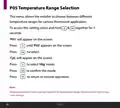
- Page 28: Temperature range selection allows the installer to choose between different temperature ranges for various thermostat applications. To access this setting, press and hold two buttons together for 5 seconds. ‘P01’ will appear on the screen. Press until ‘P05’ appears on the screen. Select ‘CyL’ mode. Press to select ‘Htg’ mode. Press to confirm the mode. Heating parameters have now been applied to temperature range, hysteresis, and high & low limit settings.
- Page 29: Resetting the thermostat to factory settings involves locating the reset button on the left-hand side of the thermostat. Press the reset button and 'rSt' will appear, followed by 'nO' flashing on the screen. Press 'YES' when it flashes to confirm. Release the reset button. The thermostat will restart and revert to its factory settings.
- Page 30: Page 30
- Page 31: Page 31
- Page 32: Page 32

Expert4house BHT-9000 Smart Knob Thermostat User Guide

SUNSKY BAC-2005 Smart Thermostat User Manual

tado ST02 Wired Smart Thermostat X Installation Guide

SALUS CONTROLS IT800 WIFI Smart Thermostat Instruction Manual

Honeywell T6/T6R Smart Thermostat User Guide

Honeywell Home T3 Pro Non-Programmable Thermostat User Manual

FantiniCosmi CH123E 230V Flush Mounting Thermostat Installation Guide

Day and Night TSTATIIEWF-01 Gray Smart Thermostat Owner’s Manual

Danfoss RMT-230 Room Thermostat Installation Guide

Honeywell T6 Pro Programmable Thermostat User Manual