
ENGO E901 Wireless Internet Thermostat User Manual


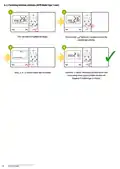


6.2 AUTO mode - two schedule types
- AUTO Mode - In the automatic mode, the thermostat maintains the set temperature according to the schedule selected by the user. You can
choose from 2 types of schedule to manage the temperature during the week.
6.2.1 First type schedule
First type schedule mode is represented by timeline - 24 hours of a day. Empty„boxes”means hours where Economic (Moon) setpoint temperature will be
maintained, black„boxes”means hours where Comfort (Sun) setpoint temperature will be maintained.
There are three different configurations in a schedule type 1:
• Two different programs (timelines), separate program for working days (Monday to Friday) and separate program for weekends (Saturday to Sunday)
• Individual programs (timelines) for each day of the week
• Same program (timeline) for the whole week
6.2.2 Second type schedule
Schedule type 2 enables the programming of 6 time intervals per day, with precision up to 10 minutes. Each of the 6 time intervals allows you to set a
different temperature (schedule type 1 is limited to switching between two setpoint temperatures (SUN/MOON) at full hours time periods).
When creating a schedule type 2, you must define time and temperature setpoint (thermostat will start to maintain given setpoint temperature from
given time setting). There are three different schedule configurations:
• Two different programs, separate program for working days (Monday to Friday) and separate program for weekends (Saturday to Sunday)
• Individual programs for each day of the week
• Same program for the whole week
Schedule of the second type example
DAYS OF THE WEEK DAYS OF THE WEEK
TIME
INTERVAL
(1 TO 5) MON-FRI
(6 TO 7) SAT-SUN
DAYS OF THE WEEK
(1 TO 5) MON-FRI
Time 6:00
Temp. setpoint
21 ° C
Time 6:00
Temp. setpoint
18°C
P1
P2
Time 8:00
Temp. setpoint
14°C
Time 8:00
Temp. setpoint
20°C
Time 11:00
Temp. setpoint
21°C
1
2
3
5
11
15 16 17
23
19 20 21 22
4
8
10
13
14
7
9
Time 11:00
Temp. setpoint
22°C
0
6
12
18
24
P3
P4
P5
P6
DAYS OF THE WEEK
(6 TO 7) SAT-SUN
Time 13:00
Temp. setpoint
14°C
Time 13:00
Temp. setpoint
20°C
Time 16:00
Temp. setpoint
21°C
Time 16:00
Temp. setpoint
18°C
Time 21:00
Temp. setpoint
14°C
Time 21:00
Temp. setpoint
14°C
1
2
3
4
5
8
10 11
13 14
23
19 20 21 22
7
9
15 16 17
0
6
12
18
24
13
E901 FULL USER MANUAL

| General | Details |
|---|---|
| Name | ENGO E901 Wireless Internet Thermostat User Manual |
| Make | ENGO |
| Language | English |
| Filetype | PDF (Download) |
| File size | 1.58 MB |
 (1 votes, average: 5.00 out of 5)
 Loading...

ENGO E55W230WIFI Wi-Fi Thermostat User Guide

ENGO E20i Series Wi-Fi Wireless Internet Thermostat User Guide

ENGO EONEBATW, EONEBATB Internet Controlled Thermostat User Guide

ENGO E901 Programmable Wired Thermostat User Manual

ENGO EASY230W Wired Thermostat User Guide

ENGO EASYBATB Wired Battery Thermostat User Guide

Engo EFAN-230 Zigbee Smart Thermostat Owner’s Manual


Honeywell CT8602 Programmable Thermostat User Guide

White Rodgers 1F78-151 Non Programmable Thermostat Instructions

HEARTH AND HOME Technologies E474962 Smart Stat Hht Remote Thermostat Instruction Manual

Google Cloud 2024 Nest Learning Thermostat Instructions

Schneider Drayton Digistat 3rd Generation Wireless Programmable Room Thermostat User Guide

Beca BHT-9000 Thermostat User Guide

GENERAL HT250 Smart Room Thermostat User Manual

Danfoss Eco Electronic Radiator Thermostat Instruction Manual

SCHRACK TECHNIK EV103311 Analog Thermostat User Manual

aube TH114-AF-GA Non-Programmable Thermostat Owner’s Manual