
Home > ENGO CONTROLS > ENGO CONTROLS ESIMPLE-230W 230V Simple Dial Thermostat Owner’s Manual
ENGO CONTROLS ESIMPLE-230W 230V Simple Dial Thermostat Owner’s Manual
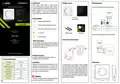


Wall mounting
Switches (sliders) for additional settings
LED light indications
The status of the thermostat is determined by the LED, illuminating in the
following colors:
Please note!
During wire connections procedure, please make sure they are not connected to
the 230V AC power supply.
1
2
Additional functions of the thermostats can be switched on or off by switches,
which are located on the front cover, under the knob. Refer to the table below to
understand what these features are:
- red
- blue
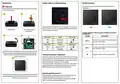
Take off the knob.
Unscrew the screw placed
under the knob.
A detailed explanation of the meaning of the LED lights can be found in
the table below:
3
4
LED DIODE
EXPLANATION
Upper slider*
HEAT
Function
Heating mode
Cooling mode
Function
Slider position
Slider position
Thermostat sends a signal for heating (the thermostat
gives 230V at the SL output).
Solid red
COOL
Bottom slider**
SPAN
Hysteresis ( 0.5°C)
TPI Algorithm
Thermostat sends a signal for cooling (the thermostat
gives 230V at the SL output).
Solid blue
Off
TPI
Take off the front cover of the thermostat, as shown in the picture. Connect the
thermostat as shown in the connection diagram above (see blue arrow). Then
attach it to the wall using the supplied mounting screws through the holes
provided (see red arrows).
Temperature has been reached or no power supply.
Selecting the heating or cooling mode*
The heating or cooling mode is based on the setting of the switches (sliders),
which are located under the knob on the front cover. The position of the HEAT
slider indicates the heating mode. When heating is required, a red LED lights up
and the thermostat gives a voltage of 230V at the SL output.
5
The position of the COOL slider indicates the cooling mode. When cooling is
required, a blue LED lights up and the thermostat gives 230V at the SL output.
When the thermostat is not in work mode, the LEDs are turned off.
Operation algorithm selection**
Put the front cover back in place and screw both parts together. Insert the knob
paying attention to the attachment method. Thermostat is ready to use. You can
set the temperature using the knob.
The thermostat gives a possibility to choose the mode of controlling the room
temperature by TPI algorithm or by hysteresis +/-0.5°C. The TPI
algorithm is designed for underfloor heating (for heating systems with high
inertia) – to precisely maintain the room temperature.

| General | Details |
|---|---|
| Name | ENGO CONTROLS ESIMPLE-230W 230V Simple Dial Thermostat Owner’s Manual |
| Make | ENGO CONTROLS |
| Language | English |
| Filetype | PDF (Download) |
| File size | 0.14 MB |
 (1 votes, average: 5.00 out of 5)
 Loading...

ENGO Controls EONE230W Internet Controlled Thermostat User Guide

ENGO CONTROLS EFAN-230W Fan Coil Thermostat User Guide

ENGO CONTROLS FAN-24W 24V Fan Coil Thermostat User Guide

ENGO CONTROLS EASY230W Non-Programmable Wired Thermostat User Guide

ENGO CONTROLS EONE230 Internet Controlled Thermostat User Guide

ENGO CONTROLS EONEBATW, EONEBATB Internet Controlled Thermostat User Manual

ENGO Controls E901WIFI Internet Wireless Thermostat User Guide

ENGO CONTROLS EONE-BATW, EONE-BATB Internet Controlled Thermostat User Guide

ENGO CONTROLS EFAN-24W Fan Coil Thermostat User Guide

ENGO CONTROLS EFAN-230W WIFI 230V Fan Coil Thermostat User Guide


PECO T8168 Performance Pro Thermostat Installation Guide

WATTS BT-A03 RF Electronic Room Thermostat Installation Guide

Robertshaw RS1110 Programmable 1 Heat 1 Cool Wall Thermostat Instruction Manual

DEVI AN420938619179 Touch Electronic Intelligent Timer Thermostat Installation Guide

THE HEATING COMPANY TR220 WiFi Thermostat User Manual

COOKING PERFORMANCE GROUP 351030208 Retrofit Thermostat Instructions

GENERALLIFE MITRA 220 RF Wireless Room Thermostat User Manual

Midea KJR-29B-BK-E Wireless Thermostat Instruction Manual

AIRZONE IBPRO6 FLEXA 3.0 Blueface Zero Wired Thermostat User Manual

EZAIoT 723 IPS Wired Smart Thermostat Instruction Manual