
Doit 474053 Low Voltage Thermostat Installation Guide
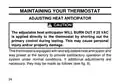
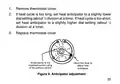



1. Remove thermostat cover.
2. If heat cycle is too long, set heat anticipator to a slightly lower
dial setting (about 1⁄
division at a time). If heat cycle is too short,
2
1
set heat anticipator to a slightly higher dial setting (about ⁄
division at a time).
2
3. Replace thermostat cover.
.25
.3
.4
.2
.5
.6
18
.8
.15
1.
Arrow points to the
matched current rating
of the primary control
Move this lever to
adjust heat
anticipator
Figure 9. Anticipator adjustment
25

| General | Details |
|---|---|
| Name | Doit 474053 Low Voltage Thermostat Installation Guide |
| Make | DOIT |
| Language | English |
| Filetype | PDF (Download) |
| File size | 0.12 MB |
 (1 votes, average: 5.00 out of 5)
 Loading...


EMERSON 1F83C-11NP Single Stage Thermostat Owner’s Manual

fontastic RAVL Wireless Radiator Thermostat User Manual

HEAT-MY-HOME HMH200 WiFi Thermostat User Guide

BEOK CONTROLS TDS75 Touch Screen Thermostat Instruction Manual

Gigaset Thermostat Instruction Manual

RTH21 Programmable Thermostat Coldbuster Dual Instruction Manual

SALUS Digital Room Thermostat RT310/RT310RF Installation Guide

GENERAL LIFE ARUNA 304S RF Digital Room Thermostat User Manual

Danfoss Link Connect Thermostat User Guide

OJ ELECTRONICS UTN-4991 Non Programmable Thermostat Owner’s Manual