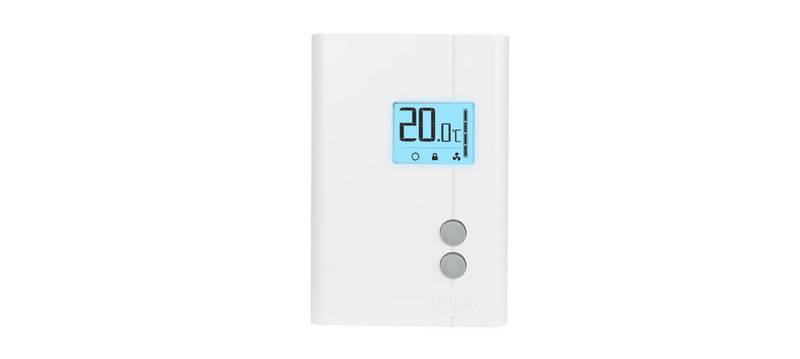
Danfoss TPOne-RF Electronic Programmable Room Thermostat Installation Guide
| General | Details |
|---|---|
| Name | Danfoss TPOne-RF Electronic Programmable Room Thermostat Installation Guide |
| Make | Danfoss |
| Language | English |
| Filetype | PDF (Download) |
| File size | 0.42 MB |

Danfoss RET-MD Electronic Intelligent Dial Setting Thermostat Installation Guide
Danfoss VICUQ24M Icon Programmable II Room Thermostat Installation Guide

Danfoss MBC 8000, MBC 8100 Heavy Duty Thermostat Installation Guide

Danfoss UT 72-UT 73 Universal Thermostat Installation Guide

Danfoss ECtemp 530 Electronic Thermostat Installation Guide

Danfoss 014G0251 Eco Radiator Thermostat User Guide

Danfoss 014G0013 Z Wave Radiator Thermostat Installation Guide

Danfoss RET230P Electronic Thermostat Instruction Manual

Danfoss TP7000 Range Electronic 7 Day Programmable Room Thermostat Installation Guide

Danfoss RET1000 Series Electronic Thermostat User Guide

Danfoss TPOne-RF Electronic Programmable Room Thermostat Installation Guide Overview
Summary of Contents
- Page 1: Electronic programmable room thermostat Installation guide
- Page 2: TPOne is an intelligent programmable heating control made easy. TPOne includes features designed to save energy. Look out for the leaf symbol throughout this guide for settings that can directly influence the energy saved. Danfoss can accept no responsibility for possible errors in catalogues, brochures, and other printed material. All trademarks in this material are property of the respective companies. Danfoss and the Danfoss logotype are trademarks of Danfoss A/S. All rights reserved. TPOne-RF.
- Page 3: Installation instructions Specifications Operating voltage: 230Vac, 50/60Hz Output relay: Volt free Setting temperature range: 5-35°C Operating temperature range: 0-45°C Battery lifetime: Min. 2 years IP rating: IP20 Important note RF products: Ensure that there are no large metal objects in line of sight between the transmitter and receiver. ErP class: The products are classified according to the Energy Related Product Directive.
- Page 4: Mounting Thermostat or remote room sensor positioning. This product should only be installed by a qualified electrician or competent heating installer. Installation should be in accordance with the local wiring regulations.
- Page 5: Wiring RX1-S Receiver Remote sensor inputs Remote room or limit sensor Window switch contact Remote sensor to be wired with 1mm 2 core double insulated cable only. Cable length should not exceed 10 metres. Sensor cable should NOT be run parallel to mains cable.
- Page 6: User interface Comfort modes Heating made easy: TPOne Comfort Modes simplify the way you plan your heating day to day. You define your comfort modes in the user schedule and manually override when you need. The Home, Away and Asleep comfort modes are linked to your defined comfort temperatures. The schedule follows the daily routine you have set or you just choose the comfort mode required. The TPOne Standby Mode allows you to switch your heating off when not required. TPOne has been designed with touch sensitive user interface buttons. To avoid accidental setting changes, the interface buttons stay in an idle state. The first button press needs to be made for 1 second to place the TPOne into an active setting state. While active, the TPOne will respond immediately to any valid key press. If no key presses are made for 30 seconds, the buttons will go back to an idle state.
- Page 7: Comfort modes include Home Mode, Away Mode, Asleep Mode, and Standby Mode. Home Mode selects the home comfort temperature typically when the home is occupied during the day. A separate Home AM and Home PM temperature can be chosen and are automatically set according to the time of day. In Home mode, pressing the home button again selects a 1, 2, or 3 hour heating boost. Away Mode selects the away comfort temperature typically when the home is unoccupied during the day. Asleep Mode selects the nighttime comfort temperature set between the end of the last home period and the beginning of the first home period of the following day. The required temperatures for each mode are selectable in the Temperature setting. Standby Mode places the TPOne in a state where it does not control the heating system other than to protect against frost damage. Standby can be canceled by pressing the Standby button again or by selecting another comfort mode. The standby option does not affect Hot Water control settings.
- Page 8: Navigation allows access to the intuitive text menu. The common feature User Menu will be displayed first. Additional settings can be found in the User Setting option. More advanced settings can be found in the Installer Setting option. Press OK to select menu options or confirm settings. OK will be shown on the display when it can be used or is required. Pressing the exit button will result in that setting change not being accepted. The navigation buttons are used to navigate the TPOne menus and change setting values. The up and down buttons are also used to manually change the required temperature. Navigation arrows will be shown on the display when these buttons can be used.
- Page 9: Button lock has been activated to avoid unintentional setting changes. To activate buttons while button lock is active, press the OK button for 5 seconds. The battery low icon indicates when the TPOne batteries should be changed. Replace batteries when the low icon is displayed to avoid loss of heating or damage to your thermostat. When the current room temperature is below the required room set temperature, the TPOne will call for heating. The heat calling icon indicates that heating is being requested from the connected heat source. The TPOne-RF is connected by radio signal to a receiver, confirmed by the radio frequency icon. If the connection is lost, the icon will go off and a warning will be shown at the top of the display. Ensure there are no large metal objects in line of sight between the transmitter and receiver to maintain communication. TPOne monitors several conditions and will provide warning or information messages when necessary.
- Page 10: Setup wizard will run when power is first applied to the TPOne. Further changes can be made in the user and installer setting menus. Set date to 04 - 02 - 2016. Set time to 24hr - 10:45. Press OK to pair. RF pairing with RX1-S receiver requires pressing PROG + CH on receiver to confirm. The setup process includes language selection. The setup wizard is essential for initial configuration. User settings can be adjusted after the initial setup. The device is ready for use after successful RF pairing.
- Page 11: Set temperatures for comfort mode. Changes can be made for each mode. Press OK to confirm new settings. See page 22 for default temperatures. Home AM temperature is 21.0°C. Home PM temperature is 22.0°C. Away temperature is 16.0°C. Asleep temperature is 12.5°C. User menu options are available. Danfoss heating system is referenced.
- Page 12: Follow this routine to set the heating schedule. Days can be set individually or grouped, and options for weekdays and weekend settings can be selected. All day combinations can then have one, two, or three home periods selected. TPOne will automatically fill in the gaps with away and asleep periods depending on the time of the day. See page 22 for default schedule times.
- Page 13: Setup schedule for heating includes specific days of the week. Home periods can be selected for different times. Home period 1 is set from 06:00 to 08:30. Home period 2 is set from 12:30 to 13:30. Home period 3 is set from 17:30 to 22:30. The heating schedule has been saved.
- Page 14: Click & Save is an easy access saving function. Switching Click & Save ON will reduce the user set comfort temperatures by 1°C. Switching Click & Save OFF will return TPOne to the user set comfort temperatures. Independent tests have proven that a reduction in home heating temperatures by 1°C can save on average 10% energy. Heating Mode will change the TPOne from a thermostat with full user set heating schedule to a manually set temperature only thermostat. In schedule mode the thermostat will follow the user set heating schedule. In manual mode the user set schedule will be ignored, the required comfort mode is then chosen manually. User set heating schedule option includes settings for the daily heating schedule. Choose weekday, weekend or independent daily options and 1, 2 or 3 periods per day. Option to reset daily heating schedule to factory defaults.
- Page 15: User set comfort temperatures for heating include individual comfort temperatures for Home AM, Home PM, Away, and Asleep. Home AM and Home PM temperatures are set during the chosen home periods in the heating schedule. Away temperature is set during the day between the home periods. Asleep temperature is set during the night between the home periods. Default settings are Home AM - 20°C, Home PM - 20°C, Away - 15°C, and Asleep - 15°C. The holiday feature allows you to set your holiday dates in advance. TPOne reduces heating to the chosen holiday temperature on the first day set to save energy. It returns to the set schedule and mode temperatures on the return date. You can enter the start and end date of your holiday and the required energy-saving home temperature.
- Page 16: User settings allow for customization of the device. You can set the current date and time, with options for 12 or 24-hour clock settings. If batteries are removed or expired for more than 2 minutes, a startup wizard will prompt for date reset. Button click provides audible feedback to confirm button presses and can be switched on or off. The display backlight activates when buttons are pressed and can be turned off to increase battery life. Temperature scale can be set to either centigrade or fahrenheit, with the default set to centigrade. The menu language can be chosen, with English as the default option. A reset menu language feature is available by pressing and holding OK for 5 seconds. User reset returns user settings to factory defaults but does not affect first-level user menu settings or date and time. Information section provides details on product type, software level, and boiler service interval date if set.
- Page 17: Installer settings include RF pairing, control type, and start-up method. The TPOne-RF must be paired to a compatible receiver or boiler relay. Initial pairing is made in the startup wizard. Control type allows the thermostat to run in On/Off mode or in chrono-proportional cycle rates. For condensing boiler control, efficiency is improved with a chrono-proportional type controller. The start-up method has three options: Normal, Delayed Start, and Optimised Start. Normal heating adjusts at programmed times. Delayed Start monitors actual and desired temperatures to optimize heating start times. Optimised Start calculates when to turn on heating to reach the desired temperature by a specific time. Default start-up method is set to Normal.
- Page 18: Installer settings include temperature limits for the thermostat setting range. The minimum temperature is 5°C and the maximum is 35°C. Frost protect helps prevent damage to the heating system from extreme low temperatures, with a default level of 5°C. Manual temperature override options include no limit, limited +/- 2°C, or no override, with the default set to no limit. Automatic daylight saving changes can be set on or off, with the default being on. Button lock can be activated to prevent unintentional setting changes, requiring the OK button to be pressed for 5 seconds to activate buttons while locked, with the default set to off. The display idle mode can be set to go off when idle, with the display turning on when any button is pressed, and the default is on.
- Page 19: Installer settings include options for external sensors. TPOne has an optional external sensor input. If fitted, select the type of external sensor: none, room sensor, window sensor, or floor limit sensor. Room sensor takes priority over the TPOne internal sensing. Window sensor puts TPOne into standby mode when the window is open. Floor limit sensor prevents overheating by turning off output if the temperature exceeds the limit. Recommended temperature limits vary by flooring type. Lockout feature allows remote activation of standby mode. While in lockout, buttons cannot be used, and TPOne will only call for heat if the temperature falls below the frost protect level. Features are activated and deactivated based on circuit input.
- Page 20: Installer settings include a service interval timer that allows setting a service due date for the boiler. The timer is passcode protected and should only be set by a qualified heating installation engineer. The installer can select from four service due restriction modes: - Warning only: visual and audible warnings without heat reduction. - Heat 45min/hr: warnings with a reduction of heat to 45 minutes per hour. - Heat 30min/hr: warnings with a reduction of heat to 30 minutes per hour. - Heat 15min/hr: warnings with a reduction of heat to 15 minutes per hour. - No heating: warnings with no heating. The service interval timer can only be reset or deactivated by an installer with the correct access code. If the TPOne is fitted to a combination boiler, the function works only with a heating demand, and hot water production remains unaffected. The demo feature provides a demonstration of the audible and visual warning for when service is due. TPOne allows the installer to lock all settings with a passcode, which must be entered for any changes. There is an option to reset all installer settings to factory defaults, but the service interval will not be reset and requires entering the service interval setup for changes.
- Page 21: Service interval If the property is owned by a landlord, he may have instructed the installer to set the service interval timer. The feature is primarily aimed at the rented property sector where the landlord has a legal responsibility under gas safety regulations to ensure that the boiler is serviced every year. If set, 28 days prior to the service due date, an audible warning will start each day at noon. The audible warning will last for 10 seconds and will be repeated every hour until a button is pressed to cancel it. If the boiler is not serviced before the due date, an audible warning will start each day at noon. The audible warning will last for 1 minute and will be repeated every hour until a button is pressed to cancel it. All overrides and programming buttons will be disabled if the boiler is not serviced. The installer may cancel or reset the service interval timer as part of the boiler service. This is a gas safety feature that can only be accessed by a qualified heating installation engineer. Gas safety regulations may vary according to region.
- Page 22: Default tables Schedule defaults 06:30 - 08:30 (Weekend 07:30 - 09:30) 06:30 - 22:30 (Weekend 07:30 - 22:30) 11:30 - 13:30 16:30 - 22:30 TPOne-RF
- Page 23: Default tables Temperature defaults 20°C AM 20°C PM 15°C Danfoss Heating
- Page 24: TPOne will show information related to current operation. Information messages will be displayed while the operation is active and will automatically reset when operation is completed. This will be displayed where a window open switch has been fitted and the window is opened. This will be displayed where a product lock switch has been fitted and the switch has been activated. If the TPOne start up method is set to Optimised Start, this message will display while this feature is active. If the TPOne start up method is set to Delayed Start, this message will display while this feature is active.
- Page 25: Warnings are displayed at the top of the TPOne monitor when necessary. Messages can be cleared by selecting Clear Warnings in the menu. The most recent warning will be shown if multiple warnings occur. All warnings can be viewed and cleared in the Clear Warnings menu. If the RF connection is lost, a warning will be displayed. If the RF Icon remains visible, the connection may have been temporarily lost. Ensure there are no large metal objects obstructing the line of sight between the transmitter and receiver. If pairing fails during installation, a warning will be shown. Manual pairing can be done through the installer menu. A frost risk warning is displayed if the temperature falls below 5°C. TPOne will call for heat, but a faulty heat source may still lead to frost damage. If the set mode temperature is not reached within 2 hours, TPOne will warn of Low Heat.
- Page 26: Warnings Service Due: This warning will be shown when the timer has expired. Contact the property owner or landlord to arrange boiler safety maintenance. Heat Reduced: This warning indicates that heating has been reduced for safety until a boiler service has been completed. High Floor Temperature: This warning will show if the floor temperature exceeds the set limit. The floor heating system should be checked to ensure overheating does not reoccur. Sensor Fail: If the in-built temperature sensor is measuring outside its operational parameters, it may have failed. Contact your service provider for advice if this warning cannot be reset. External Sensor Fail: If an external temperature sensor is measuring outside its operational parameters, it may indicate a problem with the sensor or connecting cable. Floor Sensor Fail: If a floor temperature sensor is measuring outside its operational parameters, it may indicate a problem with the sensor or connecting cable. Contact your service provider for advice if this warning cannot be reset.
- Page 27: Page 27
- Page 28: Danfoss can accept no responsibility for possible errors in catalogues, brochures and other printed material. Danfoss reserves the right to alter its products without notice. This also applies to products already on order provided that such alterations can be made without subsequential changes being necessary in specifications already agreed. All trademarks in this material are property of the respective companies. Danfoss and the Danfoss logotype are trademarks of Danfoss A/S. All rights reserved. © Danfoss HS | 11/2021 | VIHSJ102