
CLIMATE MC-LR-THERMOS Wireless Thermostat User Manual
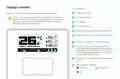
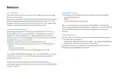
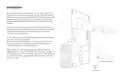
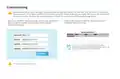


Display’s content
#
1
Description
Target temperature
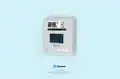
The image below has all visible elements of the display activated.
2
3
4
5
6
Sensor temperature
The 2.9” e-ink display supports fast partial refresh. Full refresh is
performed every 12 hours (period can be adjusted via a downlink) to
avoid the e-ink phenomena “image sticking” and steer clear of
permanent damage to the display.
LUX reading
Humidity reading
Shown when movement is detected by the PIR
Shows when the sensor is transmitting an uplink
2
1
4
Power source indicator - solar, battery, USB
7
8
3
Fire icon - showing automatically by default
when target temperature is higher than sensor
temperature. Automatic showing of the icon can
be disabled and status of the Fire icon can be
controlled through downlinks.
8
5
7
6
9
10
Child lock icon - indicates that the thermostat is
locked.
9
Spreading factor indicator
10
SF7 & SF8
SF10, SF11, SF12
SF9
6

| General | Details |
|---|---|
| Name | CLIMATE MC-LR-THERMOS Wireless Thermostat User Manual |
| Make | CLIMATE |
| Language | English |
| Filetype | PDF (Download) |
| File size | 0.36 MB |
 (1 votes, average: 5.00 out of 5)
 Loading...


HEAT DECOR HD305G Heating Film KIT without Thermostat Owner’s Manual

sauermann TST Electronic Thermostat User Guide

TIOEVO0003 TEVO Wireless Thermostat User Manual

GENERAL LIFE FH104 Underfloor Heating Thermostat User Manual

Smartica HY608W 3A Wifi Digital Heating Thermostat User Manual

OUELLET OTH24 Low Voltage Non Programmable Electronic Thermostat Owner’s Manual

thermokon JOY 5DO Digital Room Thermostat User Manual

ENSTO ECO16BT-EX Floor Heating Thermostat User Guide

ELMEKO THRV 22 Double-Thermostat Owner’s Manual

BEOK TGP508 Vertical Buttons Underfloor Heating Thermostat User Guide