
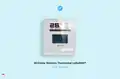
CLIMATE MC-LR-THERMOS Wireless Thermostat User Manual


Commissioning
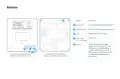
Before you install the device, we highly recommend that you first commission it on your LNS. Once the device is restarted or
exposed to light, it’ll initiate a LoRaWAN Join Procedure using SF9. Please, make sure you enable ADR in your LNS and/or mark
the device as static. The lower the spreading factor, the better the performance of the energy storage will be.
1
2
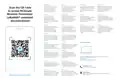
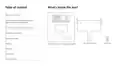
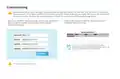
Open your LoRaWAN® Network provider access panel and add the
device using the supplied Serial Number, DevEUI, AppEUI
(JoinEUI) and AppKey.
Continue the Installation with the instructions of your
LoRaWAN® Network provider.
You can get DevEUI, AppEUI (JoinEUI) & AppKey
information from the LoRaWAN® credentials .csv file we
sent you with the fulfillment confirmation.
The data is example. Do not use.
10

| General | Details |
|---|---|
| Name | CLIMATE MC-LR-THERMOS Wireless Thermostat User Manual |
| Make | CLIMATE |
| Language | English |
| Filetype | PDF (Download) |
| File size | 0.36 MB |
 (1 votes, average: 5.00 out of 5)
 Loading...


King K901-B Wifi Programmable Thermostat Instruction Manual

EPH CDTP2 Room Thermostat Installation Guide

Danfoss RAS-C2 Radiator Thermostat Installation Guide

SALUS RT310i Smart Phone Controlled Programmable Thermostat Installation Guide

vtech Installing E-Smart W960 Thermostat User Manual

DEVIreg 530 Electronic Thermostat Installation Guide

EPH CONTROLS CP4 Programmable RF Thermostat User Manual

BEOK TDS23 Wi-Fi Fan Coil Thermostat Instruction Manual

HIVE Thermostat Mini User Guide

HYSEN HY09RF WI-FI Wireless Thermostat User Manual