
Home > BEOK CONTROLS > BEOK CONTROLS TGW60 Touch Screen Boiler Thermostat User Guide
BEOK CONTROLS TGW60 Touch Screen Boiler Thermostat User Guide


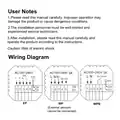

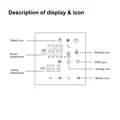
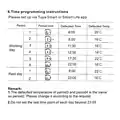




TGW60 THERMOSTAT USER GUIDE
This thermostat is suitable for water heatiing,electric heating
and boiler

| General | Details |
|---|---|
| Name | BEOK CONTROLS TGW60 Touch Screen Boiler Thermostat User Guide |
| Make | BEOK CONTROLS |
| Language | English |
| Filetype | PDF (Download) |
| File size | 1.63 MB |
 (1 votes, average: 5.00 out of 5)
 Loading...

BEOK CONTROLS TDR83 WiFi Heating Thermostat User Guide

BEOK CONTROLS TCR7 IPS Colorful LCD Screen Smart Thermostat Owner’s Manual

BEOK CONTROLS TDR89 Thermostat User Guide

BEOK CONTROLS BOT-R7X Wireless Gas Boiler Heating Thermostat Instructions

BEOK CONTROLS TCR8 IPS Colorful LCD Screen Smart Thermostat Owner’s Manual

BEOK CONTROLS TGR86 WiFi Thermostat User Guide

BEOK CONTROLS BOT-323W Series Boiler Thermostat Instruction Manual

BEOK CONTROLS TDS72 Digital Screen Thermostat Instruction Manual

BEOK CONTROLS BOT-R6W Gas Boiler Thermostat Instruction Manual

Beok Controls TS4 Series Thermostat User Guide

BEOK TGW60 Manual: Questions and Answers
BEOK TGW60 specifications
| Power supply | 100 ~ 240V |
| Floor temperature limit | 5-60℃ |
| Setpoint range | 5-95℃ |
| Differential | ±1℃(Defaults adjustable 0.5-10℃) |
| Sensor | NTC |
| Storage temperature | -5~55℃ |
| Dimensions | 86x86x19mm |
| Power consumption | <1W |
What's the difference between Manual and Away mode on BEOK TGW60?
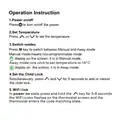
Manual mode is non-programmable. Away mode sets temperature to 16°C with a single click.
| Mode | Behavior |
|---|---|
| Manual | Non-programmable |
| Away | Sets temperature to 16°C |
How do I connect BEOK TGW60 to WiFi?
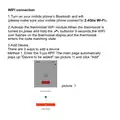
In power-on state, press and hold the WiFi key for 5-8 seconds until the WiFi icon flashes, entering code matching state.
- Power on the thermostat
- Press and hold the WiFi key for 5-8 seconds
- Watch for the WiFi icon to flash on the screen
- The thermostat enters code matching state User Guide, p. 8
What app do I need to connect BEOK TGW60 to Wi-Fi?
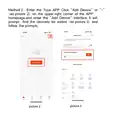
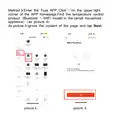
Download Tuya Smart from App Store (iOS) or Google Play (Android).
- Open App Store or Google Play on your phone.
- Search for Tuya Smart.
- Download and install the app. User Guide, p. 12
BEOK TGW60 compared with other BEOK thermostats
| Specification | BEOK TGW60 | BEOK TDR89 | BEOK TGR85-EP | BEOK Color TFT-LCD Heating Thermostat |
|---|---|---|---|---|
| Power supply | 100 ~ 240V | 100 ~ 240V | 100 ~ 240V | 200 ~ 240V 50 ~60Hz |
| Floor temperature limit | 5-60℃ | 5-60℃ | 5-60℃ | 5-99℃ |
| Setpoint range | 5-95℃ | 5-95℃ | 5-95℃ | 5-60℃ |
| Sensor | NTC | NTC | NTC | NTC |
| Storage temperature | -5~55℃ | -5~55℃ | -5~55℃ | -5~55℃ |
| Dimensions | 86x86x19mm | 86x86x14mm | 86x90x14mm | 86x86x13.3mm |
| Power consumption | <1W | <1W | <1W | <0.3W |
Other BEOK TGW60 manuals
- BEOK TGW60 Glass Screen Thermostat Instruction Manual
- BEOK TGW60 Wifi Heating Thermostat Instruction Manual
- beok TGW60 Thermostat User Guide
More BEOK thermostat manuals

SALUS DT500 Thermostat User Guide

HVAC Controls UT32 Titan Touchscreen Thermostat User Manual

Danfoss CAS 178 Thermostat Installation Guide

telethings 2D Smart LoRaWAN Thermostat User Manual

GENERAL 270 RF Room Thermostat Instruction Manual

Warmup 3iE Energy Monitoring Thermostat Instruction Manual
BEOK CONTROLS TDR83 WiFi Heating Thermostat User Guide

Beca BHP-8000 C Room Thermostat User Guide

PECO TW180 Thermostat Instruction Manual

homematic IP IP HmIP-eTRV-CL Radiator Thermostat Instruction Manual