
×
- 1. User's Manual
- 2. Environmental Policy (Airzone Interface → Airzone Blueface Zero → Main Screen → Hvac Control → User Settings → Zone Settings)
- 3. Environmental Policy
- 4. Airzone Interfaces (Airzone Blueface Zero → Operation Mode → Zone Navigation → Zone Settings → User Settings)
- 5. Hvac Control (Set-point Temperature → Efficiency Indicator → Eco-adapt Function → User Settings → Information → Fan Speed)
- 6. Zone Navigation (Operation Mode → Access To The Zone → Switch The Zone On Or Off → Zone Set-point Temperature → Zone Room Temperature)
- 7. Zone Settings (Sleep Mode → Anti-freezing → Lite Settings → Grille Angle → Control Stages → Q-adapt)
- 8. Purification (Auto → On → Off)
- 9. Airzone Blueface Zero Parameters (Identify Your System From The Airzone Blueface Zero Thermostat, Access: → User Settings → Information → System → Hvac Control → Eco-adapt Function)
- 10. Access The Main Screen By Pressing 'airzone' From The Screensaver: (Eco-adapt Function → Settings Menu → Time Schedules)
- 11. Hvac Control (Operation Mode → Fan Speed)
- 12. Settings Menu (Mode → Speed → Sleep Mode → Zone Navigation → Purification)
- 13. Airzone Think Parameters (Flexa 4.0 → Flexa 3.0 → Acuazone → Radiant → Hvac Control → Zone Settings)
- 14. Airzone Lite (Important → Basic Functions → Set-point Temperature)
- 15. Airq Sensor (Ventilation Activated → Air Conditioning Activated → Ionization Activated → Indoor Air Quality Indicator)
- 16. Airzone Wireless Valr Thermostatic Head (Interface → Control Wheel → Led Display → Functions And Statuses → Self-diagnostics → Hvac Control)
- 17. Set-point Temperature
- 18. Settings (Head Lockout → Unlocking The Head)
- 19. Changing The Direction Of The Led Display
- 20. Incidents (Warnings → Anti-freezing → Active Window → Dhw → Low Battery → Occupancy)
- 21. Errors (Communication Errors → Ac Unit Error → Purification Errors → Other Errors)
- 22. Airzone Lite Errors (Communication Loss Indicators)
- 23. Change Of Battery (Wireless Thermostats → Wireless Thermostatic Head)
- 24. Política Medioambiental (Interfaces Airzone → Airzone Blueface Zero → Control De Climatización → Función Eco-adapt → Ajustes De Usuario → Menú De Configuración)
- 25. Política Medioambiental (Recogida Selectiva De Aparatos Eléctricos → Gestión Ambiental → Reglamentación Sobre Protección Medioambiental → Sanciones Por Infracciones)
- 26. Interfaces Airzone (Airzone Blueface Zero → Pantalla Principal → Modo De Funcionamiento → Control De Climatización → Configuración De Zona → Ajustes De Usuario)
- 27. Control De Climatización (Temperatura De Consigna → Indicador De Eficiencia → Función Eco-adapt → Ajustes De Usuario → Información → Velocidad Del Ventilador)
- 28. Navegación Por Zonas (Acceso A Todas Las Zonas → Encender/apagar Todas Las Zonas → Temperatura De Consigna De La Zona → Modo De Funcionamiento)
- 29. Configuración De Zona (Modo Sleep → Antihielo → Ajustes Lite → Ángulos De Rejilla → Ajuste De Lamas → Q-adapt)
- 30. Purificación (Auto → On → Off)
- 31. Parámetros Airzone Blueface Zero (Identifique Su Sistema Desde El Termostato Airzone Blueface Zero, Acceda A: → Ajustes De Usuario → Control De Climatización → Función Eco-adapt → Navegación Por Zonas → Modos De Funcionamiento → Configuración De Zona*)
- 32. Airzone Think (Pantalla Principal → Función Eco-adapt → Modo De Funcionamiento → Menú De Configuración → Temperatura De Consigna → Humedad Relativa)
- 33. Control De Climatización (Modo De Funcionamiento → Velocidad Del Ventilador)
- 34. Menú De Configuración (Modo → Velocidad → Modo Sleep → Navegación Por Zonas → Purificación)
- 35. Parámetros Airzone Think (Control De Climatización → Velocidad Del Ventilador → Configuración De Zona → Modo → Modo Sleep → Purificación)
- 36. Airzone Lite (Funciones Básicas → Importante → Nota)
- 37. Airq Sensor (Ventilación Vmc → Climatización Activa → Ionización Activa → Indicador De Calidad De Aire)
- 38. Cabezal Termostático Inalámbrico Airzone Valr (Interfaz → Rueda De Control → Pantalla Led → Funciones Y Estados → Control De Climatización)
- 39. Temperatura De Consigna
- 40. Configuración (Bloqueo Del Cabezal → Desbloqueo Del Cabezal)
- 41. Cambio De Orientación De La Pantalla Led
- 42. Incidencias (Avisos → Antihielo → Ventana Activa → Acs → Batería Baja → Presencia Activa)
- 43. Errores (Errores De Comunicación → Error De Máquina. → Errores Purificación → Otros Errores)
- 44. Errores Airzone Lite (Pérdida De Comunicación Con La Central → Pérdida De Comunicación Entre La Central Del Sistema Y El Módulo De Zona → Pérdida De Comunicación Con El Módulo De Zona)
- 45. Cambio De Batería (Termostatos Inalámbricos → Cabezal Termostático Inalámbrico)
- 46. Politique Environnementale (Interfaces Airzone → Airzone Blueface Zero → Contrôle De Chauffage Et Refroidissement → Fonction Eco-adapt → Navigation Par Zones → Airzone Think)
- 47. Politique Environnementale (Ne Jetez Pas L'appareil Dans La Poubelle Des Déchets Ménagers → Les Pièces Qui Le Composent Peuvent Être Recyclées → Rendez-vous Chez Le Distributeur)
- 48. Interfaces Airzone (Airzone Blueface Zero → Écran De Veille → État De La Zone, Avertissements Et Erreurs → Mode De Fonctionnement → Contrôle De Chauffage Et Refroidissement → Configuration Dutilisateur)
- 49. Contrôle De Chauffage Et Refroidissement (Température De Consigne → Indicateur Defficacité → Fonction Eco-adapt → Configuration Dutilisateur → Informations → Vitesse Du Ventilateur)
- 50. Navigation Par Zones (Accès À Toutes Les Zones → Allumer/éteindre Toutes Les Zones → Mode De Fonctionnement → Erreurs → Icônes De Navigation Dans Les Zones À Distance)
- 51. Configuration De Zone (Mode Veille → Réglages De Lite → Angle Des Grilles → Réglage Des Lames → Étapes De Contrôle → Q-adapt)
- 52. Purification (Auto → On → Off)
- 53. Airzone Blueface Zero Paramètres (Identifier Votre Système À Partir Du Thermostat Airzone Blueface Zero → Configuration D'utilisateur → Contrôle De Chauffage Et Refroidissement → Fonction Eco-adapt → Mode De Fonctionnement → Navigation Par Zones)
- 54. Airzone Think (Écran De Veille → Écran Principal → Fonction Eco-adapt → Mode De Fonctionnement → Menu De Configuration → Température De Consigne → Humidité Relative)
- 55. Contrôle De Chauffage Et Refroidissement (Mode De Fonctionnement → Vitesse Du Ventilateur)
- 56. Menu De Configuration (Mode → Vitesse → Mode Veille → Navigation Par Zones → Purification)
- 57. Airzone Think Paramètres (Innobus Pro8 → Innobus Pro6 → Innobus Pro32 → Radiant → Parameters → Contrôle De Chauffage Et Refroidissement → Vitesse Du Ventilateur → Configuration De Zone → Mode)
- 58. Airzone Lite (Fonctions De Base → Température De Consigne)
- 59. Airq Sensor (Ventilation Active → Chauffage Et Refroidissement Actifs → Ionisation Active → Indicateur De Qualité De L'air Intérieure)
- 60. Tête Thermostatique Radio Airzone Valr (Interface → Réglage De La Température De Consigne → Écran Led → Fonctions Et États → Autodiagnostic → Contrôle De Chauffage Et Refroidissement)
- 61. Température De Consigne
- 62. Configuration (Verrouillage De La Tête → Déverrouillage De La Tête)
- 63. Changement Dorientation De Lécran Led
- 64. Incidences (Avertissements → Hors-gel → Fenêtre Active → Ecs → Pile Faible → Présence Active)
- 65. Erreurs De Communication (Erreur De L'unité → Erreurs Purification → Autres Erreurs)
- 66. Erreurs Airzone Lite (Communication Interrompue → Systèmes Acuazone (di6))
- 67. Changement De Pile (Thermostats Radio → Tête Thermostatique Radio)
- 68. Politica Ambientale (Interfacce Airzone → Controllo Della Climatizzazione → Funzione Eco-adapt → Configurazione Utente → Modo Di Funzionamento → Menu Di Configurazione)
- 69. Politica Ambientale (Smaltimento Corretto Delle Apparecchiature Elettriche → Raccolta Separata Dei Rifiuti → Riciclaggio Delle Parti Dell'unità → Regolamentazione Sulla Tutela Dell'ambiente → Sanzioni Per Trasgressori)
- 70. Interfacce Airzone (Airzone Blueface Zero → Schermo Principale → Modo Di Funzionamento → Funzione Eco-adapt → Controllo Della Climatizzazione → Configurazione Di Zona Utente)
- 71. Controllo Della Climatizzazione (Indicatore Di Efficienza → Funzione Eco-adapt → Configurazione Utente → Informazioni)
- 72. Navigazione Nelle Zone (Accesso A Tutte Le Zone → Accendere/spegnere Tutte Le Zone → Temperatura Ambiente Della Zona → Modo Di Funzionamento)
- 73. Configurazione Di Zona (Modo Sleep → Antigelo → Impostazioni Lite → Angolazione Bocchetta → Tipi Di Impianto → Q-adapt)
- 74. Purificazione (Auto → On)
- 75. Airzone Blueface Zero Parametri (Identifica Il Tuo Sistema Dal Termostato Airzone Blueface Zero, Accedi : → Configurazione Utente → Informazione → Sistema → Funzione Eco-adapt → Modo Di Funzionamento)
- 76. Airzone Think (Funzione Eco-adapt → Modo Di Funzionamento → Menu Di Configurazione → Temperatura Impostata → Umidità Relativa → Programmazioni Orarie)
- 77. Controllo Della Climatizzazione (Modo Di Funzionamento → Velocità Del Ventilatore)
- 78. Menu Di Configurazione (Modo → Velocità → Modo Sleep → Navigazione Nelle Zone → Purificazione)
- 79. Airzone Think Parametri (Flexa 4.0 → Flexa 3.0 → Controllo Della Climatizzazione → Velocità Del Ventilatore → Menu Di Configurazione → Modo)
- 80. Airzone Lite (Funzioni Di Base → Configurazione Di Zona)
- 81. Airq Sensor (Ventilazione Attiva → Climatizzazione Attiva → Ionizzazione Attiva → Indicatore Di Qualità Dell'aria Interna)
- 82. Testina Termostatica Senza Fili Airzone Valr (Interfaccia → Rotella Di Controllo → Regolazione Temp. → Schermo Led → Funzioni E Stati → Sostituzione Batterie)
- 83. Temperatura Impostata
- 84. Configurazione (Blocco Testina → Sblocco Testina)
- 85. Cambio Orientamento Schermo Led
- 86. Incidenze (Avvisi → Antigelo → Finestra Attiva → Acs → Batteria Bassa → Umidità → Preparazione)
- 87. Errori (Errori Di Comunicazione → Errori Di Purificazione → Altri Errori)
- 88. Errori Airzone Lite (Perdita Di Comunicazione Con La Scheda Centrale → Perdita Di Comunicazione Tra La Scheda Centrale E Il Modulo Di Zona → Perdita Di Comunicazione Con Modulo Di Zona)
- 89. Cambio Della Batteria (Termostati Senza Fili → Testina Termostatica Senza Fili)
- 90. Política Ambiental (Interfaces Airzone → Airzone Blueface Zero → Controlo De Climatização → Função Eco-adapt → Airzone Think → Incidências)
- 91. Política Ambiental (Recolha Seletiva De Dispositivos Elétricos → Gestão Ambiental Correta → Reciclagem De Peças → Sanções Para Infratores)
- 92. Interfaces Airzone (Airzone Blueface Zero → Proteção De Ecrã → Estado Da Zona, Avisos Ou Erros → Modo De Funcionamento → Função Eco-adapt → Controlo De Climatização)
- 93. Controlo De Climatização (Temperatura De Referência → Indicador De Eficiência → Função Eco-adapt → Configuração De Utilizador → Avisos → Velocidade Do Ventilador)
- 94. Navegação Por Zonas (Acesso A Todas As Zonas → Ligar/desligar Todas As Zonas → Temperatura De Referência Da Zona → Modo De Funcionamento)
- 95. Configuração Da Zona (Modo Sleep → Antigelo → Ajustes Lite → Ângulos De Grelha → Ajuste Lâminas → Etapas Controlo)
- 96. Purificação (Auto → On → Off)
- 97. Airzone Blueface Zero Parâmetros (Configuraçao De Utilizador → Informaçao → Controlo De Climatizaçao → Funçao Eco-adapt → Modo De Funcionamento → Purificaçao)
- 98. Airzone Think (Proteção De Ecrã → Ecrã Principal → Função Eco-adapt → Modo De Funcionamento → Menu De Configuração → Qualidade Do Ar Interior (qai))
- 99. Controlo De Climatização (Modo De Funcionamento → Velocidade Do Ventilador)
- 100. Menu De Configuração (Modo → Velocidade → Modo Sleep → Navegação Por Zonas → Purificação)
- 101. Airzone Think Parâmetros (Flexa 4.0 → Flexa 3.0 → Acuazone → Radiant → Controlo De Climatização → Navegaçao Por Zonas)
- 102. Airzone Lite (Funções Básicas → Temperatura De Referência)
- 103. Airq Sensor (Ventilação Ativa → Climatização Ativa → Ionização Ativa → Indicador De Qualidade Do Ar Interior)
- 104. Cabeça Termostática Sem Fios Airzone Valr (Interface → Roda De Controlo → Ecrã Led → Funções E Estados → Autodiagnóstico → Controlo De Climatização)
- 105. Temperatura De Referência
- 106. Configuração (Bloqueio Da Cabeça → Desbloqueio Da Cabeça)
- 107. Mudança De Orientação Do Ecrã Led
- 108. Incidências (Avisos → Antigelo → Janela Ativa → Aqs → Pouca Bateria → Presença Ativa)
- 109. Erros (Erros De Comunicação → Erro De Máquina. Anomalia Na Unidade De Ar Condicionado → Erros Purificação → Outros Erros)
- 110. Erros Airzone Lite
- 111. Troca De Bateria (Termostatos Sem Fios → Cabeça Termostática Sem Fios)
- 112. Umweltschutz (Airzone-schnittstellen → Airzone Blueface Zero → Hauptbildschirm → Klimatisierungsregelung → Betriebsmodus → Konfigurationsmenü)
- 113. Umweltschutz
- 114. Airzone-schnittstellen (Airzone Blueface Zero → Bildschirmschoner → Uhrzeit Und Datum → Raumtemperatur → Relative Luftfeuchtigkeit → Klimatisierungsregelung)
- 115. Klimatisierungsregelung (Solltemperatur → Effizienzanzeige → Funktion Eco-adapt → Benutzerkonfiguration → Informationen)
- 116. Zonenauswahl (Betriebsmodus → Zugriff Auf Alle → Alle Zonen Ein-/ausschalten → Zugriff Auf Zone → Solltemperatur Der Zone → Raumtemperatur Der Zone)
- 117. Zonenkonfiguration (Sleepmodus → Lite-einstellungen → Gitterwinkel → Lamellen-einstellung → Kontrollstufen → Q-adapt)
- 118. Luftreinigung (Auto-modus → On-modus → Off-modus)
- 119. Airzone Blueface Zero-parameter (Benutzerkonfiguration → Informationen → Klimatisierungsregelung → Funktion Eco-adapt → Zonenauswahl → Betriebsmodus)
- 120. Airzone Think (Steuerleiste → Hauptbildschirm → Eco-adapt Des Systems → Lüfterdrehzahl → Betriebsmodus → Konfigurationsmenü)
- 121. Klimatisierungsregelung (Solltemperatur → Betriebsmodus → Lüfterdrehzahl)
- 122. Konfigurationsmenü (Modus → Geschwindigkeit → Sleepmodus → Zonenauswahl → Luftreinigung)
- 123. Airzone Think-parameters (Flexa 4.0 → Flexa 3.0 → Acuazone → Radiant → Ra6 → Parameters)
- 124. Airzone Lite (Wichtig → Grundfunktionen)
- 125. Airq Sensor (Lüftung Aktiv → Klimatisierung Aktiv → Ionisation Aktiv → Raumluftqualitätssanzeige)
- 126. Drahtloser Airzone-thermostatkopf Valr (Schnittstelle → Einstellrad → Regelung Der Solltemperatur → Led-anzeige → Batteriewechsel → Funktionen Und Status Selbstdiagnose)
- 127. Um Einen Eingeschalteten Thermostaten Wieder Auszuschalten (Solltemperatur → Das Symbol)
- 128. Einstellungen (Sperrung Des Thermostatkopfs → Freigeben Des Thermostkopfs)
- 129. Ändern Der Ausrichtung Der Led-anzeige
- 130. Störungen (Meldungen → Antifrost → Fenster Aktiv → Batterie Schwach → Präsenz Aktiv → Tau)
- 131. Fehler (Kommunikationsfehler → Gerätefehler. Fehlfunktion Der Klimamaschine → Luftreinigungsfehler → Sonstige Fehler)
- 132. Airzone Lite Fehler (Kommunikation Mit Der Zentrale Unterbrochen → Fehler Auf Den Kommunikationsausfall Zwischen Der Zentrale Und Dem Zonenmodul → Kommunikation Mit Der Zonemodul Unterbrochen)
- 133. Batteriewechsel (Drahtloser Thermostate → Drahtloser Thermostatkopf)
- 134. Környezetvédelmi Irányelve (Airzone Interfészek → A Légkondicionáló Vezérlése → Eco-adapt Funkció → Zónabeállítások → Váratlan Események → Figyelmeztetések)
- 135. Környezetvédelmi Irányelvek (Megfelelő Környezetgazdálkodás → Újrahasznosítás És Hulladékkezelés)
- 136. Airzone Interfészek (Airzone Blueface Zero → Képernyővédő → A Zóna Állapota, Értesítések És Hibák → A Légkondicionáló Vezérlése → Zónabeállítások → Felhasználói Beállítások)
- 137. A Légkondicionáló Vezérlése (Set-point Temperature (beállított Hőmérséklet) → Hatékonysági Mutató → Eco-adapt Funkció → Felhasználói Beállítások → Information (információ))
- 138. A Ventilátor Sebessége (Nagy Sebesség → Kis Sebesség → Közepes Sebesség → Automatikus Sebesség → Navigáció A Zónákban → Üzemmód)
- 139. Heating (fűtés) (Ventilation (szellőztetés) → Dry (szárítás)* → Sleep Mode (alvó Üzemmód) → Anti-freezing (fagymentesítés) → Lite Settings (lite Beállítások) → Grille Angle (rácsszög))
- 140. Control Stages (Air → Radiant → Combined → Adjust Slats → Q-adapt → Purification)
- 141. Airzone Blueface Zero Paraméterek (Felhasználói Beállítások → A Légkondicionáló Vezérlése → Eco-adapt Funkció → Navigáció A Zónákban → Zónabeállítások → Alvó Üzemmód)
- 142. Airzone Think (Főképernyő → Eco-adapt Funkció → Üzemmód → Beállítások Menü → Alvó Üzemmód → Kommunikáció Frekvenciája: 868 Mhz)
- 143. A Légkondicionáló Vezérlése (Set-point Temperature (beállított Hőmérséklet) → Üzemmód → Cooling (hűtés) → Heating (fűtés) → Ventilation (szellőztetés) → Dry (szárítás)*)
- 144. Beállítások Menü (Üzemmód → Sebesség → Alvó Üzemmód → Navigáció A Zónákban → Tisztítás)
- 145. Airzone Think Paraméterek (Flexa 4.0 → Flexa 3.0 → A Légkondicionáló Vezérlése → A Ventilátor Sebessége → Zónabeállítások → Üzemmód)
- 146. Airzone Lite (Hőmérséklet Növelése → Hőmérséklet Csökkentése → Fontos → Alapfunkciók → Set-point Temperature)
- 147. Airq Sensor (Szabályozott Mechanikus Szellőzés → Légkondicionálás Aktív → Ionizáció Aktív → Levegőminőségi Mutató)
- 148. Airzone Valr Vezeték Nélküli Termosztátfej (Interfész → Led-es Kijelző → A Fej Állapota → Öndiagnosztika → A Légkondicionáló Vezérlése)
- 149. Beállított Hőmérséklet (Vezeték Nélküli Termosztátfej Led-es Kijelzője → Alaphőmérséklet → Kerek Vezérlőgomb → Kívánt Érték → Leadott Parancs → Környezet Hőmérséklet)
- 150. Beállítás (A Fej Blokkolása → A Fej Kioldása)
- 151. A Led-es Kijelző Tájolása
- 152. Váratlan Események (Figyelmeztetések → Anti-freezing (fagymentesítés) → Active Window (aktív Ablak) → Dhw (hmv) → Low Battery (alacsony Akkumulátor) → Occupancy (aktív Jelenlét))
- 153. Ntc2 Alarm (Filter Maintenance → Hibák → Kommunikációs Hibák → Ac Unit Error → Tisztítási Hibák → Egyéb Hibák)
- 154. Airzone Lite Hibák (Az On/off Ikon Villogása → Aquazone Rendszerek Kommunikációs Hibái)
- 155. Elemcsere (Vezeték Nélküli Termosztátok → Vezeték Nélküli Termosztátfej)
- 156. Miljöpolicy (Airzone-gränssnitt → Airzone Blueface Zero → Huvudskärm → Klimatstyrning → Användarinställningar → Inställningsmeny)
- 157. Miljöpolicy (Systemets Komponenter Är Återvinningsbara → Gällande Miljöbestämmelserna → Specialiserad Avfallsanläggning)
- 158. Airzone-gränssnitt (Airzone Blueface Zero → Zonstatus, Meddelanden Och Fel → Driftläge → Klimatstyrning → Zoninställningar → Användarinställningar)
- 159. Klimatstyrning (Set-point Temperature (förinställd Temperatur) → Effektivitetsindikator → Eco-adapt-funktion → Användarinställningar → Information)
- 160. Fläkthastighet (Navigering Genom Zoner → Driftläge → Automatisk Hastighet → Åtkomst Av Alla Zoner → Aktivera El. Stänga Av En Zon → Förinställd Temperatur För Zonen)
- 161. Heating (värme) (Ventilation → Dry (avfuktning) → Zoninställningar → Sleep Mode (viloläge) → Anti-freezing (avfrostning) → Lite Settings (lite-inställningar))
- 162. Adjust Slats (inställning Av Luftriktare) (Q-adapt → Purification (rening))
- 163. Parametrar För Airzone Blueface Zero (Identifiera Ditt System Från Termostaten Airzone Blueface Zero Genom Att Välja: → Användarinställningar → Klimatstyrning → Eco-adapt-funktion → Zoninställningar → Driftläge)
- 164. Airzone Think (Skärmsläckare → Zonstatus → Huvudskärm → Eco-adapt-funktion → Driftläge → Tidsscheman)
- 165. Klimatstyrning (Set-point Temperature (förinställd Temperatur) → Driftläge → Fläkthastighet)
- 166. Inställningsmeny (Mode (driftläge) → Speed (hastighet) → Sleep Mode (viloläge) → Zone Navigation (navigering Genom Zoner) → Purification (rening))
- 167. Parametrar För Airzone Think (Flexa 4.0 → Flexa 3.0 → Klimatstyrning → Fläkthastighet → Zoninställningar → Driftläge)
- 168. Airzone Lite (Grundläggande Funktion → Set-point Temperature (förinställd Temperatur) → Viktigt → Obs)
- 169. Airq Sensor (Styrd Mekanisk Ventilation → Klimatanläggning Aktiv → Jonisering Aktiv → Luftkvalitetsindikator)
- 170. Trådlöst Termostathuvud Airzone Valr (Gränssnitt → Reglage → Ändring Av Börvärde → Display → Batteribyte → Funktioner Och Status)
- 171. Förinställd Temperatur (börvärde) (Värmebehov Indikator)
- 172. Inställningar (Låsa Termostathuvudet → Låsa Upp Termostathuvudet)
- 173. Vända På Displayens Visning
- 174. Incidenter (Anti-freezing → Active Window → Dhw → Low Battery → Occupancy → Filter Maintenance)
- 175. Fel (Kommunikationsfel → Termostat Centralenhet / Zonmodul → Gateway Airzone-systemet → Bacnet-gateway Centralenhet → Webserver Airzone-systemet → Övriga Fel)
- 176. Fel För Airzone Lite (Om Ikonen On/off (på/av) → Aquazone-system (di6))
- 177. Byte Av Batteri (Trådlösa Termostaterna → Trådlöst Termostathuvud)
- 178. Milieubeleid (Airzone-interfaces → Klimaatregeling → Eco-adapt Functie → Ventilatorsnelheid → Parameters Voor Airzone Blueface Zero → Storingen)
- 179. Milieubeleid
- 180. Airzone-interfaces (Airzone Blueface Zero → Screensaver → Omgevingstemperatuur → Klimaatregeling → Zone-instellingen → Gebruikersinstellingen)
- 181. Klimaatregeling (Set-point Temperature (ingestelde Temperatuur) → Efficiëntieweergave → Eco-adapt Functie → Manual (handmatig) → Gebruikersinstellingen → Information (informatie))
- 182. Ventilatorsnelheid (Navigatie Door Zones → Functiemodus)
- 183. Heating (verwarmen) (Ventilation (ventilatie) → Dry (drogen) → Zone-instellingen → Sleep Mode (sluimermodus) → Anti-freezing (vorstbescherming) → Lite Settings (lite-instellingen))
- 184. Control Stages (bedieningsfasen) (Air (lucht) → Radiant (straling) → Combined (gecombineerd) → Adjust Slats (lamellen Afstellen) → Q-adapt → Purification (zuivering))
- 185. Parameters Voor Airzone Blueface Zero (Gebruikersinstellingen → Klimaatregeling → Eco-adapt Functie → Ventilatorsnelheid → Functiemodus → Zone-instellingen → Sluimermodus)
- 186. Airzone Think (Eco-adapt Functie → Ventilatorsnelheid → Functiemodus → Omgevingstemperatuur → Instellingen → Iaq)
- 187. Klimaatregeling (Set-point Temperature (ingestelde Temperatuur) → Functiemodus → Ventilatorsnelheid)
- 188. Mode (modus) (Speed (snelheid) → Sleep Mode (sluimermodus) → Zone Navigation (navigatie Door Zones) → Purification (zuivering))
- 189. Parameters Voor Airzone Think (Flexa 4.0 → Flexa 3.0 → Acuazone → Radiant → Ra6 → Parameters)
- 190. Airzone Lite (Basisfuncties → Temperatuur Verhogen → Temperatuur Verlagen → Alleen Voor Draadloze Lite-thermostaat → Zone Navigation → Lite-instellingen)
- 191. Airq Sensor (Gecontroleerde Mechanische Ventilatie → Klimaatregeling Actief → Luchtkwaliteitsindicatie)
- 192. Draadloze Airzone-thermostaatkop Valr (Interface → Regelwiel → Leddisplay → Batterij Vervangen → Zelfdiagnose → Klimaatregeling)
- 193. Ingestelde Temperatuur
- 194. Configuratie (Blokkering Van De Kop → De Kop Deblokkeren)
- 195. Weergaverichting Van Leddisplay Wijzigen
- 196. Storingen (Waarschuwingen → Anti-freezing (vorstbescherming) → Active Window (geopend Venster) → Dhw (sww) → Low Battery (batterij Bijna Leeg) → Occupancy (aanwezigheid Actief))
- 197. Ntc2 Alarm (Filter Maintenance → Storingen → Communicatiefouten → Ac Unit Error → Storingen In Zuivering → Overige Fouten)
- 198. Fouten Airzone Lite (Indien Het Pictogram On/off Van Airzone Lite-thermostaten Snel Knippert In Het Rood, Betekent Dit Dat Er Geen Communicatie Meer Is Met De Centrale.)
- 199. De Batterij Vervangen (Draadloze Thermostaten → Draadloze Thermostaatkop)
- 200. Ochrona Środowiska (Panele Sterowania Airzone → Airzone Blueface Zero → Ekran Główny → Sterowanie Klimatyzacją → Funkcja Eco-adapt → Ustawienia Użytkownika)
- 201. Ochrona Środowiska (Urządzenia Nie Wolno Wyrzucać Razem Z Odpadami Domowymi. → Części, Z Których Złożone Jest Urządzenie, Można Poddać Recyklingowi. → Naruszenia Podlegają Karom Przewidzianym W Ustawie O Ochronie Przyrody.)
- 202. Panele Sterowania Airzone (Airzone Blueface Zero → Ekran Główny → Tryb Pracy → Funkcja Eco-adapt → Sterowanie Klimatyzacją → Ustawienia Użytkownika)
- 203. Sterowanie Klimatyzacją (Set-point Temperature (temperatura Zadana) → Wskaźnik Wydajności → Funkcja Eco-adapt → Ustawienia Użytkownika → Information (informacja))
- 204. Prędkość Wentylatora (Wysoka Prędkość → Średnia Prędkość → Niska Prędkość → Automatyczna Prędkość → Nawigacja Po Strefach → Tryb Pracy)
- 205. Heating (ogrzewanie) (Ventilation (wentylacja) → Dry (osuszanie) → Sleep Mode (tryb Sleep) → Anti-freezing (ochrona Przez Zamarznięciem) → Lite Settings (ustawienia Lite) → Grille Angle (kąt Nachylenia Kierownic))
- 206. Control Stages (rodzaj Klimatyzacji) (Air (powietrze) → Radiant (promiennik) → Combined (łączony) → Adjust Slats (regulacja Lamelek) → Q-adapt → Purification (oczyszczanie Powietrza))
- 207. Parametry Airzone Blueface Zero (Ustawienia Użytkownika → Sterowanie Klimatyzacją → Funkcja Eco-adapt → Nawigacja Po Strefach → Tryb Pracy → Oczyszczanie Powietrza)
- 208. Airzone Think (Ekran Główny → Funkcja Eco-adapt → Tryb Pracy → Temperatura Zadana → Wilgotność Względna → Programator Czasowy)
- 209. Sterowanie Klimatyzacją (Set-point Temperature (temperatura Zadana) → Tryb Pracy → Prędkość Wentylatora)
- 210. Menu Ustawienia (Mode (tryb Pracy) → Speed (prędkość) → Sleep Mode (tryb Sleep) → Zone Navigation (nawigacja Po Strefach) → Purification (oczyszczanie Powietrza))
- 211. Parametry Airzone Think (Flexa 4.0 → Flexa 3.0 → Sterowanie Klimatyzacją → Prędkość Wentylatora → Ustawienia Strefy → Tryb Pracy)
- 212. Airzone Lite (Podstawowe Funkcje → Uwaga → Ważne → Częstotliwość Komunikacji → Maksymalna Moc Wypromieniowana → Set-point Temperature)
- 213. Airq Sensor (Kontrolowana Wentylacja Mechaniczna → Wskaźnik Jakości Powietrza)
- 214. Bezprzewodowa Głowica Termostatyczna Airzone Valr (Interfejs → Pokrętło → Włączanie/wyłączanie → Regulacja → Wyświetlacz Led → Wymiana Baterii → Funkcje I Stany)
- 215. Temperatura Zadana
- 216. Konfiguracja (Blokowanie Głowicy → Odblokowanie Głowicy)
- 217. Zmiana Orientacji Wyświetlacza Led
- 218. Błędy (Ostrzeżenia → Anti-freezing → Active Window → Dhw → Low Battery → Occupancy)
- 219. Ntc2 Alarm (alarm Ntc2) (Filter Maintenance (konserwacja Filtra) → Błędy → Ac Unit Error (błąd Jednostki Klimatyzacyjnej) → Błędy Dotyczące Oczyszczenia Powietrza → Inne Błędy)
- 220. Błędy Airzone Lite (Utrata Połączenia Z Centralą → Utrata Komunikacji Między Centralą Systemu A Modułem Strefy → Utrata Komunikacji Z Modułem Strefy)
- 221. Wymiana Baterii (Bezprzewodowa Głowica Termostatów → Uwaga: W Przypadku Bezprzewodowych Termostatów Lite → Bezprzewodowa Głowica Termostatyczna)
- 222. Miljømessige Retningslinjer (Airzone Grensesnitt → Airzone Blueface Zero → Hvac-kontroll → Eco-adapt-funksjon → Brukerinnstillinger → Soneinnstillinger)
- 223. Miljømessige Retningslinjer (Ikke Kast Dette Utstyret I Husholdningsavfallet → Elektriske Og Elektroniske Produkter → Resirkulering Av Deler → Forskrifter Angående Miljøvern → Bytte Av Utstyr → Straf Og Tiltak I Miljøvernloven)
- 224. Airzone Grensesnitt (Airzone Blueface Zero → Hovedskjerm → Driftsmodus → Soneinnstillinger → Brukerinnstillinger)
- 225. Hvac-kontroll (Set-point Temperature (settpunktstemperatur) → Effektivitetsindikator → Eco-adapt-funksjon → Brukerinnstillinger → Information (informasjon))
- 226. Viftehastighet (Sonenavigasjon → Driftsmodus)
- 227. Heating (oppvarming) (Ventilation (ventilasjon) → Dry (tørr) → Sleep Mode (hvilemodus) → Anti-freezing (kuldebestandig) → Lite Settings (lite-innstillinger) → Grille Angle (ristvinkel))
- 228. Adjust Slats (Q-adapt → Purification)
- 229. Airzone Blueface Zero-parametre (Identifiser Systemet Ditt Fra Airzone Blueface Zero-termostaten, Åpne: → Brukerinnstillinger → Informasjon → System → Flexa 4.0 → Flexa 3.0 → Acuazone)
- 230. Få Tilgang Til Hovedskjermen Ved Å Trykke Airzone Fra Skjermspareren: (Eco-adapt-funksjon → Viftehastighet → Driftsmodus → Innstillingsmeny → Tidsplaner → Hvilemodus)
- 231. Hvac-kontroll (Set-point Temperature (settpunktstemperatur) → Driftsmodus → Viftehastighet)
- 232. Innstillingsmeny (Mode (modus) → Speed (hastighet) → Sleep Mode (hvilemodus) → Zone Navigation (sonenavigasjon) → Purification (rensing))
- 233. Airzone Think-parametre (Flexa 4.0 → Flexa 3.0 → Acuazone → Hvac-kontroll → Soneinnstillinger → Rensing)
- 234. Grunnleggende Funksjoner (Set-point Temperature (settpunktstemperatur) → Kommunikasjonsfrekvens → Maksimal Strålingskraft → Viktig)
- 235. Airq Sensor (Kontrollert Mekanisk Ventilasjon → Klimaanlegg Aktivert → Ionisering Aktivert → Indikator For Luftkvalitet)
- 236. Airzone Trådløst Valr-termostathode (Grensesnitt → Kontrollhjul → Regulering Av Settpunkttemperaturen → Led-skjerm → Funksjoner Og Statuser)
- 237. Innstillingspunktstemperatur
- 238. Innstillinger (Låsing Av Hodet → Låse Opp Hodet)
- 239. Endre Retningen På Led-skjermen
- 240. Hendelser (Advarsler → Anti-freezing → Active Window → Dhw → Low Battery → Occupancy)
- 241. Feil (Kommunikasjonsfeil → Termostat Hovedkontrolltavle / Sonemodul → Gateway Airzone System → Bacnet-gateway Hovedkontrolltavle → Alarmkoblingsfeil Hovedkontrolltavle → Rensefeil → Andre Feil)
- 242. Airzone Lite-feil (Kommunikasjonen Med Hovedkontrolltavlen Har Gått Tapt → Tap Av Kommunikasjon Med Sentralen → Kommunikasjon Med Sonemodulen Har Blitt Mistet)
- 243. Bytte Av Batteri (Trådløse Termostater → Trådløst Termostathode)
- 244. Aplinkosaugos Politika (Airzone' Sąsajos → Airzone Blueface Zero' → Hvac Kontrolė → Eco-adapt' Funkcija → Vartotojo Nustatymai → Zonų Navigacija)
- 245. Aplinkosaugos Politika (Sudedamąsias Dalis Galima Perdirbti → Už Pažeidimus Taikomos Nuobaudos)
- 246. Airzone' Sąsajos (Airzone Blueface Zero' → Pagrindinis Ekranas → Zonų Navigacija → Kambario Temperatūra → Hvac Kontrolė → Vartotojo Nustatymai)
- 247. Hvac Kontrolė (Set-point Temperature (nustatytoji Temperatūra) → Efektyvumo Indikatorius → Eco-adapt' Funkcija → Vartotojo Nustatymai → Information (informacija))
- 248. Ventiliatoriaus Greitis (Zonų Navigacija → Eksploatacinis Režimas)
- 249. Heating (šildymas) (Ventilation (vėdinimas) → Dry (sausas)* → Sleep Mode (miegojimo Režimas) → Anti-freezing (apsauga Nuo Užšalimo) → Lite Settings (lite' Nustatymai) → Control Stages (valdymo Pakopos))
- 250. Adjust Slats (Q-adapt → Purification)
- 251. Airzone Blueface Zero' Parametrai (Identifikuokite Savo Sistemą Per Airzone Blueface Zero' Termostatą, Kurį Rasite: → Vartotojo Nustatymai → Informacija → Hvac Kontrolė → Eco-adapt' Funkcija → Eksploatacinis Režimas → Apsauga Nuo Užšalimo)
- 252. Airzone Think (Ekrano Užsklanda → Valdymo Juosta → Pagrindinis Ekranas → Eco-adapt' Funkcija → Miego Režimas → Nustatymų Meniu)
- 253. Hvac Kontrolė (Set-point Temperature (nustatytoji Temperatūra) → Eksploatacinis Režimas → Ventiliatoriaus Greitis)
- 254. Nustatymų Meniu (Mode (režimas) → Speed (greitis) → Sleep Mode (miegojimo Režimas) → Zone Navigation (zonų Navigacija) → Purification (valymas))
- 255. Airzone Think' Parametrai (Flexa 4.0 → Flexa 3.0 → Acuazone → Radiant → Hvac Kontrolė → Zonų Navigacija)
- 256. Airzone Lite' (Pagrindinės Funkcijos → Set-point Temperature (nustatytoji Temperatūra) → Svarbu)
- 257. Kontroliuojama Mechaninė Ventiliacija (Oro Kondicionavimas Įjungtas → Jonizacija Įjungta → Oro Kokybės Indikatorius)
- 258. Airzone' Belaidė Valr Termostatinė Galvutė (Sąsaja → Valdymo Ratukas → Nustatytosios Temperatūros Reguliavimas → Led Ekranas → Baterijų Keitimas → Galvutės Blokavimas → Savidiagnostika)
- 259. Nustatytoji Temperatūra (Galvutės Led Ekrane Užsidegs Piktograma)
- 260. Nustatymai (Galvutės Blokavimas → Galvutės Atrakinimas)
- 261. Led Ekrano Krypties Keitimas
- 262. Incidentai (Įspėjimai → Anti-freezing → Active Window → Dhw → Low Battery → Occupancy)
- 263. Klaidos (Ryšio Klaidos → Termostatas Pagrindinė Valdymo Plokštė / Zonos Modulis → Valymo Klaidos → Kitos Klaidos)
- 264. Airzone Lite' Klaidos (Airzone Lite' Termostatų Atveju, Jei On/off (įjungta/išjungta) Piktograma)
- 265. Pakeisti Bateriją (Belaidis Termostatas → Belaidė Termostatinė Galvutė)
- 266. Satura Rādītājs (Vides Politika → Airzone Saskarnes → Hvac Vadība → Eco-adapt Funkcija → Darbības Režīms → Iestatījumu Izvēlne)
- 267. Vides Politika (Aprīkojuma Sastāvdaļas Var Pārstrādāt → Aprīkojuma Nomaiņas Gadījumā Oriģinālais Aprīkojums Ir Jāatgriež Izplatītājam)
- 268. Airzone Saskarnes (Airzone Blueface Zero → Galvenais Ekrāns → Darbības Režīms → Ventilatora Ātrums → Zonas Iestatījumi → Lietotāja Iestatījumi)
- 269. Hvac Vadība (Set-point Temperature (iestatītā Temperatūra) → Efektivitātes Indikators → Eco-adapt Funkcija → Lietotāja Iestatījumi → Information (informācija))
- 270. Ventilatora Ātrums (Navigācija Zonās → Darbības Režīms)
- 271. Heating (Ventilation → Dry → Sleep Mode → Anti-freezing → Lite Settings → Grille Angle)
- 272. Adjust Slats (Q-adapt → Purification)
- 273. Airzone Blueface Zero Parametri (Identificējiet Savu Sistēmu No Airzone Blueface Zero Termostata, Piekļuve: → Lietotāja Iestatījumi → Sistēma → Hvac Vadība → Eco-adapt Funkcija → Darbības Režīms → Zonas Iestatījumi*)
- 274. Airzone Think (Ekrānsaudzētājs → Vadības Josla → Galvenais Ekrāns → Eco-adapt Funkcija → Darbības Režīms → Iestatījumu Izvēlne)
- 275. Hvac Vadība (Set-point Temperature (iestatītā Temperatūra) → Darbības Režīms → Ventilatora Ātrums)
- 276. Iestatījumu Izvēlne (Mode (režīms) → Speed (ātrums) → Sleep Mode (miega Režīms) → Zone Navigation (navigācija Zonās) → Purification (attīrīšana))
- 277. Airzone Think Parametri (Flexa 4.0 → Flexa 3.0 → Acuazone → Radiant → Hvac Vadība → Ventilatora Ātrums)
- 278. Airzone Lite (Svarīgi! → Pamatfunkcijas → Set-point Temperature (iestatītā Temperatūra))
- 279. Airq Sensor (Kontrolēta Mehāniskā Ventilācija → Gaisa Kondicionēšana Aktivizēta → Aktivizēta Jonizēšana → Gaisa Kvalitātes Indikators)
- 280. Airzone Bezvadu Termostatiskā Galviņa Valr (Saskarne → Vadības Ritenītis → Led Displejs → Galviņas Bloķēšana → Funkcijas Un Statusi → Hvac Vadība)
- 281. Iestatītā Temperatūra (Galviņas Led Displejā Iedegsies Ikona)
- 282. Iestatījumi (Galviņas Bloķēšana → Galviņas Atbloķēšana)
- 283. Led Displeja Virziena Maiņa
- 284. Starpgadījumi (Brīdinājumi → Anti-freezing (pretsasalšanas Aizsardzība) → Active Window (aktīvs Logs) → Dhw (kūp) → Low Battery (zems Baterijas Uzlādes Līmenis) → Occupancy (aizņemts))
- 285. Kļūdas (Sakaru Kļūdas → Termostats Galvenais Vadības Panelis / Zonu Modulis → Citas Kļūdas → Ac Unit Error (gaisa Kondicionēšanas Iekārtas Kļūda) → Attīrīšanas Kļūdas → Motorizētais Elements Nav Savienots Ar Palaidēja Izvadu)
- 286. Airzone Lite Kļūdas (Saziņas Pārtraukšana Ar Galveno Vadības Paneli → Saziņas Zudums Ar Centrāli → Saziņas Zudums Ar Zonas Moduli)
- 287. Baterijas Nomaiņa (Bezvadu Termostati → Bezvadu Termostatiskā Galviņa)
- 288. Politika V Oblasti Životního Prostředí (Rozhraní Airzone → Airzone Blueface Zero → Ovládání Hvac → Funkce Eco-adapt → Nastavení Zóny → Incidenty)
- 289. Politika V Oblasti Životního Prostředí
- 290. Rozhraní Airzone (Airzone Blueface Zero → Hlavní Obrazovka → Provozní Režim → Ovládání Hvac → Nastavení Zóny → Funkce Eco-adapt)
- 291. Ovládání Hvac (Set-point Temperature (požadovaná Teplota) → Ukazatel Účinnosti → Funkce Eco-adapt → Uživatelské Nastavení → Information (informace))
- 292. Rychlost Ventilátoru (Vysoká Rychlost → Střední Rychlost → Nízká Rychlost → Automatická Rychlost → Provozní Režim → Navigace V Zóně)
- 293. Heating (topení) (Ventilation (větrání) → Dry* (sušení) → Sleep Mode (režim Spánku) → Anti-freezing (proti Zamrzání) → Lite Settings (nastavení Lite) → Grille Angle (úhel Mřížky))
- 294. Adjust Slats (nastavení Lamel) (Q-adapt → Purification (čištění))
- 295. Parametry Airzone Blueface Zero (Identifikujte Svůj Systém Na Termostatu Airzone Blueface Zero. → Uživatelské Nastavení → Ovládání Hvac → Funkce Eco-adapt → Navigace V Zóně → Provozní Režim → Nastavení Zóny*)
- 296. Airzone Think (Hlavní Obrazovka → Funkce Eco → Provozní Režim → Režim Spánku → Časové Plány → Kvalita Vnitřního Vzduchu (iaq))
- 297. Ovládání Hvac (Set-point Temperature (požadovaná Teplota) → Provozní Režim → Rychlost Ventilátoru)
- 298. Nabídka Nastavení (Mode (režim) → Speed (rychlost) → Sleep Mode (režim Spánku) → Zone Navigation (navigace V Zóně) → Purification (čištění))
- 299. Parametry Airzone Think (Flexa 4.0 → Flexa 3.0 → Ovládání Hvac → Rychlost Ventilátoru → Nabídka Nastavení → Režim)
- 300. Airzone Lite (Komunikační Frekvence: 868 Mhz → Důležité → Základní Funkce)
- 301. Airq Sensor (Řízené Mechanické Větrání → Aktivovaná Klimatizace → Aktivovaná Ionizace → Ukazatel Kvality Ovzduší)
- 302. Bezdrátové Termostatické Hlavice Valr Airzone (Rozhraní → Ovládací Kolečko → Led Displej → Uzamknutí Hlavice → Funkce A Stavy → Výměna Baterií)
- 303. Vypnutí Hlavice (Požadovaná Teplota)
- 304. Nastavení (Uzamknutí Hlavice → Zrušení Uzamknutí Hlavice)
- 305. Změna Směru Led Displeje
- 306. Incidenty (Anti-freezing → Active Window → Dhw → Low Battery → Occupancy → Filter Maintenance)
- 307. Chyby V Komunikaci (Termostat Hlavní Ovládací Panel / Zónový Modul → Brána Systém Airzone → Chyby Při Čištění → Jiné Chyby)
- 308. Chyvy Airzone Lite (Pokud V Případě Termostatů Airzone Lite → Ikona Zap/vyp Rychle Bliká Červeně, Znamená → To, Že Byla Ztracena Komunikace S Hlavním Ovládacím Panelem.)
- 309. Výměna Baterie (Bezdrátové Termostaty → Bezdrátové Termostatické Hlavice)
- 310. Miljøpolitik (Airzone-grænseflader → Airzone Blueface Zero → Hvac-styring → Brugerindstillinger → Zoneindstillinger → Airzone Think)
- 311. Miljøpolitik (Korrekt Miljømæssig Håndtering → Genanvendelse Af Udstyrets Bestanddele → Retur Af Originalt Udstyr → Sanktioner Ved Overtrædelse)
- 312. Airzone-grænseflader (Airzone Blueface Zero → Tid Og Dato → Zonenavn → Rumtemperatur → Iaq → Zoneindstillinger)
- 313. Hvac-styring (Set-point Temperature → Effektivitetsindikator → Eco-adapt-funktion → Brugerindstillinger)
- 314. Ventilatorhastighed (Zonenavigering → Driftstilstand)
- 315. Heating (opvarmning) (Ventilation → Dry* (tørring) → Zoneindstillinger → Sleep Mode (dvaletilstand) → Anti-freezing (frostbeskyttelse) → Lite Settings (lite-indstillinger))
- 316. Adjust Slats (Q-adapt → Purification)
- 317. Parametre For Airzone Blueface Zero (Brugerindstillinger → Systemet → Flexa 4.0 → Hvac-styring → Eco-adapt-funktion → Driftstilstand → Zoneindstillinger*)
- 318. Airzone Think (Hovedskærm → Indstillingsmenu → Dvaletilstand → Tidsplaner → Ventilatorhastighed → Eco-adapt-funktion)
- 319. Hvac-styring (Set-point Temperature → Driftstilstand → Ventilatorhastighed)
- 320. Indstillingsmenu (Mode (tilstand) → Speed (hastighed) → Sleep Mode (dvaletilstand) → Zone Navigation (zonenavigering) → Purification (luftrensning))
- 321. Parametre For Airzone Think (Flexa 4.0 → Flexa 3.0 → Acuazone → Radiant → Hvac-styring → Indstillingsmenu)
- 322. Airzone Lite (Grundlæggende Funktioner → Set-point Temperature (referencetemperatur))
- 323. Airq Sensor (Kontinuerlig Obligatorisk Ventilation → Klimatisering Aktiveret → Ionisering Aktivitet → Indikator For Luftkvalitet)
- 324. Airzone Valr-termostathoved Uden Kabel (Grænseflade → Styringshjul → Regulering Af Referencetemperatur → Led-display → Funktioner Og Statusser → Udskiftning Af Batterier)
- 325. Referencetemperatur
- 326. Indstillinger (Hovedblokering → Deblokering Af Hoved)
- 327. Ændring Af Led-displayets Orientering
- 328. Hændelser (Advarsler → Anti-freezing → Active Window → Dhw → Low Battery → Occupancy)
- 329. Ntc2 Alarm (ntc2-alarm) (Filter Maintenance (filtervedligeholdelse) → Ac Unit Error (fejl På Airconditionanlægget) → Kommunikationsfejl → Andre Fejl → Termostat Hovedkontroltavle / Zonemodul → Gateway Airzone-systemet)
- 330. Airzone Lite Fejl (For Airzone Lite-termostater → Acuazone (di6)-systemer)
- 331. Udskiftning Af Batteriet (Termostater Uden Kabel → Termostathoved Uden Kabel)
- 332.
×
AIRZONE AZX6AIQSNSB-AZX6AC1VALR Think Wireless Monochrome Thermostat User Manual









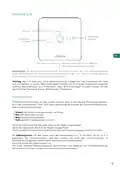


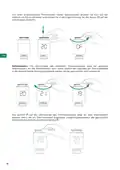



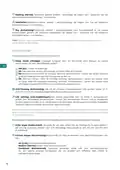






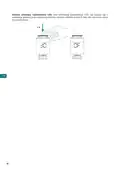







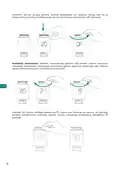










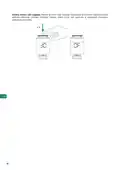


Likewise, to switch off a head that is on, briefly press its control wheel to reactivate it and turn it
in the opposite direction until the Off status appears on the LED display.
EN
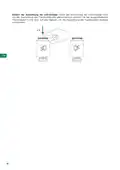
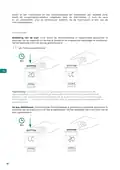
Set-point temperature. The LED display of the wireless thermostatic head shows the selected
set-point temperature. It is possible to regulate the set-point temperature by turning the head
control wheel in the corresponding direction until the desired value is shown.
The
icon will light up on the LED display of the head to indicate that demand is being
generated. When the head's room temperature reading reaches the desired set-point
temperature, the icon will turn off.
17

| General | Details |
|---|---|
| Name | AIRZONE AZX6AIQSNSB-AZX6AC1VALR Think Wireless Monochrome Thermostat User Manual |
| Make | AIRZONE |
| Language | English |
| Filetype | PDF (Download) |
| File size | 4.57 MB |
 (1 votes, average: 5.00 out of 5)
 Loading...

AIRZONE AZS62THINKRB, AZS62THINKRN Wireless Think Thermostat Instruction Manual

AIRZONE IBPRO6 FLEXA 3.0 Blueface Zero Wired Thermostat User Manual

AIRZONE Blueface Zero Thermostat User Manual


Honeywell TH8321WF02 Vision Pro WiFi Programmable Thermostat User Manual

Thalos Key 230 Bianco Touch Screen Wall Thermostat Instruction Manual

ise KNX RF Multi Radiator Thermostat Instructions

Danfoss INT69 Thermal Protection Thermostat Instruction Manual

hansgrohe AXOR UNO2 Concealed Thermostat with Shut Off Valve Instruction Manual

Beca BAC-1000 Series WiFi Thermostat User Guide

NEOMITIS RTE7OTA Wired Digital 7 Day Programmable Smart Room Thermostat Instruction Manual

Vine TJ-610E Smart Thermostat User Manual

Vine Smart Wi-Fi Thermostat with Nightlight TJ-225 User Guide
PECO CONTROL SYSTEMS T8168B-2 BACnet IP Connection Thermostat Instructions
Table of Contents
- 1. User's Manual →
- 2. Environmental Policy - Airzone Interface →
- 3. Environmental Policy →
- 4. Airzone Interfaces - Airzone Blueface Zero →
- 5. Hvac Control - Set-point Temperature →
- 6. Zone Navigation - Operation Mode →
- 7. Zone Settings - Sleep Mode →
- 8. Purification - Auto →
- 9. Airzone Blueface Zero Parameters - Identify Your System From... →
- 10. Access The Main Screen By Pressing 'airzone' From The Screen... →
- 11. Hvac Control - Operation Mode →
- 12. Settings Menu - Mode →
- 13. Airzone Think Parameters - Flexa 4.0 →
- 14. Airzone Lite - Important →
- 15. Airq Sensor - Ventilation Activated →
- 16. Airzone Wireless Valr Thermostatic Head - Interface →
- 17. Set-point Temperature →
- 18. Settings - Head Lockout →
- 19. Changing The Direction Of The Led Display →
- 20. Incidents - Warnings →
- 21. Errors - Communication Errors →
- 22. Airzone Lite Errors - Communication Loss Indicators →
- 23. Change Of Battery - Wireless Thermostats →
- 24. Política Medioambiental - Interfaces Airzone →
- 25. Política Medioambiental - Recogida Selectiva De Aparatos Elé... →
- 26. Interfaces Airzone - Airzone Blueface Zero →
- 27. Control De Climatización - Temperatura De Consigna →
- 28. Navegación Por Zonas - Acceso A Todas Las Zonas →
- 29. Configuración De Zona - Modo Sleep →
- 30. Purificación - Auto →
- 31. Parámetros Airzone Blueface Zero - Identifique Su Sistema Des... →
- 32. Airzone Think - Pantalla Principal →
- 33. Control De Climatización - Modo De Funcionamiento →
- 34. Menú De Configuración - Modo →
- 35. Parámetros Airzone Think - Control De Climatización →
- 36. Airzone Lite - Funciones Básicas →
- 37. Airq Sensor - Ventilación Vmc →
- 38. Cabezal Termostático Inalámbrico Airzone Valr - Interfaz →
- 39. Temperatura De Consigna →
- 40. Configuración - Bloqueo Del Cabezal →
- 41. Cambio De Orientación De La Pantalla Led →
- 42. Incidencias - Avisos →
- 43. Errores - Errores De Comunicación →
- 44. Errores Airzone Lite - Pérdida De Comunicación Con La Centra... →
- 45. Cambio De Batería - Termostatos Inalámbricos →
- 46. Politique Environnementale - Interfaces Airzone →
- 47. Politique Environnementale - Ne Jetez Pas L'appareil Dans La... →
- 48. Interfaces Airzone - Airzone Blueface Zero →
- 49. Contrôle De Chauffage Et Refroidissement - Température De Co... →
- 50. Navigation Par Zones - Accès À Toutes Les Zones →
- 51. Configuration De Zone - Mode Veille →
- 52. Purification - Auto →
- 53. Airzone Blueface Zero Paramètres - Identifier Votre Système À... →
- 54. Airzone Think - Écran De Veille →
- 55. Contrôle De Chauffage Et Refroidissement - Mode De Fonctionn... →
- 56. Menu De Configuration - Mode →
- 57. Airzone Think Paramètres - Innobus Pro8 →
- 58. Airzone Lite - Fonctions De Base →
- 59. Airq Sensor - Ventilation Active →
- 60. Tête Thermostatique Radio Airzone Valr - Interface →
- 61. Température De Consigne →
- 62. Configuration - Verrouillage De La Tête →
- 63. Changement Dorientation De Lécran Led →
- 64. Incidences - Avertissements →
- 65. Erreurs De Communication - Erreur De L'unité →
- 66. Erreurs Airzone Lite - Communication Interrompue →
- 67. Changement De Pile - Thermostats Radio →
- 68. Politica Ambientale - Interfacce Airzone →
- 69. Politica Ambientale - Smaltimento Corretto Delle Apparecchia... →
- 70. Interfacce Airzone - Airzone Blueface Zero →
- 71. Controllo Della Climatizzazione - Indicatore Di Efficienza →
- 72. Navigazione Nelle Zone - Accesso A Tutte Le Zone →
- 73. Configurazione Di Zona - Modo Sleep →
- 74. Purificazione - Auto →
- 75. Airzone Blueface Zero Parametri - Identifica Il Tuo Sistema D... →
- 76. Airzone Think - Funzione Eco-adapt →
- 77. Controllo Della Climatizzazione - Modo Di Funzionamento →
- 78. Menu Di Configurazione - Modo →
- 79. Airzone Think Parametri - Flexa 4.0 →
- 80. Airzone Lite - Funzioni Di Base →
- 81. Airq Sensor - Ventilazione Attiva →
- 82. Testina Termostatica Senza Fili Airzone Valr - Interfaccia →
- 83. Temperatura Impostata →
- 84. Configurazione - Blocco Testina →
- 85. Cambio Orientamento Schermo Led →
- 86. Incidenze - Avvisi →
- 87. Errori - Errori Di Comunicazione →
- 88. Errori Airzone Lite - Perdita Di Comunicazione Con La Scheda... →
- 89. Cambio Della Batteria - Termostati Senza Fili →
- 90. Política Ambiental - Interfaces Airzone →
- 91. Política Ambiental - Recolha Seletiva De Dispositivos Elétri... →
- 92. Interfaces Airzone - Airzone Blueface Zero →
- 93. Controlo De Climatização - Temperatura De Referência →
- 94. Navegação Por Zonas - Acesso A Todas As Zonas →
- 95. Configuração Da Zona - Modo Sleep →
- 96. Purificação - Auto →
- 97. Airzone Blueface Zero Parâmetros - Configuraçao De Utilizador →
- 98. Airzone Think - Proteção De Ecrã →
- 99. Controlo De Climatização - Modo De Funcionamento →
- 100. Menu De Configuração - Modo →
- 101. Airzone Think Parâmetros - Flexa 4.0 →
- 102. Airzone Lite - Funções Básicas →
- 103. Airq Sensor - Ventilação Ativa →
- 104. Cabeça Termostática Sem Fios Airzone Valr - Interface →
- 105. Temperatura De Referência →
- 106. Configuração - Bloqueio Da Cabeça →
- 107. Mudança De Orientação Do Ecrã Led →
- 108. Incidências - Avisos →
- 109. Erros - Erros De Comunicação →
- 110. Erros Airzone Lite →
- 111. Troca De Bateria - Termostatos Sem Fios →
- 112. Umweltschutz - Airzone-schnittstell... →
- 113. Umweltschutz →
- 114. Airzone-schnittstell... - Airzone Blueface Zero →
- 115. Klimatisierungsregel... - Solltemperatur →
- 116. Zonenauswahl - Betriebsmodus →
- 117. Zonenkonfiguration - Sleepmodus →
- 118. Luftreinigung - Auto-modus →
- 119. Airzone Blueface Zero-parameter - Benutzerkonfiguratio... →
- 120. Airzone Think - Steuerleiste →
- 121. Klimatisierungsregel... - Solltemperatur →
- 122. Konfigurationsmenü - Modus →
- 123. Airzone Think-parameters - Flexa 4.0 →
- 124. Airzone Lite - Wichtig →
- 125. Airq Sensor - Lüftung Aktiv →
- 126. Drahtloser Airzone-thermostatko... Valr - Schnittstelle →
- 127. Um Einen Eingeschalteten Thermostaten Wieder Auszuschalten -... →
- 128. Einstellungen - Sperrung Des Thermostatkopfs →
- 129. Ändern Der Ausrichtung Der Led-anzeige →
- 130. Störungen - Meldungen →
- 131. Fehler - Kommunikationsfehler →
- 132. Airzone Lite Fehler - Kommunikation Mit Der Zentrale Unterbr... →
- 133. Batteriewechsel - Drahtloser Thermostate →
- 134. Környezetvédelmi Irányelve - Airzone Interfészek →
- 135. Környezetvédelmi Irányelvek - Megfelelő Környezetgazdálkodás →
- 136. Airzone Interfészek - Airzone Blueface Zero →
- 137. A Légkondicionáló Vezérlése - Set-point Temperature (beállít... →
- 138. A Ventilátor Sebessége - Nagy Sebesség →
- 139. Heating (fűtés) - Ventilation (szellőztetés) →
- 140. Control Stages - Air →
- 141. Airzone Blueface Zero Paraméterek - Felhasználói Beállítások →
- 142. Airzone Think - Főképernyő →
- 143. A Légkondicionáló Vezérlése - Set-point Temperature (beállít... →
- 144. Beállítások Menü - Üzemmód →
- 145. Airzone Think Paraméterek - Flexa 4.0 →
- 146. Airzone Lite - Hőmérséklet Növelése →
- 147. Airq Sensor - Szabályozott Mechanikus Szellőzés →
- 148. Airzone Valr Vezeték Nélküli Termosztátfej - Interfész →
- 149. Beállított Hőmérséklet - Vezeték Nélküli Termosztátfej Led-e... →
- 150. Beállítás - A Fej Blokkolása →
- 151. A Led-es Kijelző Tájolása →
- 152. Váratlan Események - Figyelmeztetések →
- 153. Ntc2 Alarm - Filter Maintenance →
- 154. Airzone Lite Hibák - Az On/off Ikon Villogása →
- 155. Elemcsere - Vezeték Nélküli Termosztátok →
- 156. Miljöpolicy - Airzone-gränssnitt →
- 157. Miljöpolicy - Systemets Komponenter Är Återvinningsbara →
- 158. Airzone-gränssnitt - Airzone Blueface Zero →
- 159. Klimatstyrning - Set-point Temperature (förinställd Temperat... →
- 160. Fläkthastighet - Navigering Genom Zoner →
- 161. Heating (värme) - Ventilation →
- 162. Adjust Slats (inställning Av Luftriktare) - Q-adapt →
- 163. Parametrar För Airzone Blueface Zero - Identifiera Ditt Syste... →
- 164. Airzone Think - Skärmsläckare →
- 165. Klimatstyrning - Set-point Temperature (förinställd Temperat... →
- 166. Inställningsmeny - Mode (driftläge) →
- 167. Parametrar För Airzone Think - Flexa 4.0 →
- 168. Airzone Lite - Grundläggande Funktion →
- 169. Airq Sensor - Styrd Mekanisk Ventilation →
- 170. Trådlöst Termostathuvud Airzone Valr - Gränssnitt →
- 171. Förinställd Temperatur (börvärde) - Värmebehov Indikator →
- 172. Inställningar - Låsa Termostathuvudet →
- 173. Vända På Displayens Visning →
- 174. Incidenter - Anti-freezing →
- 175. Fel - Kommunikationsfel →
- 176. Fel För Airzone Lite - Om Ikonen On/off (på/av) →
- 177. Byte Av Batteri - Trådlösa Termostaterna →
- 178. Milieubeleid - Airzone-interfaces →
- 179. Milieubeleid →
- 180. Airzone-interfaces - Airzone Blueface Zero →
- 181. Klimaatregeling - Set-point Temperature (ingestelde Temperat... →
- 182. Ventilatorsnelheid - Navigatie Door Zones →
- 183. Heating (verwarmen) - Ventilation (ventilatie) →
- 184. Control Stages (bedieningsfasen) - Air (lucht) →
- 185. Parameters Voor Airzone Blueface Zero - Gebruikersinstelling... →
- 186. Airzone Think - Eco-adapt Functie →
- 187. Klimaatregeling - Set-point Temperature (ingestelde Temperat... →
- 188. Mode (modus) - Speed (snelheid) →
- 189. Parameters Voor Airzone Think - Flexa 4.0 →
- 190. Airzone Lite - Basisfuncties →
- 191. Airq Sensor - Gecontroleerde Mechanische Ventilatie →
- 192. Draadloze Airzone-thermostaatk... Valr - Interface →
- 193. Ingestelde Temperatuur →
- 194. Configuratie - Blokkering Van De Kop →
- 195. Weergaverichting Van Leddisplay Wijzigen →
- 196. Storingen - Waarschuwingen →
- 197. Ntc2 Alarm - Filter Maintenance →
- 198. Fouten Airzone Lite - Indien Het Pictogram On/off Van Airzon... →
- 199. De Batterij Vervangen - Draadloze Thermostaten →
- 200. Ochrona Środowiska - Panele Sterowania Airzone →
- 201. Ochrona Środowiska - Urządzenia Nie Wolno Wyrzucać Razem Z O... →
- 202. Panele Sterowania Airzone - Airzone Blueface Zero →
- 203. Sterowanie Klimatyzacją - Set-point Temperature (temperatura... →
- 204. Prędkość Wentylatora - Wysoka Prędkość →
- 205. Heating (ogrzewanie) - Ventilation (wentylacja) →
- 206. Control Stages (rodzaj Klimatyzacji) - Air (powietrze) →
- 207. Parametry Airzone Blueface Zero - Ustawienia Użytkownika →
- 208. Airzone Think - Ekran Główny →
- 209. Sterowanie Klimatyzacją - Set-point Temperature (temperatura... →
- 210. Menu Ustawienia - Mode (tryb Pracy) →
- 211. Parametry Airzone Think - Flexa 4.0 →
- 212. Airzone Lite - Podstawowe Funkcje →
- 213. Airq Sensor - Kontrolowana Wentylacja Mechaniczna →
- 214. Bezprzewodowa Głowica Termostatyczna Airzone Valr - Interfej... →
- 215. Temperatura Zadana →
- 216. Konfiguracja - Blokowanie Głowicy →
- 217. Zmiana Orientacji Wyświetlacza Led →
- 218. Błędy - Ostrzeżenia →
- 219. Ntc2 Alarm (alarm Ntc2) - Filter Maintenance (konserwacja Fi... →
- 220. Błędy Airzone Lite - Utrata Połączenia Z Centralą →
- 221. Wymiana Baterii - Bezprzewodowa Głowica Termostatów →
- 222. Miljømessige Retningslinjer - Airzone Grensesnitt →
- 223. Miljømessige Retningslinjer - Ikke Kast Dette Utstyret I Hus... →
- 224. Airzone Grensesnitt - Airzone Blueface Zero →
- 225. Hvac-kontroll - Set-point Temperature (settpunktstemperatu... →
- 226. Viftehastighet - Sonenavigasjon →
- 227. Heating (oppvarming) - Ventilation (ventilasjon) →
- 228. Adjust Slats - Q-adapt →
- 229. Airzone Blueface Zero-parametre - Identifiser Systemet Ditt F... →
- 230. Få Tilgang Til Hovedskjermen Ved Å Trykke Airzone Fra Skjerm... →
- 231. Hvac-kontroll - Set-point Temperature (settpunktstemperatu... →
- 232. Innstillingsmeny - Mode (modus) →
- 233. Airzone Think-parametre - Flexa 4.0 →
- 234. Grunnleggende Funksjoner - Set-point Temperature (settpunkts... →
- 235. Airq Sensor - Kontrollert Mekanisk Ventilasjon →
- 236. Airzone Trådløst Valr-termostathode - Grensesnitt →
- 237. Innstillingspunktste... →
- 238. Innstillinger - Låsing Av Hodet →
- 239. Endre Retningen På Led-skjermen →
- 240. Hendelser - Advarsler →
- 241. Feil - Kommunikasjonsfeil →
- 242. Airzone Lite-feil - Kommunikasjonen Med Hovedkontrolltavlen ... →
- 243. Bytte Av Batteri - Trådløse Termostater →
- 244. Aplinkosaugos Politika - Airzone' Sąsajos →
- 245. Aplinkosaugos Politika - Sudedamąsias Dalis Galima Perdirbti →
- 246. Airzone' Sąsajos - Airzone Blueface Zero' →
- 247. Hvac Kontrolė - Set-point Temperature (nustatytoji Temperatū... →
- 248. Ventiliatoriaus Greitis - Zonų Navigacija →
- 249. Heating (šildymas) - Ventilation (vėdinimas) →
- 250. Adjust Slats - Q-adapt →
- 251. Airzone Blueface Zero' Parametrai - Identifikuokite Savo Sist... →
- 252. Airzone Think - Ekrano Užsklanda →
- 253. Hvac Kontrolė - Set-point Temperature (nustatytoji Temperatū... →
- 254. Nustatymų Meniu - Mode (režimas) →
- 255. Airzone Think' Parametrai - Flexa 4.0 →
- 256. Airzone Lite' - Pagrindinės Funkcijos →
- 257. Kontroliuojama Mechaninė Ventiliacija - Oro Kondicionavimas ... →
- 258. Airzone' Belaidė Valr Termostatinė Galvutė - Sąsaja →
- 259. Nustatytoji Temperatūra - Galvutės Led Ekrane Užsidegs Pikto... →
- 260. Nustatymai - Galvutės Blokavimas →
- 261. Led Ekrano Krypties Keitimas →
- 262. Incidentai - Įspėjimai →
- 263. Klaidos - Ryšio Klaidos →
- 264. Airzone Lite' Klaidos - Airzone Lite' Termostatų Atveju, Jei... →
- 265. Pakeisti Bateriją - Belaidis Termostatas →
- 266. Satura Rādītājs - Vides Politika →
- 267. Vides Politika - Aprīkojuma Sastāvdaļas Var Pārstrādāt →
- 268. Airzone Saskarnes - Airzone Blueface Zero →
- 269. Hvac Vadība - Set-point Temperature (iestatītā Temperatūra) →
- 270. Ventilatora Ātrums - Navigācija Zonās →
- 271. Heating - Ventilation →
- 272. Adjust Slats - Q-adapt →
- 273. Airzone Blueface Zero Parametri - Identificējiet Savu Sistēmu... →
- 274. Airzone Think - Ekrānsaudzētājs →
- 275. Hvac Vadība - Set-point Temperature (iestatītā Temperatūra) →
- 276. Iestatījumu Izvēlne - Mode (režīms) →
- 277. Airzone Think Parametri - Flexa 4.0 →
- 278. Airzone Lite - Svarīgi! →
- 279. Airq Sensor - Kontrolēta Mehāniskā Ventilācija →
- 280. Airzone Bezvadu Termostatiskā Galviņa Valr - Saskarne →
- 281. Iestatītā Temperatūra - Galviņas Led Displejā Iedegsies Ikon... →
- 282. Iestatījumi - Galviņas Bloķēšana →
- 283. Led Displeja Virziena Maiņa →
- 284. Starpgadījumi - Brīdinājumi →
- 285. Kļūdas - Sakaru Kļūdas →
- 286. Airzone Lite Kļūdas - Saziņas Pārtraukšana Ar Galveno Vadība... →
- 287. Baterijas Nomaiņa - Bezvadu Termostati →
- 288. Politika V Oblasti Životního Prostředí - Rozhraní Airzone →
- 289. Politika V Oblasti Životního Prostředí →
- 290. Rozhraní Airzone - Airzone Blueface Zero →
- 291. Ovládání Hvac - Set-point Temperature (požadovaná Teplota) →
- 292. Rychlost Ventilátoru - Vysoká Rychlost →
- 293. Heating (topení) - Ventilation (větrání) →
- 294. Adjust Slats (nastavení Lamel) - Q-adapt →
- 295. Parametry Airzone Blueface Zero - Identifikujte Svůj Systém N... →
- 296. Airzone Think - Hlavní Obrazovka →
- 297. Ovládání Hvac - Set-point Temperature (požadovaná Teplota) →
- 298. Nabídka Nastavení - Mode (režim) →
- 299. Parametry Airzone Think - Flexa 4.0 →
- 300. Airzone Lite - Komunikační Frekvence: 868 Mhz →
- 301. Airq Sensor - Řízené Mechanické Větrání →
- 302. Bezdrátové Termostatické Hlavice Valr Airzone - Rozhraní →
- 303. Vypnutí Hlavice - Požadovaná Teplota →
- 304. Nastavení - Uzamknutí Hlavice →
- 305. Změna Směru Led Displeje →
- 306. Incidenty - Anti-freezing →
- 307. Chyby V Komunikaci - Termostat Hlavní Ovládací Panel / Zónov... →
- 308. Chyvy Airzone Lite - Pokud V Případě Termostatů Airzone Lite →
- 309. Výměna Baterie - Bezdrátové Termostaty →
- 310. Miljøpolitik - Airzone-grænseflader →
- 311. Miljøpolitik - Korrekt Miljømæssig Håndtering →
- 312. Airzone-grænseflader - Airzone Blueface Zero →
- 313. Hvac-styring - Set-point Temperature →
- 314. Ventilatorhastighed - Zonenavigering →
- 315. Heating (opvarmning) - Ventilation →
- 316. Adjust Slats - Q-adapt →
- 317. Parametre For Airzone Blueface Zero - Brugerindstillinger →
- 318. Airzone Think - Hovedskærm →
- 319. Hvac-styring - Set-point Temperature →
- 320. Indstillingsmenu - Mode (tilstand) →
- 321. Parametre For Airzone Think - Flexa 4.0 →
- 322. Airzone Lite - Grundlæggende Funktioner →
- 323. Airq Sensor - Kontinuerlig Obligatorisk Ventilation →
- 324. Airzone Valr-termostathoved Uden Kabel - Grænseflade →
- 325. Referencetemperatur →
- 326. Indstillinger - Hovedblokering →
- 327. Ændring Af Led-displayets Orientering →
- 328. Hændelser - Advarsler →
- 329. Ntc2 Alarm (ntc2-alarm) - Filter Maintenance (filtervedligeh... →
- 330. Airzone Lite Fejl - For Airzone Lite-termostater →
- 331. Udskiftning Af Batteriet - Termostater Uden Kabel →
- 332. Page 332 →