Home > vtech > vtech T961NN50 Universal Wired Thermostat User Guide

vtech T961NN50 Universal Wired Thermostat User Guide
T961NN50 Universal  
Wired Thermostat  
Welcome Guide  
GeneralDetails
Namevtech T961NN50 Universal Wired Thermostat User Guide
Makevtech
LanguageEnglish
FiletypePDF (Download)
File size0.21 MB
Download PDF
1 Star2 Stars3 Stars4 Stars5 Stars (1 votes, average: 5.00 out of 5)
Loading...
vtech Installing E-Smart W960 Thermostat User Manual
vtech T961NN50 Amana Wired Thermostat User Guide
Vtech E-Smart W960 Thermostat Instruction Manual
vtech W960 E-Smart Wireless Thermostat User Manual
vtech W960 Installing E-Smart Thermostat Instruction Manual
vtech W960 E-Smart Thermostat Instruction Manual
vtech T961NN50 E-Smart Thermostat Installation Guide
vtech T961 Wired Thermostat Owner’s Manual
vtech T961NN50 Wired Thermostat User Guide
vtech W960 E-Smart Wireless Thermostat

vtech T961NN50 Universal Wired Thermostat User Guide
Get the free PDF manual for the vtech T961NN50 Universal Wired Thermostat User Guide and access setup steps, usage instructions, and troubleshooting tips. 👉 View online or download now to keep your thermostat running smoothly!
vtech T961NN50 Universal Wired Thermostat User Guide Overview
Summary of Contents

  • Page 1: Welcome guide for the T961NN50 universal wired thermostat.
  • Page 2: In the box Required but not supplied Thermostat layout Ready for setup EC Tool Pro app Scan the QR code to download the app Support Specifications are subject to change without notice Copyright © 2024 VTech Communications, Inc. All rights reserved T961NN50_WelcomeGuide_7JUL2024
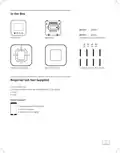
  • Page 3: In the box includes the thermostat, wall plate, wall mount screws and anchors, universal deco plate, deco plate cover, and T-lock & junction box screws. Required but not supplied items are a screwdriver set, drill and drill bits (3/16 for drywall and 7/32 for plaster), pencil, and level. A smartphone with NFC feature is required, specifically with iOS 15 or higher or Android 12.0 or higher.
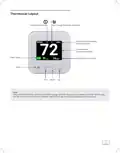
  • Page 4: Thermostat layout includes various features such as current room temperature value and HVAC mode. The schedule and filter change reminder are optional features. Current room humidity can be displayed when specific features are enabled via the EC Tool Pro app. Users can set temperature values and adjust fan settings. The interface includes options to navigate up and down. Note that certain features require activation through the app for display.
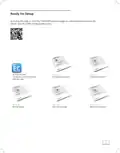
  • Page 5: Ready for setup Scan the QR code or visit the product page for the EC Tool Pro app and documentation. EC Tool Pro app Configure your thermostat with the app. Manual configuration guide Manual installation guide Manual wiring guide Manual operation guide Document warranty program