
×
- 1. Electronic Heat / Cool Thermostat With Auto-changeover (Installation Instructions → User Instructions)
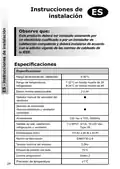
- 2. Installation Instructions (User Instructions → Instructions Dinstallation → Instructions Dutilisateur → Anweisungen Für Installati → Benutzeranweisen → Instrucciones De Instalación)
- 3. Installation (Specification → Thermostat Features → Temperature Range, Heating → Temperature Range, Cooling → Selectable Dead-band → Power Supply)
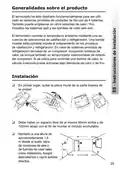
- 4. Product Overview (Installation)
- 5. Wiring (Pipe Fan Coil Application → Heat-pump Application → Electronics → Fan)
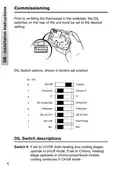
- 6. Commissioning (Dil Switch Options, Shown In Factory Set Position → Dil Switch Descriptions)
- 7. Switch 7: Active (Switch 6: Allows Celsius Or Fahrenheit Temperature Scaling → Switch 5: Enables Or Disables A Compressor Delay Timer → Switch 4: Active → Switch 3: Allows Dead-band Between Heating And Cooling To Be Set → Switch 2: Allows Application To Set As Fan Coil Or As Heat Pump → Switch 1: The Function Of This Switch Is Dependent Upon The Setting Of Switch 2)
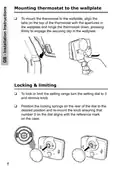
- 8. Mounting Thermostat To The Wallplate (Locking & Limiting)
- 9. Temperature Setting Dial (Fan Runs Continuously → Thermostat Off → Led Indicators → Lcd Display → Reset Button)
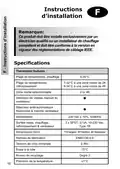
- 10. Instructions Dinstallation (Spécifications → Thermostat Features → Plage De Températures, Chauffage → Plage De Températures, Refroidissement → Alimentation → Normes De Fabrication)
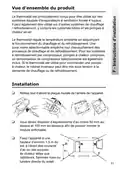
- 11. Vue Densemble Du Produit (Installation)
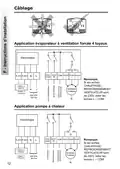
- 12. Câblage (Application Évaporateur À Ventilation Forcée 4 Tuyaux → Electronique → Application Pompe À Chaleur → Ventilateur 3 Vitesses)
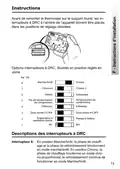
- 13. Instructions (Options Interrupteurs À Drc → Descriptions Des Interrupteurs À Drc)
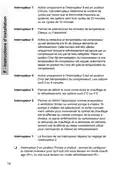
- 14. Interrupteur 7: Activé Uniquement Si Linterrupteur 8 Est En Position Chrono (Interrupteur 6: Permet De Sélectionner Les Échelles De Température Celsius Ou Fahrenheit → Interrupteur 5: Active Ou Désactive Un Temporisateur De Compresseur → Interrupteur 4: Activé Uniquement Si Linterrupteur 5 Est En Position Cmp Del → Interrupteur 3: Permet De Définir La Zone Morte Entre Le Chauffage Et Le Refroidissement → Interrupteur 2: Permet De Définir Lapplication Comme Évaporateur À Ventilation Forcée Ou Comme Pompe À Chaleur → Interrupteur 1: La Fonction De Cet Interrupteur Dépend Du Réglage De Linterrupteur 2)
- 15. Fixation Du Thermostat Au Support Mural (Verrouillage & Limitation)
- 16. Instructions Dutilisateur (Cadran De Réglage De Température → Vitesse De Ventilateur → Thermostat Arrêté → La Diode Est Allumée En Rouge Pendant La Demande De Chauffage → Lécran Lcd Affiche La Température Ambiante Effective → Remarque)
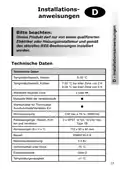
- 17. Installationsanweisungen (Technische Daten → Temperaturbereich, Heizen → Temperaturbereich, Kühlen → Wählbare Neutrale Zone → Manuelle Wahl Der Ventilatorstufe → Stromversorgung)
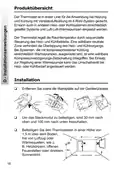
- 18. Produktübersicht (Installation)
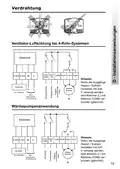
- 19. Verdrahtung (Ventilator-luftkühlung Bei 4-rohr-systemen → Elektronik → Heizen / Kühlen → Fernfühler → Stufen-ventilator → Wärmepumpenanwendung)
- 20. Inbetriebnahme-instruktion (Dil-schalteroptionen → Dil-schalterbeschreibungen)
- 21. Schalter 7 (Schalter 6 → Schalter 5 → Schalter 4 → Schalter 3 → Schalter 2 → Schalter 1)
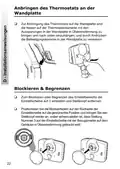
- 22. Anbringen Des Thermostats An Der Wandplatte (Blockieren & Begrenzen)
- 23. Temperaturinstellscheibe (Reset-taste → Ventilatorgeschwindigkeit → Led-lampe Anzeigen → Lcd-display Funktionen → Hinweis Zur Rücksetzung Des Mikroprozessors → Benutzeranweisung)
- 24. Instrucciones De Instalación (Especificaciones → Rango De Temperaturas, Calefacción → Rango De Temperaturas, Refrigeración → Selector Manual De Velocidad Del Ventilador → Alimentación → Dimensiones (mm))
- 25. Generalidades Sobre El Producto (Instalación)
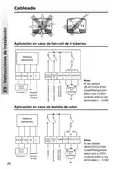
- 26. Cableado (Aplicación En Caso De Fan-coil De 4 Tuberías → Aplicación En Caso De Bomba De Calor → Ventilador De 3 Velocidades)
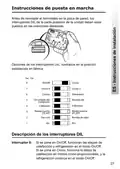
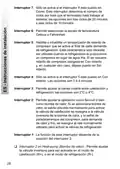
- 27. Instrucciones De Puesta En Marcha (Opciones De Los Interruptores Dil → Descripción De Los Interruptores Dil)
- 28. Interruptor 7 (Interruptor 6 → Interruptor 5 → Interruptor 4 → Interruptor 3 → Interruptor 2 → Interruptor 1)
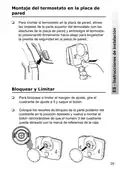
- 29. Montaje Del Termostato En La Placa De Pared (Bloquear Y Limitar)
- 30. Cuadrante De Ajuste De Temperatura (Botón Reset → El Ventilador Funciona Continuamente → El Ventilador Funciona Bajo Demanda De Calor O Frío → Velocidad Del Ventilador → Termostato Desconectado → Led Iluminado En Rojo Durante La Demanda De Calefacción)
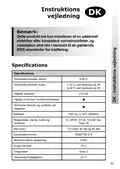
- 31. Instruktionsvejledning (Specifications → Temperaturområde, Varme → Temperaturområde, Kulde → Valgbar Dødzone → Batterier → Konstruktionsnorm)
- 32. Produktoversigt (Vejledning)
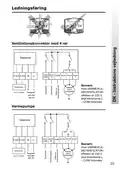
- 33. Ledningsføring (Ventilationskonvektor Med 4 Rør → Elektronik → Fjernsensor → Ventilator Med 3 Hastigheder → Varmepumpe)
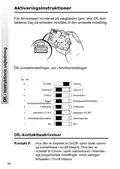
- 34. Aktiveringsinstruktioner (Dil-kontaktindstillinger → Dil-kontaktbeskrivelser)
- 35. Kontakt 7 (Kontakt 6 → Kontakt 5 → Kontakt 4 → Kontakt 3 → Kontakt 2 → Kontakt 1)
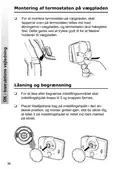
- 36. Montering Af Termostaten På Vægpladen (Låsning Og Begrænsning)
- 37. Temperaturindstillingshjul (Reset-knap → Ventilatoren Kører Uafbrudt → Ventilatorhastighed → Lysdioden Lyser Rødt Ved Opvarmning → Lcd-display)
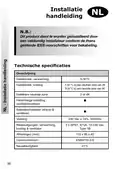
- 38. Installatie (Technische Specificaties → Omschrijving → Instelbereik, Verwarming → Instelbereik, Koeling → Handmatige Instelling → Voeding)
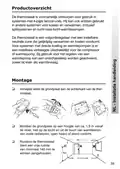
- 39. Productoverzicht (Montage)
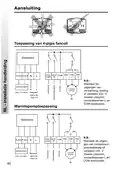
- 40. Aansluiting (Toepassing Van 4-pijps Fancoil → Elektronica → Fan → Warmtepomptoepassing)
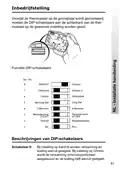
- 41. Inbedrijfstelling (Functies Dip-schakelaars → Beschrijvingen Van Dip-schakelaars)
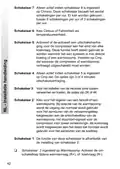
- 42. Schakelaar 7 (Schakelaar 6 → Schakelaar 5 → Schakelaar 4 → Schakelaar 3 → Schakelaar 2 → Schakelaar 1)
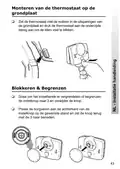
- 43. Monteren Van De Thermostaat Op De Grondplaat (Blokkeren & Begrenzen)
- 44. Instelknop, Lees Instelling (Reset-knop → Ventilator Continu → Ventilatorsnelheid 3 → Ventilatorsnelheid 2 → Ventilatorsnelheid 1 → Thermostaat Uitgeschakeld)
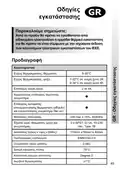
- 45. Χαρακτηριστικά (Εύρος Θερμοκρασίας, Θέρμανση → Εύρος Θερμοκρασίας, Ψύξη → Επιλέξιμη Νεκρή Ζώνη → Χειροκίνητος Επιλογέας Ταχύτητας Ανεμιστήρα → Επιλογέας Αυτόματης Απενεργοποίησης Θερμοστάτη → Διαστάσεις (μήκος X Ύψος X Βάθος))
- 46. Γενική Εικόνα Του Προϊόντος (Εγκατάσταση Θερμοστάτη)
- 47. Εφαρμογή Τοπικής Κλιματιστικής Μονάδας (fan Coil) 4 Σωλήνων (Εφαρμογή Αντλίας Θερμότητας)
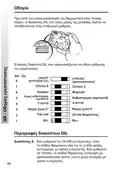
- 48. Πριν Από Την Επανεγκατάσταση Του Θερμοστάτη Στον Πίνακα Τοίχου, Οι Διακόπτες Dil Στο Πίσω Μέρος Της Μονάδας Πρέπει Να Τοποθετούνται Στην Επι…
- 49. Διακόπτης 7: Ρύθμιση Θερμοστάτη (Διακόπτης 6: Κλίμακα Θερμοκρασίας → Διακόπτης 5: Χρονοδιακόπτης Καθυστέρησης Συμπιεστή → Διακόπτης 4: Ρύθμιση Καθυστέρησης Συμπιεστή → Διακόπτης 3: Ρύθμιση Νεκρής Ζώνης → Διακόπτης 2: Ρύθμιση Εφαρμογής → Διακόπτης 1: Λειτουργία Διακόπτη 2)
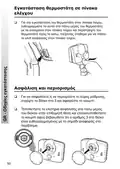
- 50. Εγκατάσταση Θερμοστάτη Σε Πίνακα Ελέγχου (Ασφάλιση Και Περιορισμός)
- 51. Πλήκτρο Reset (Δίσκος Ρύθμισης Θερμοκρασίας → Ο Ανεμιστήρας Λειτουργεί Με Τη Ζήτηση Θερμότητας Ή Ψύξης → Θερμοστάτης Εκτός → Η Led (φωτοδίοδος) Ανάβει Κόκκινη Κατά Τη Ζήτηση Θερμότητας → Η Οθόνη Lcd Δείχνει Την Υπάρχουσα Θερμοκρασία Χώρου → Σημείωση: Εάν Για Οποιονδήποτε Λόγο Είναι Αναγκαίο Να Επαναφερθεί Ο Μικροεπεξεργαστής)
- 52. Instrukcja Instalacji (Specyfikacja → Zakres Temperatur, Grzanie → Zakres Temperatur, Chłodzenie → Ręczny Wybór Prędkości Wentylatora → Zasilanie → Wymiary (mm))
- 53. Opis Urządzenia (Instalacja)
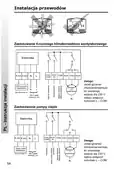
- 54. Instalacja Przewodów (Zastosowanie 4-rurowego Klimakonwektora Wentylatorowego → Zastosowanie Pompy Ciepła)
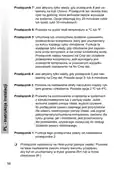
- 55. Instrukcja (Opcje Przełącznika Dil → Przełączniki Dil - Opis)
- 56. Przełącznik 7 (Przełącznik 6 → Przełącznik 5 → Przełącznik 4 → Przełącznik 3 → Przełącznik 2 → Przełącznik 1)
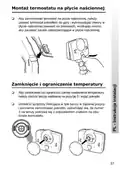
- 57. Montaż Termostatu Na Płytce Naściennej (Zamknięcie I Ograniczenie Temperatury)
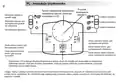
- 58. Instrukcja Użytkownika (Przycisk Resetowania (reset) → Tarcza Nastawiania Temperatury → Wentylator Pracuje W Sposób Ciągły → Wyświetlacz Lcd Pokazuje Aktualną Temperaturę W Pokoju → Uwaga: Gdyby Z Jakiegoś Powodu Konieczne Było Zresetowanie Mikroprocesora)
- 59. Montavimo Instrukcijos (Specifikacija → Temperatūros Diapazonas, Šildymas → Temperatūros Diapazonas, Vėsinimas → Maitinimas → Matmenys (mm) → Atitinka Standartus)
- 60. Gaminio Pristatymas (Montavimo Instrukcijos)
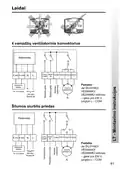
- 61. Laidai (Vamzdžių Ventiliatorinis Konvektorius → Elektronika → Cool/heat → Distancinis Daviklis → Greiciu Ventiliatorius → Šilumos Siurblio Priedas)
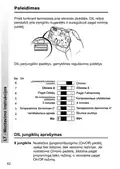
- 62. Paleidimas (Prieš Tvirtinant Termostatą → Dil Perjungiklio Padėtys → Dil Jungiklių Aprašymas)
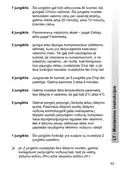
- 63. Jungiklis (Pasirenkama Matavimo Skalė → Įjungia Arba Išjungia Kompresoriaus Uždelsimo Laikmatį → Jungiamas Tik Tuomet, Jei 5 Jungiklis Yra Cmp Del Padėtyje → Galima Nustatyti Ribinį Temperatūros Parametrą → Galima Įrenginį Perjungti Į Fankoilą Arba Į Šildymo Siurblį → Šio Jungiklio Funkcija Yra Susijusi Su Nustatyta 2 Jungiklio Padėtimi)
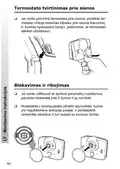
- 64. Termostato Tvirtinimas Prie Sienos (Blokavimas Ir Ribojimas)
- 65. Temperatūros Nustatymo Skalė (Reset Mygtukas → Ventiliatorius Veikia Nepertraukiamai → Ventiliatorius Veikia Šildymo Ar Vėsinimo Režimu → Led Indikatorius Dega Raudonai, Jei Šildoma → Led Indikatorius Dega Žaliai, Jei Vėsinama → Pastaba)
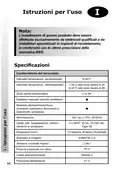
- 66. Istruzioni Per Luso (Specificazioni → Caratteristiche Del Termostato → Intervallo Temperatura, Riscaldamento → Intervallo Temperatura, Raffreddamento → Dimensioni (mm) → Standard Di Progetto)
- 67. Descrizione Prodotto (Installazione)
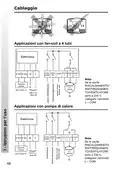
- 68. Cablaggio (Applicazioni Con Fan-coil A 4 Tubi → Elettronica → Applicazioni Con Pompa Di Calore)
- 69. Messa In Servizio (Opzioni Interruttori Dil → Descrizione Interruttori Dil)
- 70. Interruttore 7 (Interruttore 6 → Interruttore 5 → Interruttore 4 → Interruttore 3 → Interruttore 2 → Interruttore 1)
- 71. Montaggio Termostato Sulla Staffa A Parete (Bloccaggio E Esclusioni)
- 72. Istruzioni Per Lutente (Pomello Di Regolazione Temperatura → Display Lcd → Pulsante Reset → Funzionamento Continuato Del Ventilatore → Funzionamento Del Ventilatore In Base Alle Richieste Di Riscaldamento O Raffreddamento → Nota)
- 73.
- 74.
- 75.
- 76. Part No 39051v05s2-1 10/07
×
RET-230-HC-3 Electronic Heat Cool Thermostat User Manual



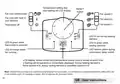

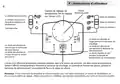


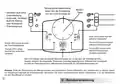




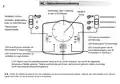







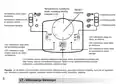



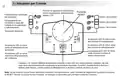



Temperature setting dial,
read setting off LCD display
RESET
button
Fan runs continuously
Fan speed 3
Fan speed 2
Fan speed 1
Fan runs with heat or
cool demand
Thermostat off
LED lit red during heating
demand
LED lit green when
thermostat is powered
LED lit green when
cooling demand.
LED flashes green during
compressor delay period
LED lit orange when
fan running
LCD display, shows actual room temperature unless knob is moved at which time
a flashing set temperature is momentarily displayed. During heating demand a
flame symbol is lit, during cooling demand a snowflake symbol is lit
Note: Should it be necessary to reset the microprocessor for any reason, a reset button is located beneath the setting dial. Use
a non-metallic point, for example a match- stick to depress the recessed button.
GB - User Instructions

| General | Details |
|---|---|
| Name | RET-230-HC-3 Electronic Heat Cool Thermostat User Manual |
| Make | RET |
| Language | English |
| Filetype | PDF (Download) |
| File size | 0.93 MB |
 (1 votes, average: 5.00 out of 5)
 Loading...

Roth Basicline Wired Thermostat Installation Guide

Livn 147 Thermostat User Guide

NEOMITIS RTE7OTA Wired Digital 7 Day Programmable Smart Room Thermostat Instruction Manual

HEATIT 54 304 59 DIN Smart Thermostat Installation Guide

VIMAR 02952 Well-Contact Plus Electronic Touchscreen Thermostat Instruction Manual

NEOMITIS Rtaneoa Wired Analog Room Thermostat Instruction Manual

EBERLE UTE Series Flush Mounted Room Thermostat Owner’s Manual

MI-HEAT MST1 Room Thermostat for Underfloor Heating User Manual

Honeywell D1-528 Thermostat User Guide

STELPRO STE402NP Smart Electronic Thermostat User Guide
Table of Contents
- 1. Electronic Heat / Cool Thermostat With Auto-changeover - Ins... →
- 2. Installation Instructions - User Instructions →
- 3. Installation - Specification →
- 4. Product Overview - Installation →
- 5. Wiring - Pipe Fan Coil Application →
- 6. Commissioning - Dil Switch Options, Shown In Factory Set Pos... →
- 7. Switch 7: Active - Switch 6: Allows Celsius Or Fahrenheit Te... →
- 8. Mounting Thermostat To The Wallplate - Locking & Limiting →
- 9. Temperature Setting Dial - Fan Runs Continuously →
- 10. Instructions Dinstallation - Spécifications →
- 11. Vue Densemble Du Produit - Installation →
- 12. Câblage - Application Évaporateur À Ventilation Forcée 4 Tuy... →
- 13. Instructions - Options Interrupteurs À Drc →
- 14. Interrupteur 7: Activé Uniquement Si Linterrupteur 8 Est En ... →
- 15. Fixation Du Thermostat Au Support Mural - Verrouillage & Lim... →
- 16. Instructions Dutilisateur - Cadran De Réglage De Température →
- 17. Installationsanweisu... - Technische Daten →
- 18. Produktübersicht - Installation →
- 19. Verdrahtung - Ventilator-luftkühlu... Bei 4-rohr-systemen →
- 20. Inbetriebnahme-instr... - Dil-schalteroptionen →
- 21. Schalter 7 - Schalter 6 →
- 22. Anbringen Des Thermostats An Der Wandplatte - Blockieren & B... →
- 23. Temperaturinstellsch... - Reset-taste →
- 24. Instrucciones De Instalación - Especificaciones →
- 25. Generalidades Sobre El Producto - Instalación →
- 26. Cableado - Aplicación En Caso De Fan-coil De 4 Tuberías →
- 27. Instrucciones De Puesta En Marcha - Opciones De Los Interrup... →
- 28. Interruptor 7 - Interruptor 6 →
- 29. Montaje Del Termostato En La Placa De Pared - Bloquear Y Lim... →
- 30. Cuadrante De Ajuste De Temperatura - Botón Reset →
- 31. Instruktionsvejledni... - Specifications →
- 32. Produktoversigt - Vejledning →
- 33. Ledningsføring - Ventilationskonvekto... Med 4 Rør →
- 34. Aktiveringsinstrukti... - Dil-kontaktindstilli... →
- 35. Kontakt 7 - Kontakt 6 →
- 36. Montering Af Termostaten På Vægpladen - Låsning Og Begrænsni... →
- 37. Temperaturindstillin... - Reset-knap →
- 38. Installatie - Technische Specificaties →
- 39. Productoverzicht - Montage →
- 40. Aansluiting - Toepassing Van 4-pijps Fancoil →
- 41. Inbedrijfstelling - Functies Dip-schakelaars →
- 42. Schakelaar 7 - Schakelaar 6 →
- 43. Monteren Van De Thermostaat Op De Grondplaat - Blokkeren & B... →
- 44. Instelknop, Lees Instelling - Reset-knop →
- 45. Χαρακτηριστικά - Εύρος Θερμοκρασίας, Θέρμανση →
- 46. Γενική Εικόνα Του Προϊόντος - Εγκατάσταση Θερμοστάτη →
- 47. Εφαρμογή Τοπικής Κλιματιστικής Μονάδας (fan Coil) 4 Σωλήνων ... →
- 48. Πριν Από Την Επανεγκατάσταση Του Θερμοστάτη Στον Πίνακα Τοίχ... →
- 49. Διακόπτης 7: Ρύθμιση Θερμοστάτη - Διακόπτης 6: Κλίμακα Θερμο... →
- 50. Εγκατάσταση Θερμοστάτη Σε Πίνακα Ελέγχου - Ασφάλιση Και Περι... →
- 51. Πλήκτρο Reset - Δίσκος Ρύθμισης Θερμοκρασίας →
- 52. Instrukcja Instalacji - Specyfikacja →
- 53. Opis Urządzenia - Instalacja →
- 54. Instalacja Przewodów - Zastosowanie 4-rurowego Klimakonwekto... →
- 55. Instrukcja - Opcje Przełącznika Dil →
- 56. Przełącznik 7 - Przełącznik 6 →
- 57. Montaż Termostatu Na Płytce Naściennej - Zamknięcie I Ograni... →
- 58. Instrukcja Użytkownika - Przycisk Resetowania (reset) →
- 59. Montavimo Instrukcijos - Specifikacija →
- 60. Gaminio Pristatymas - Montavimo Instrukcijos →
- 61. Laidai - Vamzdžių Ventiliatorinis Konvektorius →
- 62. Paleidimas - Prieš Tvirtinant Termostatą →
- 63. Jungiklis - Pasirenkama Matavimo Skalė →
- 64. Termostato Tvirtinimas Prie Sienos - Blokavimas Ir Ribojimas →
- 65. Temperatūros Nustatymo Skalė - Reset Mygtukas →
- 66. Istruzioni Per Luso - Specificazioni →
- 67. Descrizione Prodotto - Installazione →
- 68. Cablaggio - Applicazioni Con Fan-coil A 4 Tubi →
- 69. Messa In Servizio - Opzioni Interruttori Dil →
- 70. Interruttore 7 - Interruttore 6 →
- 71. Montaggio Termostato Sulla Staffa A Parete - Bloccaggio E Es... →
- 72. Istruzioni Per Lutente - Pomello Di Regolazione Temperatura →
- 73. Page 73 →
- 74. Page 74 →
- 75. Page 75 →
- 76. Part No 39051v05s2-1 10/07 →