
resideo P200 Series Focus PRO Thermostat User Guide
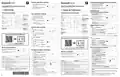


System operation settings
Paramètres de fonctionnement du système
1
Appuyez sur le bouton MODE (MODE)
pour passer au prochain mode
système disponible (par exemple :
Heat/ Chauffage, Off/Arrêt, Cool/
Refroidissement).
1
Press the Mode button to cycle to the
next available System mode (Ex: Heat,
off, cool).
MODE
Indoor
Heat
MODE
Indoor
Heat
FocusPRO P200 Series Thermostat
Série FocusPRO P200 Thermostat
MENU
Hold
2
Cycle through the modes until the
required System mode is displayed
and leave it to activate.
MENU
Hold
FAN
TH2110U4004, TH2320U4006
TH2110U4004, TH2320U4006
2
Faites défiler les modes jusqu'à ce que
le mode souhaité s'affiche et laissez-le
s'activer.
Auto
FAN
Auto
EN User Guide
FR Guide de l'utilisateur
Paramètres de
M39511
M39511
fonctionnement du ventilateur
Thermostat controls
Commandes du thermostat
1
Appuyez et relâchez le bouton
FAN (VENTILATEUR) pour passer au mode
Ventilateur suivant.
Fan operation settings
MODE
L'heure
Etat du système
Cool On/Heat On/Aux
Heat On,
Time
System status
Cool On/Heat
On/Aux Heat On,
Indoor
Heat
1
Press/release the Fan button to cycle to
the next available Fan mode.
2
Lorsque le mode de ventilation
souhaité est affiché, arrêtez d'appuyer
sur la touche de ventilation.
MENU
Hold
Mode
Chauffage/Arrêt/
Refroidissement/
Auto/EM
Mode
Heat/Off/Cool/
Auto/EM Heat
(emergency heat)
FAN
MODE
2
When the desired Fan mode is
displayed, stop pressing fan button.
Auto
Indoor
Heat
Point de consigne
de la température
intérieure
Indoor
Modes du ventilateur :
MENU
Hold
temperature
setpoint
‒
Auto : Le ventilateur fonctionne
Fan modes:
Chauffage
(chauffage
d'urgence)
FAN
Set To
MODE
Set To
MODE
uniquement lorsque le système de
chauffage ou de refroidissement est en
marche.
PM
‒
Auto: Fan runs only when the
heating or cooling system
PM
Auto
Appuyez sur
ou
pour modifier
Indoor
Indoor
Press
or
to
Heat
Heat
Menu
M39512
sur
change temperature
setting
Press to display
options. Start here
to set a program
schedule
is on.
On: Fan is always on.
Circ: Fan runs about 33% of the
time to circulate air.
MENU
MENU
le réglage de la
température
Hold
Hold
‒
‒
On (Marche): Le ventilateur est toujours activé.
Circ (Circulation): Le ventilateur fonctionne de
manière aléatoire environ 33 % du temps.
Menu
Appuyez
‒
‒
FAN
FAN
Auto
Temperature/
Auto
Heat On
M39512
Heat On
pour afficher
les options.
Commencez ici
pour programmer
un cédule
Température/
Navigation
Navigation
Augmentez ou
diminuez le point
de consigne de
la température et
naviguez dans les
menus
Increase or decrease
temperature setpoint
and navigate menus
Réglez l'heure et la date
Fan
Auto/On/Circulate
MODE
Temps
Indoor
Heat
Set the time and date
Time
1
2
3
Appuyez sur MENU (MENU) sur le
thermostat.
M39541
M39541
Actual indoor
temperature
Schedule
MENU
Hold
Fan
(Ventilateur)
Auto/On/
Circulation
information
FAN
Appuyez sur
ou
pour aller à TEMPS.
Following time based
schedule and options
1
Press Menu on the thermostat.
Auto
MODE
Appuyez sur SELECT (SÉLECTIONNEZ).
Indoor
Heat
Informations sur
le programme
Suivant le temps
basé sur horaire et
options
2
Press
Select.
or
to go to TIME. Press
Appuyez sur ou sur pour choisir le
format d'horloge 12 ou 24 heures et
MENU
Hold
Température
intérieure
réelle
FAN
appuyez sur appuyez sur NEXT (SUIVANT).
3
4
5
Press
or
to choose 12 or 24
Auto
M39509
hour clock format and press Next.
4
5
Appuyez sur
NEXT (SUIVANT).
ou
pour régler l'heure et la date l'heure et appuyez sur
Press
press Next.
or
to adjust the hour and
Scan for the full User Manual
Appuyez sur
ou sur
pour régler les minutes et appuyez sur SAVE & EXIT.
M39509
Press or
to adjust the minute
and press SAVE & EXIT.
Date
Scanner pour le manuel complet de l’utilisateur
1
2
3
4
5
Appuyez sur MENU (MENU) sur le
thermostat.
Date
1
2
Press Menu on the thermostat.
Hold
Appuyez sur
ou sur
pour aller à
Hold
Press
or
to go to DATE and
to choose YEAR and
to adjust the MONTH
DATE et appuyez sur SELECT (SÉLECTIONNEZ).
press Select.
Appuyez sur ou pour choisir YEAR
(ANNÉE) et appuyez sur NEXT (SUIVANT).
Appuyez sur ou sur pour régler le
MONTH (MOIS) et appuyez sur NEXT (SUIVANT).
Appuyez sur ou sur pour sélectionner DATE et appuyez sur SAVE & EXIT.
3
4
5
Press or
press Next.
You can search online for Resideo 33-00691EFS for
the Owner’s Manual or scan the QR code.
M39510
Press
and press Next.
or
M39510
Press
or
to choose DATE and press SAVE & EXIT.
Vous pouvez rechercher en ligne Resideo 33-00691EFS pour
obtenir le manuel d'utilisation ou scanner le code QR.
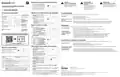
Alerts and reminders
Pour programmer les horaires
MODE
When an alert is active, the icon appears
in the lower part of the display as well as
the alert #.
1
Appuyez sur MENU (MENU) sur votre
thermostat. Appuyez sur ou
Indoor
Heat
To adjust program schedules
MENU
Hold
jusqu'à ce que SCHED s'affiche. Appuyez
sur SELECT (SÉLECTIONNEZ).
FAN
Auto
When the filter Reminder is active the
icon appears as well as 181.
1
Press Menu on your thermostat. Press
or until SCHED is displayed.
Alertes et rappels
Lorsqu'une alerte est active, l'icône
Hold
2
Un carré apparaît autour de ON (ACTIVER)
ou OFF (ARRÊT) à l'écran. Si vous
souhaitez utiliser un horaire, appuyez sur
MODE
Press Select.
Indoor
Heat
apparaît dans la partie inférieure de l'écran
ainsi que le numéro de l'alerte.
2
A square appears around ON or OFF
in the display. If you want to use a
MENU
Hold
ou
pour. sélectionner ON (ACTIVER).
M39588
Hold
FAN
Appuyez sur NEXT (SUIVANT) pour modifier
la programmation ou appuyez sur EXIT
(SORTIE) pour quitter le menu.
Auto
Lorsque le rappel de filtre est actif,
l'icône apparaît ainsi que le numéro 181.
schedule, press
or
to select ON.
Alert
405
407
164
170
173
178
181
Meaning
Press Next to edit the schedule or
press EXIT to exit the menu.
Low batteries
3
4
Si vous modifiez le programme, appuyez
sur NEXT (SUIVANT) pour modifier le ou les
jours qui clignotent à l'écran.
3
4
5
If editing the schedule, press Next to
edit the day or days flashing in the
display.
M39588
Critically low batteries
Heat pump has detected a fault
Thermostat memory failure
Internal sensor error
Wired outdoor sensor error
Replace filter
Hold
Alerte
405
407
164
170
Signification
Le mot " Wake " devrait être clignotant.
Appuyez sur NEXT (SUIVANT). Appuyez sur
The word Wake should be flashing.
Piles faibles
ou
période de programmation. Appuyez sur
pour activer ou désactiver cette
Press NEXT. Press
or
to turn this
schedule period on or off. Press NEXT.
Hold
Piles gravement faibles
La pompe à chaleur a détecté un défaut
NEXT (SUIVANT).
If the schedule period was set to ON,
M39532
5
6
7
Si la période de programmation a été
réglée sur ON (ACTIVER), l'heure clignote. Appuyez sur
l'heure de cette période. Appuyez sur NEXT (SUIVANT).
the time will be flashing. Press
to adjust the time for this period.
Press NEXT.
or
ou
pour régler
ou pour
Défaillance de la mémoire du thermostat
Erreur de capteur interne
Le point de consigne de la chaleur clignote. Appuyez sur
régler le point de consigne de la chaleur pour cette période. Appuyez sur NEXT
(SUIVANT).
(Reset this timer by pressing Menu. Press Up or down to find
FILT. Press Select, read scrolling text, then press Dismiss to
clear the reminder after replacing the filter.)
6
The Heat setpoint will be flashing.
Press
M39532
173
or
to adjust the Heat
setpoint for this period. Press NEXT.
178
Erreur de capteur extérieur câblé
Le point de consigne Cool clignote. Appuyez sur
ou
pour régler le
7
8
9
The Cool setpoint will be flashing. Press
or
point de consigne de refroidissement pour cette période. Appuyez sur NEXT
(SUIVANT).
181
Remplacer le filtre (Réinitialisez cette minuterie en appuyant
to adjust the Cool setpoint for this period. Press NEXT.
sur Menu. Appuyez sur Haut ou Bas pour trouver FILT. Appuyez
sur Select, lisez le texte défilant, puis appuyez sur Dismiss pour
effacer le rappel après avoir remplacé le filtre.)
The display will show the next schedule period flashing. Repeat steps 4–7
for the other schedule periods and days.
8
9
L'écran affiche la prochaine période de programmation en clignotant.
Répétez les étapes 4 à 7 pour les autres périodes et jours de l'horaire.
33-00683EFS—02
Press the SAVE & EXIT button at upper left.
Appuyez sur le bouton SAVE & EXIT en haut à gauche.


| General | Details |
|---|---|
| Name | resideo P200 Series Focus PRO Thermostat User Guide |
| Make | resideo |
| Language | English |
| Filetype | PDF (Download) |
| File size | 0.35 MB |
 (1 votes, average: 5.00 out of 5)
 Loading...

resideo T3 Programmable Thermostat Installation Guide

resideo TH2320WF4011 Smart Thermostat Installation Guide

resideo TH2110WF4008 Smart Thermostat User Guide

resideo TH4110U2005 T4 Pro Programmable Thermostat User Manual

resideo P200 Series Focus PRO Thermostat User Guide Overview
Summary of Contents
- Page 1: System operation settings Press the Mode button to cycle to the next available System mode (Ex: Heat, off, cool). Cycle through the modes until the required System mode is displayed and leave it to activate. Press/release the Fan button to cycle to the next available Fan mode. When the desired Fan mode is displayed, stop pressing the fan button. Fan runs only when the heating or cooling system is on. The fan is always on. Fan runs about 33% of the time to circulate air. Increase or decrease temperature setpoint and navigate menus. Set the time and date. When an alert is active, the icon appears in the lower part of the display as well as the alert number.
- Page 2: Caution: Risk of damage to equipment. To prevent possible compressor damage, do not operate cooling system when outdoor temperature is below 50°F (10°C). Troubleshooting: If you have difficulty with your thermostat, please try the following suggestions. Most problems can be corrected quickly and easily. Check circuit breaker and reset if necessary. Make sure power switch at heating and cooling system is on. Make sure furnace door is closed securely. Temperature settings do not change: Compressor protection feature is engaged. Wait 5 minutes for the system to restart safely, without damage to the compressor. If display says “unlock”, thermostat owner has set a lockout setting. If not, verify you are in the correct mode (heat, cool, em heat or auto). If you are in the correct mode, but you cannot set the heat from 40°F to 90°F (4.5°C to 32°C), or set the cool from 50°F to 99°F (10°C to 37°C), you may have Maximum or minimum setpoint limits restricting your setting. Alerts and reminders: When an alert is active, the icon appears at the bottom of the screen, as well as the alert number. Replace the filter reminder: Press MENU on the thermostat. Press Up or Down to find FILT. Press Select, read the scrolling text, and then press Dismiss to clear the reminder after replacing the filter.

SUNTOUCH SunStat 1140-01 R4 Relay Thermostat User Manual

Living Heat T5 Touch Screen Digital Smart Thermostat Instructions

neptronic TMA54-EXT1 Thermostat Instruction Manual

COMBUSTION CONTROL Anti Siphon Device Flue Gas Safety Thermostat Instruction Manual

MI-HEAT MTS200 WiFi Thermostat Instruction Manual

Aideepen STC-3028 Temperature Humidity Controller User Manual

EPH CDTP2 Room Thermostat Installation Guide

LUX TX9600TSA Smart Temp Universal 7 Day Programmable Touchscreen Thermostat Instruction Manual

Beca BHT-008 Heating Thermostat User Guide

beok-controls TGM50 Smart WiFi Underfloor Thermostat User Guide