
resideo TH2320WF4011 Smart Thermostat Installation Guide


#ISU ISU Name
ISU Options (default in bold)
1040 Scheduling Options
1 = 1 week (all days the same)
2 = 5-2 Programmable
3 = 5-1-1 Programmable
4 =7-Day Programmable
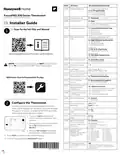
FocusPRO 200 Series Thermostat
S200 Series TH2320WF4011 Smart
1050 Temperature Scale
1060 Outdoor Sensor
F = Fahrenheit
0 = None
C = Celsius
1 = Wired Outdoor Sensor (TH2320 only)
2 = Internet (TH2320WF only)
EN Installer Guide
1 = Conventional Forced Air Heat
2 = Heat Pump
3 = Radiant Heat
2000 Heating System Type
EN Scan for the full ISUs and Manual
1
5 = None (Cool Only)
2010 Heating Equipment
Type
Conventional Forced Air Heat:
1 = Standard Efficiency Gas Forced Air
2 = High Efficiency Gas Forced Air
3 = Oil Forced Air
4 = Electric Forced Air
5 = Hot Water Fan Coil
Heat pump:
7 = Air to Air Heat Pump
8 = Geothermal Heat Pump
Radiant Heat:
9 = Hot Water Radiant Heat
12 = Steam
info.honeywellhome.com/focuspro-p200-s200-im
O = O (O/0B in Cool)
1 = B (O/0B in Heat)
2060 Reversing Valve O/B
2070 Compressor Stages
NOTE: For Heat Pump systems do NOT connect a wire
to the W terminal of the UWP™ Mounting System.
0, 1, 2
Heat Stages /
Backup Heat Stages
Heat Stages: 1, 2
Backup Heat Stages: 0, 1
2071
2110
Fan Control in Heat
(Shown if 2010 = 4 or 5)
1 = Equipment Controls fan
2 = Thermostat Controls Fan
S200 Series: Scan to Download the Pro App
2175 Aux / E Terminal
Control
0 = Drive both Aux & E together
1 = Aux and E independent
2180 Backup Heat Source
(Heat Pump Only)
(TH2320 only)
31 = Electric Forced Air
32 = Standard Efficiency Gas Forced Air
33 = High Efficiency Gas Forced Air
34 = Oil Forced Air
2185 Emergency Heat Source
(TH2320 only)
36 = Hot Water Radiant Heat
3000 System Changeover
0 = Manual
1 = Automatic
Configure the Thermostat
3015 Auto Changeover
Differential
0°F to 5°F
0.0°C to 2.5°C
2
On initial setup, the thermostat will enter the ISU
menu. S200 models can be setup using the Resideo
Pro app or on screen. If entering the ISU menu after
initial setup, follow the steps below:
0 = No
1 = Yes
3020 Finish With High Cool
Stage
3021 Finish With High Heat
Stage
0 = No
1 = Yes
1. Press and hold the bottom left
button and Up arrow button for 5
seconds.
0 = Comfort
2 °F to 15 °F (in 1 °F
increments)
1.0 °C to 7.5 °C (in 0.5 °C
increment).
3090 Backup Heat Droop
(For heat pump with
aux heat stage. 0 only
for electric)
Hold
2. Press or to cycle through options.
When ISU is displayed, press
SELECT.
0 = Off
8 = 4 hours
9 = 5 hours
3110 Upstage Timer for
Backup Heat
When an ISU number is displayed,
press or to change the setting.
3.
1 = 30 minutes
2 = 45 minutes
3 = 60 minutes
4 = 75 minutes
5 = 90 minutes
6 = 2 hours
M39612
10 = 6 hours
11 = 8 hours
12 = 10 hours
13 = 12 hours
14 = 14 hours
15 = 16 hours
(If 3090 = 0 and 2180 =
31, 3110 only has
settings 0-3)
4.
5.
Press NEXT to advance to the next ISU setting.
To finish setup, press the SAVE & EXIT button.
7 = 3 hours
3120 Compressor Lockout
(1060 needs to be set
to 1 or 2)
Off
-15°F to 60°F (in 5°F increments)
-26.0°C to 15.5°C (in 2.5°C or 3.0°C
increments)
33-00714-01


| General | Details |
|---|---|
| Name | resideo TH2320WF4011 Smart Thermostat Installation Guide |
| Make | resideo |
| Language | English |
| Filetype | PDF (Download) |
| File size | 0.12 MB |
 (1 votes, average: 5.00 out of 5)
 Loading...

resideo T3 Programmable Thermostat Installation Guide

resideo TH2110WF4008 Smart Thermostat User Guide

resideo TH4110U2005 T4 Pro Programmable Thermostat User Manual

Resideo TH2320WF4011 Manual: Questions and Answers
What do the ISU codes on the Resideo TH2320WF4011 display mean?
ISU codes are installer setup units that configure system type, heating equipment, fan control, and other operational settings.
| Code Range | Function |
|---|---|
| 1040 | Scheduling options |
| 1050 | Temperature scale |
| 1060 | Outdoor sensor type |
| 2000-2010 | Heating system and equipment type |
| 2110-2175 | Fan and auxiliary control |
| 3000-3125 | System changeover and heat pump settings |
Can I use an outdoor sensor with the Resideo TH2320WF4011?
Yes. ISU 1060 lets you select None, a wired outdoor sensor (TH2320 only), or internet-based outdoor data (TH2320WF only). Installation Guide, p. 1
More Resideo thermostat manuals

BEOK TGT79 Touch Screen Thermostat User Manual

Google Cloud 2024 Nest Learning Thermostat Instructions

GENERAL Life MITRA 250S RF Wireless Room Thermostat User Guide

INTIEL Controllers DT 3.1 Programmable Differential Thermostat User Guide

DOOR D4004 Wireless Thermostat User Guide

TFC Group OP-WFSTAT Wi-Fi Programmable Thermostat User Guide

Honeywell RTH2300 Thermostat User Guide

ENSTO ECO16BTD Floor Heating Thermostat User Guide

QH Basic Quality Heating CV Clock Thermostat Instruction Manual

hansgrohe 15754000 Metris Classic Ecostat Classic High Flow Thermostat Instruction Manual