
Milesight WT101 Smart Radiator Thermostat User Guide


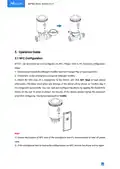









3. Install the two batteries with correct direction, which is shown on the battery cover.
4. Restore the battery cover in place. After installing the batteries, the device will turn on
automatically and the LED display will light on for 3s.
Note:
1) The device can be powered by 1.5V AA Li-FeS2 or alkaline batteries, not Li-SoCl2 batteries. It is
suggested to use Li-FeS2 batteries which has longer battery life than alkaline batteries.
2) Make sure both batteries are newest when install, or battery life will be reduced.
3) After installing the batteries, the device will show and report battery level as 100% at the first
time even for old batteries. The device will calculate the battery level after one hour.
4. Installation Instruction
4.1 Adapter Selection
The valve base plate can be used for all valves with a thread size of M30 × 1.5 mm from the
most common manufacturers without any accessories. For other valve types, select the
corresponding adapter and mount it on the valve.
8

| General | Details |
|---|---|
| Name | Milesight WT101 Smart Radiator Thermostat User Guide |
| Make | Milesight |
| Language | English |
| Filetype | PDF (Download) |
| File size | 0.4 MB |
 (1 votes, average: 5.00 out of 5)
 Loading...

Milesight WT201-868M Smart Thermostat User Guide

Milesight WT201 Airteq Smart Thermostat User Guide

Milesight WT201 Smart Thermostat User Guide

Milesight WT30x Smart Fan Coil Thermostat User Guide


EvenAir T21WF WiFi Thermostat User Manual

SALUS DT500 Thermostat User Guide

Mi-Heat GH35EU Digital Greenhouse Thermostat User Manual

Honeywell RTH230B Programmable Electronic Thermostat User Guide

LuxPro PSPLV512d Programmable Heating Thermostat Instruction Manual

Honeywell THX321WFS2001W T10 or T10+ Pro Smart Thermostat User Guide

emerald AC Link Smart Thermostat Owner’s Manual

550-13060 HVAC-Thermostat Niko Home Control Instructions

namron 4512737 Touch Zigbee 16A Thermostat Instruction Manual

Braeburn 2030 Programmable Thermostat Instruction Manual