
Home > LEHNER VERSAND > LEHNER VERSAND 01477 Easymaxx Digital Radiator Thermostat User Manual
LEHNER VERSAND 01477 Easymaxx Digital Radiator Thermostat User Manual


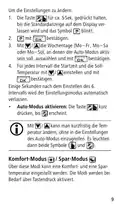






1. Hold down the
button for approx. 5sec.
until the default display on the display is exited.
2. Briefly press
repeatedly until “ADVANCED”
flashes.
3. Keep pressing
until the number (A1–
AA) for the function you want appears.
4. Adjust the values with
/
and confirm with
.
The settings mode is automatically exited a few
seconds after the last entry is made.
OPENING AND CLOSING THE VALVE
•
To switch off the radiator for a long time, hold
down the button for approx. 5 sec. Off
appears on the display and the valve is closed.
To open the valve again, hold down the
button again.
•
To permanently open the radiator valve, e.g.
before dismounting the thermostat, hold down
the button for approx. 5 sec. OP appears on
the display.
To close the valve again, hold down the
button again.
CLEANING AND STORAGE
•
Do not use any caustic or abrasive cleaning
agents to clean the device! These might dam-
age the surface.
29

| General | Details |
|---|---|
| Name | LEHNER VERSAND 01477 Easymaxx Digital Radiator Thermostat User Manual |
| Make | LEHNER VERSAND |
| Language | English |
| Filetype | PDF (Download) |
| File size | 0.43 MB |
 (1 votes, average: 5.00 out of 5)
 Loading...


EPH CONTROLS RFC RF Cylinder Thermostat Instruction Manual

eurotherm Smart One 365 Thermostat User Manual

Honeywell RTH9590 Wi-Fi Color Touchscreen Programmable Thermostat User Guide

GENERAL HT100S Digital Room Thermostat User Manual

Vine Smart Wi-Fi Thermostat with Nightlight TJ-225 User Guide

micro-air EasyTouch RV 356 True Air RV Thermostat User Manual

Honeywell FocusPRO P200 Series Programmable Thermostat Installation Guide

TCL IPOWER Heat Mat Thermostat Instruction Manual

BEOK CONTROLS TGW60 Touch Screen Boiler Thermostat User Guide

White Rodgers 1F78-144 Non Programmable Thermostat Instruction Manual