
Home > INTIEL Controllers > INTIEL Controllers DT 3.1 Programmable Differential Thermostat User Guide
INTIEL Controllers DT 3.1 Programmable Differential Thermostat User Guide


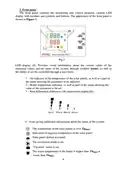
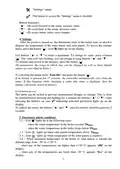




"Settings" menu;
The button to access the "Settings" menu is disabled.
Button functions:
"▲" – (3) scroll forward in the menu, increase value;
"▼" – (4) scroll back in the menu, decrease value;
" ▄" – (5) access menu, select, save changes.
4. Settings
After the power is turned on, the thermostat starts in the initial state, in which it
displays the temperature of the water heater and solar panels. To access the settings
menu, press the button "▄". Icon
lights up on the display.
Use buttons "▲" и "▼" to select a parameter. To change its value, press a button
"▄". The value will start flashing, you can change it using buttons "▲" and "▼".
To confirm and record in the memory, press the button "▄".
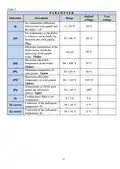
All parameters, the range in which they can be changed as well as their default
values are described in Table 1.
To exit from the menu select "Еnd SEt" and press the button "▄".
If no button is pressed for 15 seconds, the controller automatically exits from the
menu. If this happens while changing a value (the value is flashing), then the
change will not be stored in memory.
Lock menu access
The menu can be locked to prevent unintentional changes to settings. This is done
by simultaneously pressing and holding for 2 seconds the buttons "▲" и "▼". After
releasing the buttons, an icon
display.
indicating activated protection lights up on the
To unlock the menu, the buttons "▲" and "▼" must be pressed and held again for 2
seconds.
5. Emergency alarm conditions
5.1 – Icon
lights up in the following cases:
- when the water temperature in the boiler exceeds Тb
;
max
- when the water temperature in the boiler drops below Тb
.
min
5.2 – Icon
5.3 – Icon
lights up when solar panels temperature above Тp
lights up when temperature of the solar panels is negative.
.
max
5.4 – When measured temperature of the boiler or solar panels is outside the
defined range from -30° to +130 °С.
- when any of the temperatures are higher than +130 °C appears "tHi" on the
display;
- when any of the temperatures are lower than -30 °C appears "tLo" on the
display.
7

| General | Details |
|---|---|
| Name | INTIEL Controllers DT 3.1 Programmable Differential Thermostat User Guide |
| Make | INTIEL Controllers |
| Language | English |
| Filetype | PDF (Download) |
| File size | 0.22 MB |
 (1 votes, average: 5.00 out of 5)
 Loading...


EMERSON 1F83C-11NP Single Stage Thermostat Owner’s Manual

COPELAND 1F95G-1235GC Humidity Universal Thermostat Instruction Manual

VIMAR 01910 Electronic Timer Thermostat Instruction Manual

DAIKIN EKRRVATR2BA Home Controls Radiator Thermostat User Guide

Honeywell FocusPRO TH6000 Series Programmable Thermostat Instruction Manual

KETOTEK KTF0163 Series Smart Thermostat Instruction Manual

STELPRO STE402NP Smart Electronic Thermostat User Guide

GENERAL LIFE Senna 270S RF Wireless Room Thermostat User Manual

IMIT TA5 Mechanical Thermostat User Manual

EONEBATW-B ZigBee Smart Thermostat User Guide