
Home > HEAT DECOR > HEAT DECOR HD-T1000 WIFI Thermostat User Guide
HEAT DECOR HD-T1000 WIFI Thermostat User Guide



HD-T1000 WIFI THERMOSTAT
HD-T1000 Series Intelligent Heating Temperature Controller with weekly programming function,
it can be set six period times & the corresponding setting temperature per day. You also can choose
manual control or temporary control mode of operation. With the unique far-way control function,
simple operation, energy saving and environmental protection, this thermostat can be suitable for
electric heating equipment control and water system heating electric drive valve control.
1. Parameter:
Voltage:
Imax16A
5℃~45℃
20~60℃
220VAC,50/60HZ
Current:
<1W
Power consumption:
Control range:
Limitation setting:
Default temp. deviation: 1℃(0.5~10℃ adjustable)
Accuracy:
±1℃
IP20
IP Grade:
NTC
Sensor:
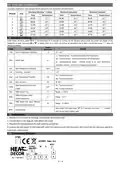
2. Panel display:
3. Function:
:Manual mode: Control the device by manual。
:Program mode: It can be controlled automatically by the set time& temperatures (with six different time & related
temperature),see below:
、 simultaneous display:For temporary control mode, press“ ”or“ ” will change to this mode, the device will comes out of
the temporarily current period time control, and come into the control of the manual mode, which also will automatically
return to the programming mode when the next period time comes.
:Lock, Press the key“ ”&“ ”together for more than 5 seconds, the device locked, and press them for another 5 seconds, it
will unlock again.
:Heating : Means for heating now.。
4. Button Functions
: Power, ON/OFF by short press.
M
: Mode, Short press for manual model& programmable mode change.
: Clock, Short press for time setting.:minute setting→ hour setting→ week setting. Press“ ”for next parameter setting,
the twinkled data means to be set, press“ ”or“ ”to setting and 10 seconds can be recorded after everything to be recorded.
: Up, for increase the related parameters or adjust working mode.
: Down, do decrease the related parameters or adjust the working mode.
Weekly Program: Under Power on mode, press“ ” and “
” for 5 seconds enter weekly programmable setting mode, press“ ”or“ ”for data
Time(Period 1) →Temperature(Period 1) Monday to Friday →…→Time(Period 6) → Temperature(Period 6) Sunday
1 / 4


| General | Details |
|---|---|
| Name | HEAT DECOR HD-T1000 WIFI Thermostat User Guide |
| Make | HEAT DECOR |
| Language | English |
| Filetype | PDF (Download) |
| File size | 0.26 MB |
 (1 votes, average: 5.00 out of 5)
 Loading...

HEAT DECOR HD305G Heating Film KIT without Thermostat Owner’s Manual


GENERAL LIFE 300S RF Wireless Room Thermostat User Manual

GENERAL LIFE MITRA 230S Digital Room Thermostat User Manual

Honeywell THR830T Homeexpert Room Thermostat Instruction Manual

PURGEAR STC-2304 Digital Thermostat User Guide

PNI CT25PW WIFI Smart Thermostat User Manual

SECURE ThermoPlus AS2 Programmable Room Thermostat Instruction Manual

Aideepen STC-3028 Temperature Humidity Controller User Manual

Danfoss REPI Series Digital Thermostat User Manual

tado Smart AC Control V3+ Thermostat Instruction Manual

REHAU 13280001001 Thermostat Installation Guide