
Home > HEAT DECOR > HEAT DECOR HD-T1000 WIFI Thermostat User Guide
HEAT DECOR HD-T1000 WIFI Thermostat User Guide



HD-T1000 WIFI THERMOSTAT
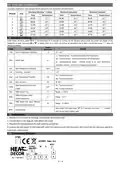
( see below attachment, each previous Period setting time can’t exceed the next Period time)
Weekday (Monday ~ Friday)
Weekend (Saturday)
Weekend (Sunday)
Periods
Icon
Time
06:30
08:00
11:30
12:30
18:00
22:30
Temperature
21℃
Time
06:30
08:00
11:30
12:30
18:00
22:30
Temperature
Time
Temperature
21℃
06:30
08:00
11:30
12:30
18:00
22:30
21℃
18℃
21℃
18℃
21℃
16℃
1
2
3
4
5
6
18℃
18℃
21℃
21℃
18℃
18℃
21℃
21℃
16℃
16℃
5. Advanced setting:
Under Power off status, press“
related No. & value, then press“ ”or“
settings completed.
”&“
”simultaneously for 5 seconds for coming into the advance setting mode, the screen will display all the
” to adjust, press“ M ”to enter next setting, All parameters will be kept in record after press “
” when all
Default
parameters
Code
Option
Details
1Adj
Room Temperature Calibration
-2
-9℃~+9℃
I n:internal sensor(to control and protect the temperature)
OU:external sensor(to control and protect the temperature)
2Sen
Sensor type
In
AL: internal/external sensor ( internal sensor is for room temperature
controlling, external sensor is for temperature protection)
3Lit
4dif
High Temperature Protection
Switching Deviation
50.0
1
5~60℃
1~5℃
On:Function turned on
5Ltp
6Hit
Low Temperature Protection
Max. Set Temp.
Off
45
Off:Function turned off
35~95℃
Open window detect function
(OWD)
On:Function turned on
7OEN
8Otl
OFF
15
Off:Function turned off
OWD Detect Time
Range:2~30min
OWD Drop temp. select
9Otp
2
Range:2~4℃
(Within detect time)
OWD Delay time select (Recover
to previous working status)
0Pdt
30
-
Range:10~60min
when show“-”and keep press “M” for 5 seconds until show“- - -”, it means
AFAC
Factory Reset
return to the restore factory reset
6. Installation:
1. Release the front cover by inserting a screwdriver into bottom crack.
2. Connect wires as the diagram, then tighten the screw.
3. Mounted the backing plate in the wall socket by screwdriver.
4. Connect the back power & front plate with insert the Conductive pin into the socket, then match the slot and press slightly to
make them matched well.
7. Connecting Diagram
2 / 4

| General | Details |
|---|---|
| Name | HEAT DECOR HD-T1000 WIFI Thermostat User Guide |
| Make | HEAT DECOR |
| Language | English |
| Filetype | PDF (Download) |
| File size | 0.26 MB |
 (1 votes, average: 5.00 out of 5)
 Loading...

HEAT DECOR HD305G Heating Film KIT without Thermostat Owner’s Manual


EBECO EB500 Electric Floor Heating Thermostat Instruction Manual

GENERAL LIFE NORA 270S Smart Digital Room Thermostat Instruction Manual

ADVENT AIR ACTH12 Digital LCD Thermostat Instruction Manual

Honeywell Y460A2003 Creative Series Thermostat Installation Guide

Robertshaw 4350 BJ Gas Thermostat Instructions

BAXI uSense 2 Wired Smart Thermostat Installation Guide

micro-Air EasyTouch RV 351 Thermostat User Manual

TECH CONTROLLERS EU-T-4.1n Wireless Thermostat User Manual

Honeywell TL5110 Digital Non-programmable Thermostat User Guide

EZAIoT 723 IPS Wired Smart Thermostat Instruction Manual