
Home > HEAT DECOR > HEAT DECOR HD-T1000 WIFI Thermostat User Guide
HEAT DECOR HD-T1000 WIFI Thermostat User Guide



HD-T1000 WIFI THERMOSTAT
* Below Information Available for WiFi Thermostat Only
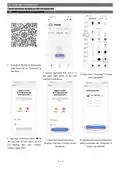
8. WIFI connection & operation
1. Scan above QR Code or sourcing the
Apps “Smart Life” Or “TuyaSmart” at
App Store.
2. Account registration first, click “+” in
3. Please select “Thermostat” in “Small
the upper right corner of the main
interface to add device.
Home Application”
4. Long press thermostat button “ ” &
“ ” key, until “ ”icon shown on LCD
and flashing, then click “Confirm
indicator rapidly blink”
5. Enter Wi-Fi password and click
“Confirm”, then click “Continue” to pair
the devices
6. Waiting a few seconds till the device
added successfully, click “Completed” to
device main interface
3 / 4

| General | Details |
|---|---|
| Name | HEAT DECOR HD-T1000 WIFI Thermostat User Guide |
| Make | HEAT DECOR |
| Language | English |
| Filetype | PDF (Download) |
| File size | 0.26 MB |
 (1 votes, average: 5.00 out of 5)
 Loading...

HEAT DECOR HD305G Heating Film KIT without Thermostat Owner’s Manual


KeepRite TSTATIIEWF-01 Ion Gray Smart Thermostat Owner’s Manual

Quality Heating PRF-80 Touch Thermostat Instructions

Danfoss KP 61 Thermostat

InverterCool CPT100 2C Wi-Fi Thermostat Instruction Manual

BUDDERFLY BTS-U1 Thermostat User Manual

COMPUTHERM E800RF Multizone Wi-Fi Thermostat Instruction Manual

EMERSON 1D56-310 White-Rodgers Low Voltage Horizontal Mounting Thermostat Instruction Manual

Honeywell 69-2384ES-01 RTH111 Non Programmable Thermostat Installation Guide

MYS Air MS20,22,25 Thermostats User Manual

GENERAL LIFE ARUNA 302S Smart Room Thermostat User Manual