
Home > ENGO CONTROLS > ENGO CONTROLS E901RF Wireless Programmable Thermostat User Guide
ENGO CONTROLS E901RF Wireless Programmable Thermostat User Guide


Wall mounting
E901RX receiver from the wireless kit
LCD icon description
Setting the comfort temperature
1
7
8
9
10
11 12
13 14
Receiver’s switches description:
LEFT SWITCH
ON - Manual mode
- receiver ON
Press any button to highlight the screen, then follow the
steps below:
E901RF | Wireless Programmable Thermostat
1.
2.
6
5
4
1
OFF - Manual mode
- receiver OFF
15
16
RIGHT SWITCH
3
1
2
3
4
17
18
Remove the thermostat cover as shown in the picture.
If there are batteries inside, remove them.
2
1
MANUAL - Receiver works in
manual mode
(according to the left switch)
E901 | Hardwired Programmable Thermostat
3.
4.
2
AUTO - Receiver works in AUTO
mode (according to the
thermostat’s command)
1. Program timeline indicator
2. AM/PM
3. Clock
4. Day of the week indicator
5. Settings icon
6. Key lock function
7. Send a signal (pairing)
8. Holiday Mode
10. Antifrost Mode
11. Comfort Mode
12. Economic Mode
13. Cooling mode - ON
14. Heating mode - OFF
15. Temperature unit
Press button to enter comfort temperature mode.
The sun icon should be visible on the display.
Ver. 1
Date of issue: I 2022
LED indications in the receiver
2
16. Room / setpoint temperature
17. Temporary override
18. Program number
Quick Guide
The status of the receiver is indicated
by two LEDs. These are LEDs with the
following colors:
9. Low battery indicator
Use a screwdriver to push the plastic tabs in as shown in the figure until you
feel resistance, and tilt the front part of the housing.
1
- green (upper one),
Button description
1
2
Button Function
2
3
- orange (lower one).
Change the parameter value down
Change the parameter value up
Set the day of the week
Set the hour
Using
or
buttons set new comfort temperature value.
Distributor:
A detailed explanation of the meaning of the LEDs can be found in the table below:
D
H
QL CONTROLS Sp z o.o. Sp. k.
43-262 Kobielice
4 Rolna St.
3
DESCRIPTION
The receiver is connected to the 230V power
supply.
M
Set the minutes
Poland
Comfort temperature
The receiver can be controlled by thermostat if it
is in automatic mode when the right switch is in
the AUTO position.
Separate the front part from the back part in the direction shown above.
Economic temperature / Holiday mode
The green LED
lights up
4
AUTO
PROG
AUTO mode / Back button
The receiver can be started manually when the
right switch is in the MANUAL position.
Programming / Program selection
Confirm by button or wait until the thermostat will approve your choice
itself and display the main screen.
Confirm function
Factory Reset
Reset
The receiver is in the pairing mode and is looking
The green LED
for a signal from the thermostat (then you must
flashes
Setting the economic temperature
activate the“SYNC”parameter in the thermostat).
Then fix the screws and
the holes provided (see bigger arrows). Connect the wires to the COM / NO
connector (see smaller arrows).
Introduction
Press any button to highlight the screen, then follow the
steps below:
Setting Time / Setting Date
E901 & E901RF is a weekly, surface-mounted electronic room thermostat intended
for home use. It has been designed for control of heating devices (e.g. gas, oil boilers,
heat pumps) or cooling devices. It has the function of creating your own schedules.
Thanks to the built-in algorithms, it offers much better temperature control accuracy
than traditional mechanical thermostats. Please read these instructions carefully
before using the device for the first time. The thermostat should use AA, 1.5V
alkaline batteries. Put the batteries in the battery compartment located under the
flap. Rechargeable batteries are not allowed.
The green LED
is off
The receiver is disconnected from the 230V power
supply or the left switch is in the OFF position.
1
5
In automatic mode, the receiver received a
heating / cooling signal from the thermostat.
The orange LED
lights up
The receiver was started in manual mode (left ON
switch, right MANUAL switch)
Product Compliance
This product complies with the following EU Directives:
E901: 2014/30/EU, 2014/35/EU, 2011/65/EU
E901RF: 2014/53/EU, 2011/65/EU
868.0 MHz - 868.6 MHz; <13dBm
-
-
Press D button to set the day.
Press H button to set the hour.
The receiver was paired but lost communication
with the thermostat due to out of range or low
battery in the thermostat. The receiver starts
flashing after 40 minutes of time when it does
not receive a signal from the thermostat.
Press button to enter economic temperature mode.
The moon icon should be visible on the display.
The orange LED
flashes
Please note!
This document is a quick guide for installing and operating the product and indicates
its most important features and functions.
Using the hinges from left, fold the back and front covers by moving as
shown in the picture above until they click into place.
2
-
Press M button to set the minutes.
Safety Information:
Connection description for wired thermostat E901
AC 230V
Use in accordance with national and EU regulations. Use the device only as intended,
keeping it in a dry condition. The product is for indoor use only. Installation must
be carried out by a qualified person in accordance with national and EU regulations.
The orange LED
is off
The receiver does not send a heating / cooling
signal.
L
Manual mode - temperature settings
Installation:
There are several temperature levels at our disposal. Only one
temperature level is realized 24 hours a day in manual mode. You can set
a different temperature for each level.
E901
Installation must be performed by a qualified person with appropriate electrical
qualifications, in accordance with the standards and regulations in force in a given
country and in the EU. The manufacturer is not responsible for non-compliance with
the instructions.
L
Connection description for wireless thermostat E901RF
AC 230V
L
COM
3V
2 x AA
L
E901TX
- Comfort Mode - in this mode, the thermostat is to maintain
a constant day temperature. When the temperature is set
manually, e.g. 23 ° C, the thermostat maintains it until
user switches to another operating mode or set a different
temperature, e.g. 21 ° C.
Using
or
buttons set new economic temperature value.
NO
L
WARNING:
For the entire installation, there may be additional protection requirements, which
the installer is responsible for.
N
COM
E901RX
3V
2 x AA
RECEIVER
3
NO
N
N
The purpose of this symbol is to indicate that this device should not be
discarded in household waste. For the protection of the environment,
human health and natural resources, disposal should only take place
at an appropriate recycling collection facility for WEEE directive
products. For more information on disposal and recycling of this product
please contact local municipal authorities, disposal services or the original point
of purchase.
On sale, exchange or disposal of a device we recommend you reset or delete
any device settings. Internet connected devices should be removed from any
registered online accounts, Mobile or Web Apps, or the online account should be
closed to ensure device data is no longer linked or associated with your personal
details. It is the consumer’s responsibility to remove a device, close an account,
or notify us of any change in ownership to ensure any association or linkage to
personal accounts is removed or updated.
N
AC 230V
OR
- Economic Mode - in this mode, the thermostat is to maintain
the reduced (night) temperature. When the temperature is
set manually, e.g. 17 ° C, the thermostat maintains it until
user switches to another mode or set a different temperature,
e.g. 19 ° C.
N
L
OR
AC 230V
L
E901
L
E901TX
COM
NO
3V
2 x AA
MAX
5 (3) A
COM
E901RX
3V
2 x AA
MAX
RECEIVER
16 (5) A
Confirm by button or wait until the thermostat will approve your choice
itself and display the main screen.
NO
N
The values of these temperatures are taken into account in the automatic
mode (for the first type of schedule -> see next page).
N
N


| General | Details |
|---|---|
| Name | ENGO CONTROLS E901RF Wireless Programmable Thermostat User Guide |
| Make | ENGO CONTROLS |
| Language | English |
| Filetype | PDF (Download) |
| File size | 0.63 MB |
 (1 votes, average: 5.00 out of 5)
 Loading...

ENGO Controls EONE230W Internet Controlled Thermostat User Guide

ENGO CONTROLS EFAN-230W Fan Coil Thermostat User Guide

ENGO CONTROLS FAN-24W 24V Fan Coil Thermostat User Guide

ENGO CONTROLS EASY230W Non-Programmable Wired Thermostat User Guide

ENGO CONTROLS EONE230 Internet Controlled Thermostat User Guide

ENGO CONTROLS EONEBATW, EONEBATB Internet Controlled Thermostat User Manual

ENGO Controls E901WIFI Internet Wireless Thermostat User Guide

ENGO CONTROLS EONE-BATW, EONE-BATB Internet Controlled Thermostat User Guide

ENGO CONTROLS EFAN-24W Fan Coil Thermostat User Guide

ENGO CONTROLS EFAN-230W WIFI 230V Fan Coil Thermostat User Guide
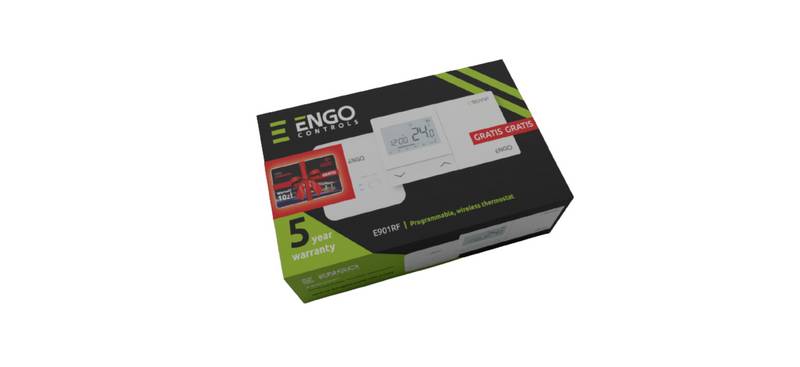
ENGO CONTROLS E901RF Wireless Programmable Thermostat User Guide Overview
Summary of Contents
- Page 1: Wall mounting E901RX receiver from the wireless kit Setting the comfort temperature Receiver’s switches description Manual mode - receiver works in manual mode AUTO - receiver works in AUTO mode Comfort temperature The receiver can be controlled by thermostat if it is in automatic mode. Safety Information: Use in accordance with national and EU regulations. The purpose of this symbol is to indicate that this device should not be discarded in household waste.
- Page 2: AUTO mode - work according to the schedule. In the automatic mode, the thermostat maintains the set temperature according to the schedule selected by the user. You can choose from 2 types of schedule to manage the temperature during the week. There are 9 programs available. Programs 0-3 are factory programs. Programs 4-9 can be defined by user. Programs should be set for each week days. The thermostat started to send a signal to find the receiver. When the green diode on the receiver lights up continuously, the devices have been paired on a new frequency. If the green diode on the receiver has not stopped blinking after 10 minutes, repeat the pairing process. To enter installer parameters press and hold the button for 5 seconds. Press button for 5 seconds to enter the schedule programming selection mode.

ENGO EASYBATB Wired Battery Thermostat User Guide

SunTouch 113901 SunStat ConnectPlus Thermostat User Manual

Braeburn Programmable Touchscreen Thermostat User Manual

Danfoss Ally Cheap Radiator Thermostat Owner’s Manual

Hotwire HWGL2 Dual Programming Thermostat Instructions

Danfoss 015G3090 React Radiator Thermostat Installation Guide

BEOK CONTROLS TGT79 Touch Screen Thermostat Instruction Manual

Danfoss RAS-D2 Radiator Thermostat Installation Guide

azbil TY6000Z2000 Neostat Room Thermostat Instruction Manual

finder 1C.B1 Bliss2 Smart Thermostat User Manual