
×
- 1. Installation, Setup And User Guide
- 2. Installation Guide (Setup Guide → Configuring Your Ecobee Thermostat For The First Time (im A Homeowner) → Configuring Your Ecobee Thermostat For A Heat-pump System → Fan Coil Unit (fcu) Wiring On The Ecobee → The Pipe Sensor → Setting Up An Ecobee For Dehumidification Control)
- 3. How To Use Temperature Correction On Your Ecobee Thermostat (How Do I Register My Ecobee Thermostat? → Registering Using The Ecobee App → How To Adjust The Comfort Settings → How To Create/adjust A Thermostat Schedule → How To Schedule A Vacation Event On Your Ecobee → Using A Hold Setting On My Ecobee Thermostat)
- 4. Smartsensors (How Can I Use Them In My Home? → How Do I Mount A Smartsensor On A Wall? → Smartsensor Tech Specs → Where Can I See The Status Of Each Smartsensor? → Pairing A Smartsensor: → Unpairing A Smartsensor (if Needed))
- 5. Compressor & Heat/aux Staging Setting (Compressor Minimum Cycle Off Time → Compressor Minimum On Time → Compressor Min Outdoor Temperature → What Is Eco+ And How Does It Work? → How Can I Customize My Eco+ Experience? → Smart Home & Away)
- 6. Wiring Diagrams (Diagram 1. Furnace (1-stage) + Ac (1-stage) Using Pek → Diagram 2. Furnace (2-stage) + Ac (1-stage) Using Pek → Diagram 3. Furnace (1-stage) + Ac (2-stage) Using Pek → Diagram 4. Furnace (2-stage) + Ac (2-stage) Using Pek → Diagram 9. Heatpump (1-stage) → Diagram 19. How To Include A Float Switch On The Y Circuit → Diagram 22. How To Include A Ventilator / Hrv / Erv)
- 7. Installation Guide (Download The Ecobee App → What Youll Find In The Box → You May Also Need These Tools → Installation Scenarios)
- 8. How To Determine If Your Hvac System Compatible And If You Have A C-wire (Step 1: Power Off Your Heating, Ventilation, And Air Conditioning (hvac) System By Using The Master Switch Or Circuit Breaker Box. This Is Important For Your Safety. → Step 2: Confirm Your System Is Off By Turning On Your Heat (during Winter) Or Your Ac (during Summer). Wait A Few Minutes You Should Not Feel Air Coming From Your Vents.)
- 9. Step 3: Remove Your Old Thermostat Cover From The Wall.
- 10. What Do My Thermostat's Wire Labels Mean? (Common Thermostat Wires: → C → R → W/w1 & W2 → Y/y1 & Y2 → G Or G1 → O/b → E)
- 11. Less Common Thermostat Wires (S Terminals Are For Outdoor Temperature Sensors → The L Wire Can Be Used To Power Indicator Lights → If You Have A Wire Labelled B But Do Not Have A Separate Wire Labelled O → A Wire Connected To The W3 Terminal On Your Current Thermostat Indicates That You Have A Three-stage Furnace → A Wire Connected To The Y3 Terminal On Your Current Thermostat Indicates That You Have A Three-stage Cooling System)
- 12. Description (H Or Hum Or → This Wire Or Pair Of Wires Controls Your Whole-home Dehumidification System. → Incompatible Thermostat Wires: → Ecobee Thermostats Are Not Compatible With These Types Of Wires → These Wire Labels Indicate A Proprietary System That Is Not Compatible With Ecobee Thermostats. → These Wire Labels And Terminal Blocks Indicate A High-voltage System)
- 13. Step 4: (Take A Picture Of The Wires Connected To The Terminals Of Your Old Thermostat. You May Need To Reference This Photo Later.)
- 14. Scenario 1: Install Your Ecobee With A C-wire (Tip: To Install Accessories (humidifier, Dehumidifier, Or Ventilator) Please Refer To The Wiring Diagrams Section In This Manual. → Step 5: Carefully Disconnect And Label The Wires From Your Old Thermostat One At A Time, Using The Labels Provided. → Tip: If You Have A Jumper Between Rc, Rh, Or R, Leave It Alone. Only Label The Wires That Run From Your Wall Into A Terminal Block.)
- 15. Step 6: Unscrew The Mounting Plate Of Your Old Thermostat To Remove It From The Wall.
- 16. Step 8: Pull The Wires Through The Hole In The Middle Of The Backplate And Then Attach The Backplate To The Wall Using The Drywall Anchors A…
- 17. Step 9: Insert Your Remaining Wires Into The Side (not The Front) Of Their Corresponding Terminal Blocks.
- 18. Step 11: Carefully Push Any Excess Wires Back Into The Hole And Ensure There Are No Drafts Coming From The Hole(s) In The Wall.
- 19. Step 13 (Tip → Congratulations)
- 20. Scenario 2: How To Install With Multiple G-wires (Installation Of A System With Multiple G Wires Means You Have A Multi-speed Fan. → Step 5: Carefully Disconnect And Label The Wires From Your Old Thermostat One At A Time, Using The Labels Provided. → Tip: If You Have A Jumper Between Rc, Rh, Or R, Leave It Alone.)
- 21. Step 6: Unscrew The Mounting Plate Of Your Old Thermostat To Remove It From The Wall.
- 22. Step 8: Pull The Wires Through The Hole In The Middle Of The Backplate And Then Attach The Backplate To The Wall Using The Drywall Anchors A…
- 23. Step 10: Connecting Wires (Step 11: Ensuring Secure Connections)
- 24. Step 12: Carefully Push Any Excess Wires Back Into The Hole And Ensure There Are No Drafts Coming From The Hole(s) In The Wall.
- 25. Step 14: Gently Press Your Ecobee Into The Backplate Until It Clicks Into Place. If The Thermostat Rocks Or Is Not Flush With The Wall, Be S…
- 26. Scenario 3: How To Install Without A C-wire Using The Supplied Pek Adaptor (Installation With The Power Extender Kit (pek))
- 27. Step 5: Take Your Power Extender Kit, Wire Labels, Tools, Your Smartphone, And Go To Your Hvac System.
- 28. Step 7: Take A Picture Of The Wires Connected To Your Control Board. You May Need To Reference This Photo Later.
- 29. Step 9: Disconnect The Wires Labeled R, Y, G, And W From The Control Board.
- 30. Step 11: Tug On The Wires Gently To Ensure They Are Securely Connected. (Step 12: Connect The Five White Wires Coming Out Of Your Power Extender Kit To Their Corresponding Terminals On The Control Board.)
- 31. Step 13: Mount The Power Extender Kit Inside Your Hvac System, Taking Care Not To Strain The Wires. Close The Hvac Cover Panel Securely And …
- 32. Step 14: Back At Your Thermostat (Step 15: Unscrew The Mounting Plate Of Your Old Thermostat To Remove It From The Wall → Recycle Your Old Thermostat Safely With Your Local Hazardous Waste Facility)
- 33. Step 16: Decide If You Want To Use The Trim Plate With Your Ecobee. The Trim Plate Is Useful If You Want To Hide Marks Or Holes Left On The …
- 34. Step 18: Remove The Rc, C, And Pek White Labels From The Label Sheet And Attach Them To The Wires As Shown Below: Step 19: First, Connect Th…
- 35. Tug On The Wires Gently To Ensure They Are Securely Connected.
- 36. Step 21: Carefully Push Any Excess Wires Back Into The Hole And Ensure There Are No Drafts Coming From The Hole(s) In The Wall.
- 37. Step 23 (Tip → Congratulations)
- 38. Setup Guide (Configuring Your Ecobee Thermostat For The First Time (im A Homeowner) → If Your Ecobee Thermostat Has Not Detected The Wiring Correctly During The Guided Setup → If You Notice A Wiring Error After You Have Completed Setup)
- 39. These Steps Will Allow You To Select The Thermostat Name, Your Desired Heat/cool Set-point, Hvac System Mode, And Enabled Or Disable Smart H…
- 40. Configuring Your Ecobee Thermostat For A Heat-pump System (These Are The Applicable Steps To Configure When O/b Is Detected Or Selected During The Wire Selection Phase.)
- 41. Configuring Your Ecobee Thermostat For The First Time (im A Pro) (Fan Coil Unit (fcu) Wiring On The Ecobee → Pipe System → Pipe System)
- 42. Terminal Activation For Multi-speed Fan Control (Multi-speed Options → Pipe Sensor → Low Speed → Medium Speed → High Speed)
- 43. Fan Speed Selection (system Mode) (Optimized → Main Menu)
- 44. The Pipe Sensor (User Configurable For Open Or Closed Activation → Compatible With Both On-cool / On-heat Sensors → Compatible With Dry-contact Pipe Sensors)
- 45. Pipe Sensor Activation (notification & Alerts) (Aqua-stat Alerts (building Mode Changes) → Aqua-stat (switch Modes) → Aqua-stat (alerts & Reminders) → Informs Customer The Option To Switch System Mode)
- 46. Multi-speed Setup Flow Options During Setup Process (Fan Coil Unit, No W1 Wire → Fan Coil Unit, W/ W1 Wire → Pipe)
- 47. Heat Pump/ptac (Y1 And O/b Detected → For Ptac, Configure It As Air-to-air Heat Pump → Fan Coil Unit, No W1 Wire & Pipe Sensor)
- 48. Fan Coil Unit, W/ W1 Wire & Pipe Sensor (With Or Without Aux Heat)
- 49. Setting Up An Ecobee For Dehumidification Control (Dehumidification Control Setup → Key Settings For Dehumidification → Acc+/- Relay State → Auto-detection Of Wires → Selecting Dehumidifier During Setup)
- 50. Dehumidifier Settings (Dehumidify With Fan → Min Runtime Delta → Dehumidify In Heat Mode → Dehumidifier Active → Ac Overcool Max)
- 51. Setting Up An Ecobee For Ventilator Control (Ventilator Minimum On Time While Away → Ventilator Minimum On Time While Home)
- 52. Free Cooling (Pre-occupancy Purge → Free Cooling Max Outdoor Temperature → Free Cooling Max Outdoor Humidity → Indoor/outdoor Temperature Delta → Max Desired Temperature Delta)
- 53. Setting Up An Ecobee For Humidification Control (Humidifier → Correct Setup For Humidification Control → Key Settings For Humidification → Type Of Humidifier System)
- 54. Humidifier Type (Min Runtime Delta → Window Efficiency → On → Off → Frost Control)
- 55. User Guide (Change System Mode → Alexa Voice And Notification → Indoor Humidity → Temperature Adjustment → Main Menu To Access Thermostat Settings → Quick Changes Menu To Set A Fan Hold)
- 56. How To Use Temperature Correction On Your Ecobee Thermostat (Temperature Correction → How Do I Register My Ecobee Thermostat? → Note: Registration Codes Are Valid For About One Hour Before They Expire)
- 57. Registering Using The Ecobee App (Download The Ecobee App → Create An Account → Fill Out The Necessary Fields → Give Your Home A Name)
- 58. Add A Device (Register A Device → Ecobee Thermostat → Homeiq Report → Home Details Setup → Finish At The Bottom Right Corner)
- 59. How To Adjust The Comfort Settings (Comfort Settings)
- 60. How To Create/adjust A Thermostat Schedule (Programming Your Schedule On The Thermostat → Programming Your Schedule Through The Mobile App → Creating A Custom Comfort Setting → Viewing Your Schedule For A Specific Day → Changing The Start Time Of An Activity)
- 61. If You Wish To Add A New Comfort Setting Into Your Schedule, Click The + Icon In The Top Right Corner. You Will Be Given The Option To Choos…
- 62. You Will Then Be Able To Select The Days You Wish To Copy This Schedule Over To. Tap Save In The Bottom Right Corner.
- 63. How To Schedule A Vacation Event On Your Ecobee (The Vacation Feature On Your Ecobee Helps Conserve Energy While Youre Away And Ensures Your Home Is Comfortable When You Return. → Scheduling A Vacation Can Also Completed From The Mobile App Or Web-portal.)
- 64. Using A Hold Setting On My Ecobee Thermostat (How Does Sensor Participation Work When There Is A Hold? → How Do I Adjust The Hold Setting? → How Do I Cancel A Hold?)
- 65. How To Adjust The Preferences On Your Ecobee Thermostat (Temperature Display → Heating/cooling Ranges)
- 66. Thermostat Name (Alexa Sounds → Screen Brightness → Active To Standby Screen Timer → Hold Action Duration)
- 67. Smart Recovery (Access Control)
- 68. All (Temperature And Quick Changes → System Mode → Schedule → Vacation → Other Settings)
- 69. How To Control Your Hvac System's Fan (Fan Control In Heat Mode → Fan Minimum On Time → Quick Changes → Heat/cool Dissipation Time → Fan Mode In Comfort Settings)
- 70. Fan Minimum On Time (Quick Changes)
- 71. Quick Changes Menu Features (Timed Fan Holds → Multi-speed Fan Support → Setting Fan Holds → Using The New Feature → Expected Display After Setting Fan Hold)
- 72. Heat/cool Dissipation Time (Fan Mode In Comfort Settings)
- 73. How To Enable Auto Heat/cool Changeover On My Ecobee Thermostat (Auto Mode On Your Ecobee Thermostat → To Enable This System Mode)
- 74. Auto Activation (Temperature Control → Heat/cool Min Delta → Editing Thresholds)
- 75. How To Set Reminders & Alerts On Your Ecobee Thermostat (Reminders → Alerts → Viewing Reminders And Alerts → Different Reminders And Alerts → Hvac Service → Furnace Filter → Low Temp Alert)
- 76. Aux Outdoor Temp Alert (Low/high Humidity Alert → Display Alerts On Thermostat → Enable Heating/cooling Alerts)
- 77. Smartsensors: Setup Guide And Faqs (Install These Portable Powerhouses Throughout Your Home For Comfort In The Rooms That Matter Most → Compared With Room Sensor, Our Previous Generation Ecobee Thermostat Sensor, Smartsensor Features The Following Improvements → Compatible With Ecobee Thermostats Smartthermostat With Voice Control, Ecobee4, Ecobee3 Lite And Ecobee3)
- 78. How Can I Use Them In My Home? (How Do I Mount A Smartsensor On A Wall?)
- 79. Smartsensor Tech Specs (Occupancy And Temperature Detection → Communication → Range And Viewing Angle → Battery)
- 80. Where Can I See The Status Of Each Smartsensor? (Pairing A Smartsensor:)
- 81. Main Menu (Sensors → Smartsensor)
- 82. Scan The Qr Code On The Sensor's Pull Tab With Your Wireless Device's Camera. (the Qr Code Is Also Printed On The Smartsensor's Battery Slot…
- 83. Pull The Tab To Pair (Troubleshooting Tips → Select A Name For Your Sensor)
- 84. If You Have More Than One Ecobee Thermostat, Select Which Thermostat You Want To Pair The Sensor To, Then Select Sensor, Meet Thermostat. (What Are Comfort Settings? → Unpairing A Smartsensor (if Needed))
- 85. Sensor Participation And Comfort Setting (Comfort Settings → Customize Your Comfort By Adjusting Your Sensor Participation Settings)
- 86. Comfort Settings (Participating Sensors)
- 87. Smartsensor Participation Faqs (How Does My Ecobee Thermostat Manage Sensor Participation When It's Changing From One Comfort Setting To The Next? → How Does Sensor Participation Work When I Adjust The Temperature Manually? → When A Smartsensor Isn't Participating In A Comfort Setting, What Does My Ecobee Thermostat Do With Its Reading? → How Can I Tell Which Sensors Are Participating In The Current Comfort Setting?)
- 88. Smart Home/away (How It Works → Smart Home → Smart Away)
- 89. What Temperature Set Points Are In Effect When Smart Away Is Running? (How To Enable Smart Home/away → How To Tell When Smart Home Or Smart Away Is Active → Follow-me Mode → How It Works)
- 90. How To Enable Follow Me Mode (How Does Follow Me Function Under The 'sleep' Comfort Setting? → What Happens If None Of The Sensors Participating In The Active Comfort Setting Report Motion? → When I Leave A Room, How Long Will It Be Until That Smartsensor's Temperature Readings No Longer Factor Into My Ecobee's Temperature Averaging Calculation? → What Happens To Follow Me Mode If I Manually Adjust The Temperature While It's Running?)
- 91. Appendix (How To Access Threshold Settings → Thermostat Hvac Settings For All System Types → Using Ac Overcool Max To Reduce Humidity → Minimize The Use Of Aux Heat With A Heat-pump → What Does The Exclamation Mark With The Flame Icon Mean? → What Is Eco+ And How It Works → What Do The Various Icons Mean Of The Thermostat?)
- 92. Adding An Hvac Accessory (Duel (2) Transformer Hvac Systems → How To Access Threshold Settings)
- 93. Automatic And Manual Threshold Staging (Savings Vs Comfort)
- 94. Automatic Staging With A Heat Pump System (Aux Savings Optimization → Minimum (0.5f / 0.3c) → Basic (1f / 0.5c) → Balanced (1.5f / 0.8c) → Super (2f / 1.1c) → Maximum (2.5f / 1.4c))
- 95. Using Ac Overcool Max To Reduce Humidity (Configuring Ac Overcool Max → Setting Desired Humidity Point → Operation Of Ac Overcool Max)
- 96. Minimize The Use Of Auxiliary Heat With A Heat-pump (Thresholds Section Settings → Configure Staging Manually)
- 97. Minimum Outdoor Temperature For Heat Pump (Compressor Min Outdoor Temp → Heat Differential Temp)
- 98. What Does The Flame Icon With An Exclamation Mark Mean? (Override For 2 Hours: → Modify:)
- 99. Thermostat Hvac Settings For All System Types (Auto Heat/cool → Heat/cool Minimum Delta → Heat Dissipation Time → Cool Dissipation Time → Heat Differential Temperature → Cool Differential Temp)
- 100. Heat Minimum On Time (Ac Overcool Max → Temperature Correction → Humidity Correction → Thermal Protect → Compressor & Heat/aux Staging Settings → Compressor Minimum Cycle Off Time)
- 101. Compressor Stage 2 Temperature Delta (Compressor Reverse Staging → Compressor Stage 1 Max Runtime → Two Stage Furnace Settings → Heat Stage 2 Temperature Delta → Heat Stage 1 Max Runtime → Aux Heat Settings (heat Pumps With Aux Heat))
- 102. Compressor To Aux Temperature Delta (Compressor To Aux Runtime → Aux Stage 2 Temperature Delta → Aux Reverse Staging → Aux Stage 1 Max Runtime)
- 103. What Is Eco+ And How Does It Work? (How Do I Know When Eco+ Is Active? → What Are Monthly Reports And How Are Eco+ Savings Calculated? → Can I Use One Eco+ Feature Without Using The Others?)
- 104. Will Eco+ Make Any Changes To My Comfort Settings? (How Can I Customize My Eco+ Experience? → Eco+ Features)
- 105. Adjusting Temperature For Humidity (What Happens When Humidity Is High? → What Happens When Humidity Is Low? → How Do I Know When The Thermostat Is Adjusting For Humidity? → Notes)
- 106. Time Of Use (Time Of Use Feature → Utility Provider Contact → Activating Time Of Use → Precooling And Preheating → Rate Plan Information)
- 107. The Depth Of The Precool, Preheat Or Setbacks Depends On Your Eco+ Slider Preferences. These Depths Are Relative Offsets Applied On Top Of T…
- 108. Eco+ Icon (Time Of Use Events → Enabling And Disabling Time Of Use → Setup Requirements)
- 109. Community Energy Savings (Utility Provider Rewards → Eligibility And Application Process → Adjusting Home Temperature → Opting Out Of Events)
- 110. The Depth Of The Precool, Preheat Or Setbacks Depend On Your Eco+ Slider Preferences. These Depths Are Relative
- 111. Community Energy Savings (Eco+ Icon → Smart Home & Away)
- 112. Schedule Assistant (Customizing Your Thermostat Schedule → Using Ecobee Occupancy Sensors → Recommendations For Your Schedule → Activating Schedule Assistant → Note On Ecobee3 Lite)
- 113. Pause When Open (What Is It?)
- 114. How Do I Access This Feature? (I Paired My Smart Sensor For Doors And Windows To My Smart Camera With Voice, Do I Have To Repair My Sensor To My Ecobee Thermostat For Pause On Door/window To Work? → Does My Thermostat Have To Be Connected Online All The Time For This Feature To Work?)
- 115. What Do All The Icons On My Ecobee Mean? (Comfort Setting Icons → Alert Icons)
- 116. Home Screen Icons (Menu Icons → Navigation & Button Icons)
- 117. System Icons (Weather Icons)
- 118. Wi-fi Icons
- 119. Wiring Diagrams (Diagram 1. Furnace (1-stage) + Ac (1-stage) Using Pek → Diagram 2. Furnace (2-stage) + Ac (1-stage) Using Pek)
- 120. Diagram 3. Furnace (1-stage) + Ac (2-stage) Using Pek (Diagram 4. Furnace (2-stage) + Ac (2-stage) Using Pek)
- 121. Diagram 5. Furnace (1-stage) + Ac (1-stage) (Diagram 6. Furnace (2-stage) + Ac (1-stage))
- 122. Diagram 7. Furnace (1-stage) + Ac (2-stage) (Diagram 8. Furnace (2-stage) + Ac (2-stage))
- 123. Diagram 9. Heatpump (1-stage) (Diagram 10. Heatpump (1-stage) Using Pek)
- 124. Diagram 11. Heatpump (2-stage) (Diagram 12. Heatpump (2-stage) Using Pek)
- 125. Diagram 13. Heatpump (1-stage) + Aux Heat (1-stage) (Diagram 14. Heatpump (2-stage) + Aux Heat (1-stage))
- 126. Diagram 15. Heatpump (2-stage) + Aux Heat (2-stage) (Diagram 16. Heatpump (1-stage) + Aux Heat (1-stage) Using Pek)
- 127. Diagram 17. Heatpump (2-stage) + Aux Heat (1-stage) Using Pek (Diagram 18. Heatpump (2-stage) + Aux Heat (2-stage) Using Pek)
- 128. How To Include A Float Switch On The Y Circuit (How To Include A 1-wire Dehumidifier / Humidifier)
- 129. Diagram 21. How To Include A 2-wire Dehumidifier / Humidifier (Diagram 22. How To Include A Ventilator / Hrv / Erv)
- 130. Diagram 23. Boiler (1-stage) + Ac (1-stage) 2 Transformers (Diagram 24. Boiler (1-stage) + Ac (2-stage) 2 Transformers)
- 131. Diagram 25. Boiler (2-stage) + Ac (2-stage) 2 Transformers
- 132. Contact Us (Sales Hours → Support Hours)
×
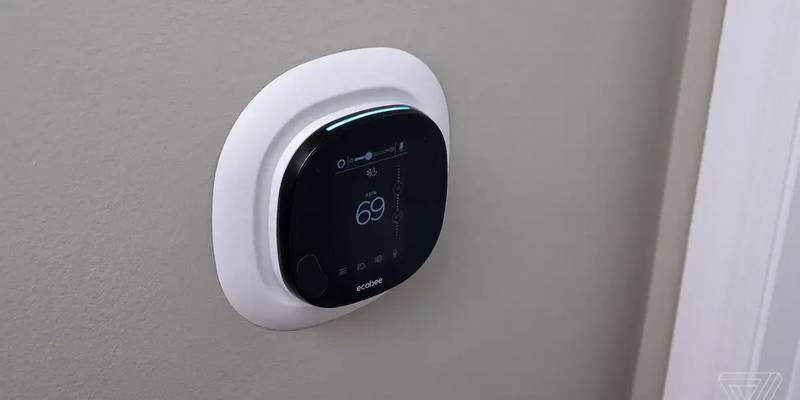
ecobee M5A Smart Wi-Fi Thermostat User Guide


STEP 8: Pull the wires through the hole in the middle of the backplate and then
attach the backplate to the wall using the drywall anchors and screws provided.
TIP: Use a 3/16" drill bit to drill a hole for the drywall anchors.
25 Dockside Drive, Suite 700
Toronto, ON M5A 0B5
ecobee.com

| General | Details |
|---|---|
| Name | ecobee M5A Smart Wi-Fi Thermostat User Guide |
| Make | Ecobee |
| Language | English |
| Filetype | PDF (Download) |
| File size | 2.48 MB |
 (1 votes, average: 5.00 out of 5)
 Loading...


vivint VS-ZGBTHERM-001 Smart Thermostat User Guide

BEOK TGP53 China Piano Buttons Underfloor Heating Thermostat User Guide

King Electric K322E Electronic Non Programmable Thermostat Instructions

Honeywell FocusPRO 5000 Thermostat Installation Guide

BN-LINK 6×8 Reptile Heat Thermostat Instructions

EvenAir T21WF WiFi Thermostat User Manual

SANGAMO CHPWIFI Fort Programmable Thermostat User Guide

SILVERCREST IAN 469312_2310 Digital Radiator Thermostat Instruction Manual

KETOTEK KTF0155 Smart Thermostat User Manual
bryant ecobee3 Lite Smart Thermostat User Guide
Table of Contents
- 1. Installation, Setup And User Guide →
- 2. Installation Guide - Setup Guide →
- 3. How To Use Temperature Correction On Your Ecobee Thermostat ... →
- 4. Smartsensors - How Can I Use Them In My Home? →
- 5. Compressor & Heat/aux Staging Setting - Compressor Minimum C... →
- 6. Wiring Diagrams - Diagram 1. Furnace (1-stage) + Ac (1-stage... →
- 7. Installation Guide - Download The Ecobee App →
- 8. How To Determine If Your Hvac System Compatible And If You H... →
- 9. Step 3: Remove Your Old Thermostat Cover From The Wall. →
- 10. What Do My Thermostat's Wire Labels Mean? - Common Thermosta... →
- 11. Less Common Thermostat Wires - S Terminals Are For Outdoor T... →
- 12. Description - H Or Hum Or →
- 13. Step 4: - Take A Picture Of The Wires Connected To The Termi... →
- 14. Scenario 1: Install Your Ecobee With A C-wire - Tip: To Inst... →
- 15. Step 6: Unscrew The Mounting Plate Of Your Old Thermostat To... →
- 16. Step 8: Pull The Wires Through The Hole In The Middle Of The... →
- 17. Step 9: Insert Your Remaining Wires Into The Side (not The F... →
- 18. Step 11: Carefully Push Any Excess Wires Back Into The Hole ... →
- 19. Step 13 - Tip →
- 20. Scenario 2: How To Install With Multiple G-wires - Installat... →
- 21. Step 6: Unscrew The Mounting Plate Of Your Old Thermostat To... →
- 22. Step 8: Pull The Wires Through The Hole In The Middle Of The... →
- 23. Step 10: Connecting Wires - Step 11: Ensuring Secure Connect... →
- 24. Step 12: Carefully Push Any Excess Wires Back Into The Hole ... →
- 25. Step 14: Gently Press Your Ecobee Into The Backplate Until I... →
- 26. Scenario 3: How To Install Without A C-wire Using The Suppli... →
- 27. Step 5: Take Your Power Extender Kit, Wire Labels, Tools, Yo... →
- 28. Step 7: Take A Picture Of The Wires Connected To Your Contro... →
- 29. Step 9: Disconnect The Wires Labeled R, Y, G, And W From The... →
- 30. Step 11: Tug On The Wires Gently To Ensure They Are Securely... →
- 31. Step 13: Mount The Power Extender Kit Inside Your Hvac Syste... →
- 32. Step 14: Back At Your Thermostat - Step 15: Unscrew The Moun... →
- 33. Step 16: Decide If You Want To Use The Trim Plate With Your ... →
- 34. Step 18: Remove The Rc, C, And Pek White Labels From The Lab... →
- 35. Tug On The Wires Gently To Ensure They Are Securely Connecte... →
- 36. Step 21: Carefully Push Any Excess Wires Back Into The Hole ... →
- 37. Step 23 - Tip →
- 38. Setup Guide - Configuring Your Ecobee Thermostat For The Fir... →
- 39. These Steps Will Allow You To Select The Thermostat Name, Yo... →
- 40. Configuring Your Ecobee Thermostat For A Heat-pump System - ... →
- 41. Configuring Your Ecobee Thermostat For The First Time (im A ... →
- 42. Terminal Activation For Multi-speed Fan Control - Multi-spee... →
- 43. Fan Speed Selection (system Mode) - Optimized →
- 44. The Pipe Sensor - User Configurable For Open Or Closed Activ... →
- 45. Pipe Sensor Activation (notification & Alerts) - Aqua-stat A... →
- 46. Multi-speed Setup Flow Options During Setup Process - Fan Co... →
- 47. Heat Pump/ptac - Y1 And O/b Detected →
- 48. Fan Coil Unit, W/ W1 Wire & Pipe Sensor - With Or Without Au... →
- 49. Setting Up An Ecobee For Dehumidification Control - Dehumidi... →
- 50. Dehumidifier Settings - Dehumidify With Fan →
- 51. Setting Up An Ecobee For Ventilator Control - Ventilator Min... →
- 52. Free Cooling - Pre-occupancy Purge →
- 53. Setting Up An Ecobee For Humidification Control - Humidifier →
- 54. Humidifier Type - Min Runtime Delta →
- 55. User Guide - Change System Mode →
- 56. How To Use Temperature Correction On Your Ecobee Thermostat ... →
- 57. Registering Using The Ecobee App - Download The Ecobee App →
- 58. Add A Device - Register A Device →
- 59. How To Adjust The Comfort Settings - Comfort Settings →
- 60. How To Create/adjust A Thermostat Schedule - Programming You... →
- 61. If You Wish To Add A New Comfort Setting Into Your Schedule,... →
- 62. You Will Then Be Able To Select The Days You Wish To Copy Th... →
- 63. How To Schedule A Vacation Event On Your Ecobee - The Vacati... →
- 64. Using A Hold Setting On My Ecobee Thermostat - How Does Sens... →
- 65. How To Adjust The Preferences On Your Ecobee Thermostat - Te... →
- 66. Thermostat Name - Alexa Sounds →
- 67. Smart Recovery - Access Control →
- 68. All - Temperature And Quick Changes →
- 69. How To Control Your Hvac System's Fan - Fan Control In Heat ... →
- 70. Fan Minimum On Time - Quick Changes →
- 71. Quick Changes Menu Features - Timed Fan Holds →
- 72. Heat/cool Dissipation Time - Fan Mode In Comfort Settings →
- 73. How To Enable Auto Heat/cool Changeover On My Ecobee Thermos... →
- 74. Auto Activation - Temperature Control →
- 75. How To Set Reminders & Alerts On Your Ecobee Thermostat - Re... →
- 76. Aux Outdoor Temp Alert - Low/high Humidity Alert →
- 77. Smartsensors: Setup Guide And Faqs - Install These Portable ... →
- 78. How Can I Use Them In My Home? - How Do I Mount A Smartsenso... →
- 79. Smartsensor Tech Specs - Occupancy And Temperature Detection →
- 80. Where Can I See The Status Of Each Smartsensor? - Pairing A ... →
- 81. Main Menu - Sensors →
- 82. Scan The Qr Code On The Sensor's Pull Tab With Your Wireless... →
- 83. Pull The Tab To Pair - Troubleshooting Tips →
- 84. If You Have More Than One Ecobee Thermostat, Select Which Th... →
- 85. Sensor Participation And Comfort Setting - Comfort Settings →
- 86. Comfort Settings - Participating Sensors →
- 87. Smartsensor Participation Faqs - How Does My Ecobee Thermost... →
- 88. Smart Home/away - How It Works →
- 89. What Temperature Set Points Are In Effect When Smart Away Is... →
- 90. How To Enable Follow Me Mode - How Does Follow Me Function U... →
- 91. Appendix - How To Access Threshold Settings →
- 92. Adding An Hvac Accessory - Duel (2) Transformer Hvac Systems →
- 93. Automatic And Manual Threshold Staging - Savings Vs Comfort →
- 94. Automatic Staging With A Heat Pump System - Aux Savings Opti... →
- 95. Using Ac Overcool Max To Reduce Humidity - Configuring Ac Ov... →
- 96. Minimize The Use Of Auxiliary Heat With A Heat-pump - Thresh... →
- 97. Minimum Outdoor Temperature For Heat Pump - Compressor Min O... →
- 98. What Does The Flame Icon With An Exclamation Mark Mean? - Ov... →
- 99. Thermostat Hvac Settings For All System Types - Auto Heat/co... →
- 100. Heat Minimum On Time - Ac Overcool Max →
- 101. Compressor Stage 2 Temperature Delta - Compressor Reverse St... →
- 102. Compressor To Aux Temperature Delta - Compressor To Aux Runt... →
- 103. What Is Eco+ And How Does It Work? - How Do I Know When Eco+... →
- 104. Will Eco+ Make Any Changes To My Comfort Settings? - How Can... →
- 105. Adjusting Temperature For Humidity - What Happens When Humid... →
- 106. Time Of Use - Time Of Use Feature →
- 107. The Depth Of The Precool, Preheat Or Setbacks Depends On You... →
- 108. Eco+ Icon - Time Of Use Events →
- 109. Community Energy Savings - Utility Provider Rewards →
- 110. The Depth Of The Precool, Preheat Or Setbacks Depend On Your... →
- 111. Community Energy Savings - Eco+ Icon →
- 112. Schedule Assistant - Customizing Your Thermostat Schedule →
- 113. Pause When Open - What Is It? →
- 114. How Do I Access This Feature? - I Paired My Smart Sensor For... →
- 115. What Do All The Icons On My Ecobee Mean? - Comfort Setting I... →
- 116. Home Screen Icons - Menu Icons →
- 117. System Icons - Weather Icons →
- 118. Wi-fi Icons →
- 119. Wiring Diagrams - Diagram 1. Furnace (1-stage) + Ac (1-stage... →
- 120. Diagram 3. Furnace (1-stage) + Ac (2-stage) Using Pek - Diag... →
- 121. Diagram 5. Furnace (1-stage) + Ac (1-stage) - Diagram 6. Fur... →
- 122. Diagram 7. Furnace (1-stage) + Ac (2-stage) - Diagram 8. Fur... →
- 123. Diagram 9. Heatpump (1-stage) - Diagram 10. Heatpump (1-stag... →
- 124. Diagram 11. Heatpump (2-stage) - Diagram 12. Heatpump (2-sta... →
- 125. Diagram 13. Heatpump (1-stage) + Aux Heat (1-stage) - Diagra... →
- 126. Diagram 15. Heatpump (2-stage) + Aux Heat (2-stage) - Diagra... →
- 127. Diagram 17. Heatpump (2-stage) + Aux Heat (1-stage) Using Pe... →
- 128. How To Include A Float Switch On The Y Circuit - How To Incl... →
- 129. Diagram 21. How To Include A 2-wire Dehumidifier / Humidifie... →
- 130. Diagram 23. Boiler (1-stage) + Ac (1-stage) 2 Transformers -... →
- 131. Diagram 25. Boiler (2-stage) + Ac (2-stage) 2 Transformers →
- 132. Contact Us - Sales Hours →