
WATTS TEK564 Invita WiFi Thermostat Instruction Manual


Registering a Device
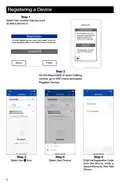
Step 1
Select the Location that you want
to add a device to.
REGISTRATION
To finish registering your
thermostat, enter the code
displayed below in the
Watts Home mobile app.
Registration
To finish registering your snow melt control, enter the
code displayed below in the Watts Home mobile app.
12345678
The registration code will
expire in 30:00 minutes.
12345678
Back
Help
Step 2
On the thermostat or snow melting
control, go to WiFi menu and press
Register Device.
Step 3
Select the C icon
Step 4
Select Add Device
Step 5
Enter the Registration Code
from the device, enter a
device nickname, then Add
Device
6

| General | Details |
|---|---|
| Name | WATTS TEK564 Invita WiFi Thermostat Instruction Manual |
| Make | WATTS |
| Language | English |
| Filetype | PDF (Download) |
| File size | 0.16 MB |
 (1 votes, average: 5.00 out of 5)
 Loading...

WATTS IOM-T-564 tekmar Invita WiFi Thermostat Instruction Manual

WATTS IOM-T-563 Tekmar WiFi Thermostat Installation Guide

WATTS BT-A03 RF Electronic Room Thermostat Installation Guide

WATTS WTC-ES Contact Thermostat User Manual

WATTS 563 WiFi Thermostat User Manual

WATTS W561 WiFi Thermostat Instruction Manual

WATTS Tekmar Wi-Fi Thermostat Instruction Manual


technolysis HY703RF WIFI Thermostat User Manual

Honeywell Home T10 Programmable Smart Thermostat Installation Guide

HYSEN HY09RF WI-FI Wireless Thermostat User Manual

DEVI 610 Electronic Thermostat Installation Guide

heatit ET-7AW Touchscreen Programmable Thermostat User Manual

Honeywell PRO 1000 Series Heat Pump Thermostat Instruction Manual

WHITE-RODGERS 1F90-71 5-Day 2-Day Electronic Digital Thermostat Instruction Manual

sygonix 2735095 Wireless Heating Thermostat Instruction Manual

White-Rodgers 1F97-1277 Big Blue Single Stage Thermostat User Manual

Rheem RETST700SYS EcoNet Smart Thermostat Owner’s Manual