
STELPRO STZW402+ Electronic Thermostat for The Smart Home Owner’s Manual
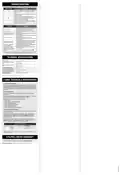


TROUBLESHOOTING
PROBLEM CODE
DEFINITION
LO
HI
Temperature is below 0 °C (32 °F), heating will be always active
Temperature is above 50 °C (122 °F), heating will be always
inactive
Temperature sensor is defective, heating will always be inactive.
Call technical support.
--
The connection could not be established with the Z-Wave
network. Make sure the thermostat is within range of the Z-Wave
controller or a Z-Wave repeater and make sure the Z-Wave
controller is in inclusion or exclusion mode.
ERR
Secondary temperature sensor is defective. The thermostat will
still control the temperature but performance may be diminished.
Consider replacing the thermostat.
E1
PROBLEM
The thermostat is hot
Heating is always on
SOLUTION
In normal operating conditions, the thermostat housing may
become hot at maximum load. That is normal and will not
affect the effective operation of the thermostat.
Check if the thermostat is properly connected. Refer to the
installation section.
Heating does not run even if the
thermostat indicates it is on
Check if the thermostat is properly connected. Refer to the
installation section.
Check if the thermostat is properly connected. Refer to the
installation section.
The display does not turn on
Check the power supply at the electrical panel.
Check if the heating unit has a switch. If so, ensure that this
switch is turned on.
The thermal protection of the heating unit has opened due
to overheating. Check if the heating unit is in good oper-
ating condition and that clearance around the appliance is
according to the manufacturer’s specifications.
The display turns off a few min-
utes and then turns on again
The displayed ambient tem-
perature is incorrect
Check the presence of an air stream or a heat source near
the thermostat, and correct the situation.
Make sure the thermostat is properly associated with the
Z-Wave controller.
The connectivity icon is
blinking on the main screen
Setpoint and mode cannot be
changed
The thermostat is locked, turn OFF the lock mode
N.B. If you are unable to solve the problem after having verified these points, please communi-
cate with our customer service. Consult our website for contact information.
TECHNICAL SPECIFICATIONS
Supply voltage
120/240 VAC, 50/60 Hz
1.25 A
300 W @ 240 VAC
150 W @ 120 VAC
Minimum current with resistive
load
16.7 A
4000 W @ 240 VAC
2000 W @ 120 VAC
Maximum current with resistive
load
Temperature display range
Temperature display resolution
Temperature setpoint range
Temperature setpoint increment
Storage temperature
0,5 °C (1 °F)
0,5 °C (1 °F)
5 °C à 30 °C (41 °F à 86 °F)
0,5 °C (1 °F)
-50 °C à 50 °C (-58 °F à 122 °F)
-20 °C à 50 °C (-4 °F à 122 °F)
Operating temperature*
*LCD performance might diminish below 0 °C (32 °F)
Z-WAVE TECHNICALS INFORMATIONS
Z-WAVE INTEROPERABILITY
This product can be included and operated in any Z-Wave network
with other Z-Wave certified devices from other manufacturers and/or
other applications. All non-battery operated nodes within the network
will act as repeaters regardless of vendor to increase reliability of the
network.
Z-WAVE ASSOCIATION
The Z-Wave Association Command Class is supported by the
thermostat.
The thermostat supports the lifeline as Group1 and only one Node
Id is supported in this group (the Z-Wave controller).
The following reports are sent via the Lifeline:
• Basic Report
• Device Reset Locally Notification
• Thermostat Mode Report
• Thermostat Setpoint Report
• Sensor Multilevel Report
• Thermostat Operating State Report
Z-WAVE BASIC COMMAND CLASS
The Z-Wave Basic command class is supported by the thermostat
in the following way:
To trigger the Eco mode on the thermostat: send it a Basic SET
(0x00) command (Energy saving mode). To trigger the Comfort
mode on the thermostat: send it a Basic SET (0xFF) command
(Comfort mode)
If a setpoint change is sent through the Z-Wave network, the
thermostat mode will automatically switch to Comfort mode. The
Z-Wave modes are described in the following table:
CROSS REFERENCE TABLE
KI
Z-WAVE PROTOCOL
COMFORT
ECO (
OFF (
HEAT (1)
ENERGY SAVE HEAT (11)
)
OFF (0)
)
Note: Each time the inclusion or exclusion process is started, the thermostat will send a
“Node Information Frame”
STELPRO LIMITED WARRANTY
STELPRO DESIGN INC. Saint-Bruno-de-Montarville, Québec, Canada, J3V 6L7

| General | Details |
|---|---|
| Name | STELPRO STZW402+ Electronic Thermostat for The Smart Home Owner’s Manual |
| Make | StelPro |
| Language | English |
| Filetype | PDF (Download) |
| File size | 0.27 MB |
 (1 votes, average: 5.00 out of 5)
 Loading...

STELPRO STF362NP Floor Heating Thermostat Owner’s Manual

STELPRO ST302P Programmable Electronic Thermostat Owner’s Manual

STELPRO SAT402ZB Smart Thermostat User Guide

STELPRO ST252NPFF Non-Programmable Electronic Thermostat Owner’s Manual

STELPRO ST402PFF Programmable Electronic Thermostat Owner’s Manual

STELPRO ASMC402 Maestro Zigbee Smart Programmable Thermostat User Guide

STELPRO SIBTE12C Electronic Thermostat Owner’s Manual

STELPRO SIBTE13F Electronic Thermostat User Guide

STELPRO STCP MULTIPLE PROGRAMMING ELECTRONIC THERMOSTAT User Guide

STELPRO STCP Floor Heating Thermostat Multiple Programming User Guide


Danfoss ECtemp Touch Electronic Intelligent Timer Thermostat Installation Guide

GENERAL FH260S Underfloor Heating Thermostat User Manual

VICONICS VTR8350A5500B Fan Coil Unit Thermostat User Manual

Honeywell RTH8500 Wi-Fi Series Thermostat User Guide

beok TDR89 Wi-Fi Thermostat User Guide

Meross MTS200HK Smart Thermostat User Manual

Honeywell Lyric T5 Wi-Fi Thermostat Installation Guide

auronic AU3151 Oil Radiator with Thermostat User Manual

Honeywell 5000 Non Programmable Digital Thermostat User Guide

ecoartheating B07QZRVC8K Temperature Controller Electric Thermostat Instruction Manual