
SANGAMO CHPWIFI Fort Programmable Thermostat User Guide




Product Overview
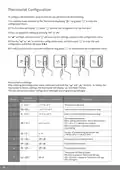
Thermostat
1.
Wireless icon “ ” always on when
paired with the receiver, flashes when
connection is intermittent
2.
3.
4.
5.
6.
7.
8.
9.
10.
Frost protection icon
Call for heat icon
Programming mode icon
Low battery alert
Confirm icon
Up button
ON/OFF button
Room temperature or setting temperature display
Down button
Receiver
WiFi Status Indicator
Output Indicator
Call for heat: Green
Network Pairing Mode:
The LED flashes fast or
slow Green
ON/OFF Indicator
Power indicator: Red
Override output status:
Green
Network Connection
Successful: Blue
RF indicator: Yellow
Control Button
(With power indicator)
* To manually call for heat, press and hold the control button, until the LED turns Green.
Default Programming Schedule
Note: The programming schedule can be configured within the ClickSmart+ app
Period 1
Period 2
Period 3
Afternoon ON Afternoon OFF
11:00 20°C 14:00 16°C
Period 4
Period 5
Period 6
Morning ON
Morning OFF
Evening ON
Evening OFF
06:00
20°C
08:00
16°C
18:00
20°C
22:00
16°C
3

| General | Details |
|---|---|
| Name | SANGAMO CHPWIFI Fort Programmable Thermostat User Guide |
| Make | SANGAMO |
| Language | English |
| Filetype | PDF (Download) |
| File size | 0.52 MB |
 (1 votes, average: 5.00 out of 5)
 Loading...


Danfoss RMT-230 Room Thermostat Installation Guide

meitav-tec FMH24-PD-1S-IR Thermostat Owner’s Manual

TFC Group OP-WFSTAT Wi-Fi Thermostat User Guide

Smartica HY608W 3A Wifi Digital Heating Thermostat User Manual

EONEBATW-B ZigBee Smart Thermostat User Guide

EMERSON 1F75P-21PR Display Thermostat Instruction Manual

CONTEMPORARY CONTROLS BAST-421C-B2 BACnet Communicating Thermostat User Manual

Honeywell TH2320WF4010 FocusPRO Smart Thermostat User Guide

PURGEAR STC-2304 Digital Thermostat User Guide

HEATIT Z-TRM6 Matt Z-Wave Thermostat User Guide