
Home > QuietWarmth > QUIETWarmth Type UCG Thermostat User Manual
QUIETWarmth Type UCG Thermostat User Manual





Type UCG/UDG
English
Factory setting: 24 hour clock
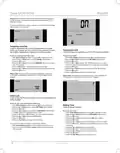
6 Press the Up or Down buttons to the select the period of interest:
2 DAYS, 30 DAYS or 365 DAYS. The percentage of time that the
heating has been turned on will then be indicated in the upper part of
the display.
The Readout submenu also contains information about the Software
version and the type of control (Room, Floor, Regulator or Room limit)
selected for the Application. (See Application for more information).
TIME
SETTINGS
SETTINGS
2 DAYS
30 DAYS
365 DAYS
SOFTWARE
APPLICATION
EXIT
READOUT
Offset Temperature
I want to adjust the difference in temperature between the ther-
mostat and my room thermometer.
Setting Day
I want to change the day of the week.
To do so, you must:
To do so, you must:
1 With Active Display (backlight on) press OK to activate the menu.
2 Press the Up or Down buttons until the SETTINGS option flashes.
3 Press the OK button.
1 With Active Display (backlight on) press OK to activate the menu.
2 Press the Up or Down buttons until the SETTINGS option flashes.
3 Press the OK button.
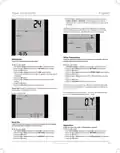
4 Press the Up or Down buttons until the DAY option flashes.
The currently selected day of the week will appear in the lower part of
the display.
4 Press the Up or Down buttons until the OFFSET TEMP option flashes.
5 Press the OK button.
6 Press the Up or Down buttons to set the offset temperature (in steps
of 0.1°).
5 Press the OK button.
6 Press the Up or Down buttons until the required day of the week
flashes.
7 Press the OK button.
8 Follow the Exit Menu procedure to exit the menu.
7 Press the OK button.
8 Follow the Exit Menu procedure to exit the menu.
Offset is used to compensate for any difference between the thermostat
and the actual room temperature. It is possible to adjust the offset by up
to +/- 10 °C or +/- 18 °F.
Please note: Usually, the electrician who installed the thermostat will have
set the correct time and day of the week.
If, for example, the thermostat shows 1° too much, the offset should be
set to 1°. The temperature will then be set 1° lower.
Factory setting: MON
DAY
SETTINGS
SETTINGS
MON TUE WED THU
FRI SAT SUN
OFFSET TEMP
Read Out
I want to know the amount of time (in percent) that the heating
has been turned on within a certain period.
Application
I want to select the type of temperature control.
To do so, you must:
To do so, you must:
1 With Active Display (backlight on) press OK to activate the menu.
2 Press the Up or Down buttons until the SETTINGS option flashes.
3 Press the OK button.
1 With Active Display (backlight on) press OK to activate the menu.
2 Press the Up or Down buttons until the SETTINGS option flashes.
3 Press the OK button.
4 Press the Up or Down buttons until the READOUT option flashes.
5 Press the OK button.
4 Press the Up or Down buttons until the APPLICATION option flashes.
5 Press the OK button.
© 2012 OJ Electronics A/S
5

| General | Details |
|---|---|
| Name | QUIETWarmth Type UCG Thermostat User Manual |
| Make | QuietWarmth |
| Language | English |
| Filetype | PDF (Download) |
| File size | 0.35 MB |
 (1 votes, average: 5.00 out of 5)
 Loading...

QuietWarmth THERMAEGH-ET72 Thermaegh Wifi Programmable Touchscreen Thermostat User Manual


CYDATA CY917B Daisy Wi-Fi Thermostat User Guide

White-Rodgers 1F97-1277 Big Blue Single Stage Thermostat User Manual

aube technologies TH104PLUS 5-2 Day Programmable Electric Thermostat Owner’s Manual

Honeywell Home T6 Pro Smart Programmable Thermostat User Guide

Wengart TP808-S-2 Low Voltage Thermostat User Guide

EMERSON 1F75C-11NP Non Programmable Single Stage Thermostat User Manual

COMBUSTION CONTROL Anti Siphon Device Flue Gas Safety Thermostat Instruction Manual

OSCAR OS20 LCD Thermostat Instruction Manual

Honeywell Smart Color Touchscreen Programmable Thermostat RTH9590 User Manual

DEVIreg Electronic Intelligent Timer Thermostat Installation Guide