
PELICAN TC3 Commercial Connected Thermostat Installation Guide








PELICAN
Model: TC3
Commercial Connected Thermostat
with CO2
Installation Guide
!
Before you start
Review all instructions before starting to avoid discovering or creating any
issues during installation. This thermostat is designed to be installed on 24V
AC systems only.
This thermostat is designed to be installed by a licensed professional.
A Pelican Gateway must be used with this thermostat. The thermostat cannot
be configured or managed without the gateway. We recommend installing
the gateway prior to installing this product.
Installation Location
NEVER INSTALL IN AN ENCLOSED METAL BOX OR ON A METAL SURFACE.
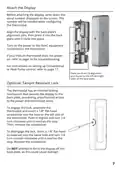
Install in a location where it can communicate with the Pelican wireless mesh
network.
Install 48" to 60" from the floor in the room where it will be maintaining the
temperature.
Install on an interior wall away from doors, filing cabinets, electrical
equipment, or other metal objects.


| General | Details |
|---|---|
| Name | PELICAN TC3 Commercial Connected Thermostat Installation Guide |
| Make | Pelican |
| Language | English |
| Filetype | PDF (Download) |
| File size | 0.32 MB |
 (1 votes, average: 5.00 out of 5)
 Loading...

PELICAN TC4 Commercial Connected Thermostat Installation Guide

PELICAN TC1 Commercial Connected Thermostat Installation Guide


GLOBAL CEG Series Convector with Thermostat Instruction Manual

AIRZONE IBPRO6 FLEXA 3.0 Blueface Zero Wired Thermostat User Manual

sygonix 2997033 Wi-Fi Radiator Thermostat Instruction Manual

PURGEAR STC-8080H Digital Thermostat User Guide

BEOK TDS72 Digital Screen Thermostat Instruction Manual

CYDATA CY917B Daisy Wi-Fi Thermostat User Guide

GENERAL SENNA 300S Smart Room Thermostat User Manual

Honeywell TH1100DV PRO Series Non Programmable Thermostat Instruction Manual

GENERAL FH10, FH10S Underfloor Heating Thermostat User Manual

telethings teleRelays-2L Device Thermostat User Manual