
MYSON Unisenza Plus Thermostat Instruction Manual

















Unisenza Plus - Thermostat
Installation and user manual
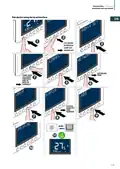
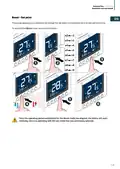
Change set point
EN
BOOST
BOOST
BOOST
MENU
MENU
1
MENU
2
3
The icon
flashes when Optimum Start/Stop is active or Valve Protection operates.
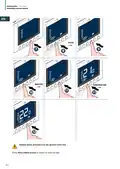
Change operation mode
Press Operation Mode button to switch between Schedule/Tempo-
rary override and Permanent Hold mode.
BOOST
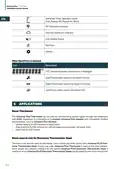
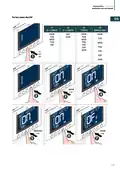
Icon
Mode
Explanation
The set point is kept constant regardless of the sched-
Permanent Hold mode
Schedule mode
ule.
To modify the set point, use the + and - keys.
The set point is the one established in the programming
and the number of the planning program is indicated.
The set point set in the programming is modified us-
Schedule/Temporary override ing the + and - keys and remains active until the next
programming arrives.
Temporary scheduling mode overrides the scheduling set point temperature and will remain
active until the next scheduling time slot arrives. Subsequently the temperature will be the one
established according to the planning on the APP.
24

| General | Details |
|---|---|
| Name | MYSON Unisenza Plus Thermostat Instruction Manual |
| Make | MYSON |
| Language | English |
| Filetype | PDF (Download) |
| File size | 4.39 MB |
 (1 votes, average: 5.00 out of 5)
 Loading...

MYSON Unisenza Dial Thermostat User Manual

MYSON Unisenza Digital Thermostat User Manual

MYSON Unisenza WiFi Programmable Thermostat User Guide


VIVE COMFORT TP-S-755 Cool Programmable Thermostat Instruction Manual

nVent GM-TA Thermostat User Manual

Wyze Thermostat User Guide

AuVerte C504 Ondur Elegant Temperature Control Thermostat Installation Guide

hansgrohe 10717000 AXOR STARCK X Highflow Concealed Thermostat Instruction Manual

Honeywell Home S200 Series FocusPRO Smart Thermostat User Guide

Honeywell D1-528 Thermostat User Guide

GENERAL SENNA 270S Smart Room Thermostat User Manual

NOBO NCU-2Te High Precision Thermostat Instruction Manual

HASWILL ELECTRONICS STC-200 Thermostat User Guide